GPT Image 2AI-Prompt

VTuber Logo Concept Grid — Sora 2 Prompt

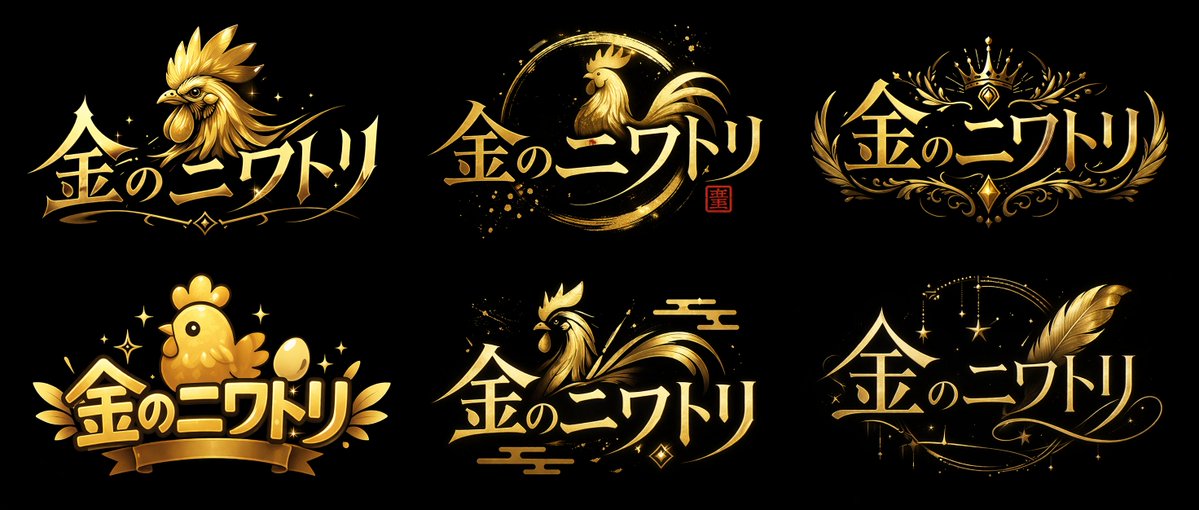
Generate a 2x3 grid of six diverse VTuber-style logo concepts—sharp, brush-stroke, chibi, and more—in one customizable layout.
VTuber Logo Concept Grid — Sora 2 Prompt
PROMPT · EN
type
logo concept sheet
layout
2x3 grid
global_attributes
text
{argument name="logo text" default="金のニワトリ"}
color_palette
item 1
{argument name="primary color" default="gold"}
item 2
{argument name="background color" default="black"}
style
VTuber style logo designs, metallic, shiny, high contrast
variants
item 1
position
top-left
style
sharp and fierce
icon
detailed {argument name="main subject" default="golden rooster"} head facing left
typography
sharp, dynamic
item 2
position
top-center
style
brush stroke / ensō
icon
elegant rooster profile inside a circular brush stroke, small red seal stamp
typography
elegant, flowing
item 3
position
top-right
style
royal crest
icon
crown, symmetrical floral filigree
typography
elegant, serif
item 4
position
bottom-left
style
cute / chibi
icon
round cute chick, golden egg, ribbon banner
typography
bubbly, thick
item 5
position
bottom-center
style
traditional Japanese
icon
stylized rooster, traditional clouds
typography
flowing, dynamic
item 6
position
bottom-right
style
magical / elegant
icon
large golden feather, sparkling stars, crescent moon motif
typography
elegant, cursive-inspired

Über diesen Prompt

Generate a 2x3 grid of six diverse VTuber-style logo concepts—sharp, brush-stroke, chibi, and more—in one customizable layout. Use it as a Konzeptkunst starting point for GPT Image 2: keep the visual structure and style constraints intact, then swap in your own subject, brand, or scene.

This prompt is organized as structured JSON with fields such as type, layout, global attributes, and variants. Keeping that hierarchy helps the model separate the subject, layout, interface elements, and detail constraints.

Start with small changes to subject, scene, camera, and color, then generate a few variations to compare composition and detail without turning the page copy into keyword stuffing.

So verwendest du diesen Prompt

  1. Copy the prompt and choose a suitable model like Sora 2.
  2. Edit the variables (logo text, colors, main subject) to match your brand.
  3. Generate the image to get a clean 2x3 grid of logo concepts.
  4. Pick your favorite design and refine it further if needed.
FAQ

Mehr von GPT Image 2

Alle ansehen

Schneller erstellen mit Sora2Hub-Prompts.

Nutze kuratierte Prompt-Seiten als suchbare Einstiege und starte direkt mit dem passenden Modellkontext.

Prompts entdecken