
Anime vs Reality: Grid Prompt — Sora 2
Create a striking grid of a 2D anime character navigating photorealistic real-world scenes, from cafes to crosswalks, blending cartoon charm with lifelike environments effortlessly.
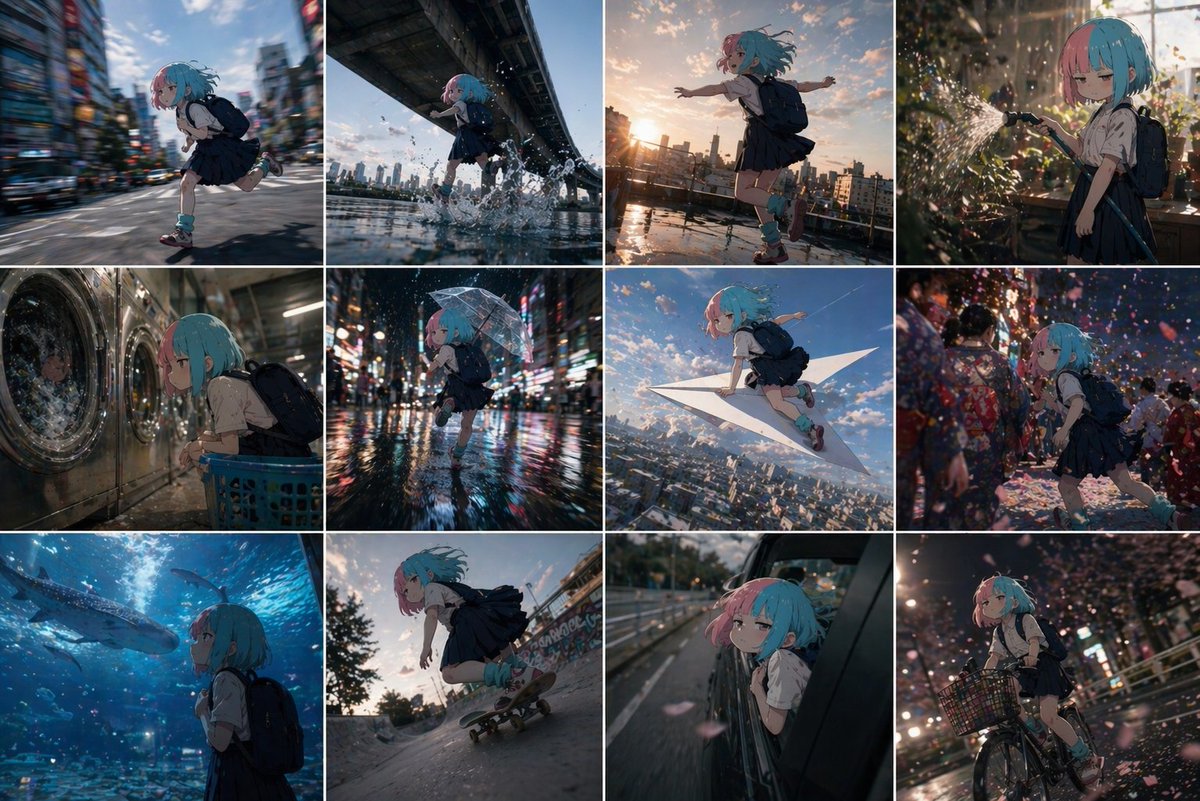
Using the reference 2D cel anime character, create a grid-divided image showing the character doing various things in the real world. Each grid cell should depict the character in a different realistic environment 鈥?shopping at a store, waiting at a crosswalk, sitting in a cafe, riding public transit, taking photos at a landmark, etc. Maintain the character's flat 2D cel animation style while the environments are photorealistic, creating an interesting contrast between cartoon character and real-world setting. The grid should show 6-9 different scenes with consistent character design across all panels.
Sobre este prompt
Create a striking grid of a 2D anime character navigating photorealistic real-world scenes, from cafes to crosswalks, blending cartoon charm with lifelike environments effortlessly. Use it as a Arte Conceptual starting point for GPT Image 2: keep the visual structure and style constraints intact, then swap in your own subject, brand, or scene.
Common directions include community showcase, advanced, anime, and grid layout. Treat these tags as creative cues; the prompt structure and preview image are the more useful guide.
Start with small changes to subject, scene, camera, and color, then generate a few variations to compare composition and detail without turning the page copy into keyword stuffing.
Cómo usar este prompt
- Copy the prompt text from above.
- Paste it into your preferred AI image generator (e.g., Sora, Midjourney, DALL·E).
- For best results, attach a reference image of your 2D cel anime character to maintain consistency.
- Adjust the number of grid cells (6–9) and specific real-world scenes as desired.
- Generate the image and refine with variations if needed.


