
GPT Image 2Prompt de IA
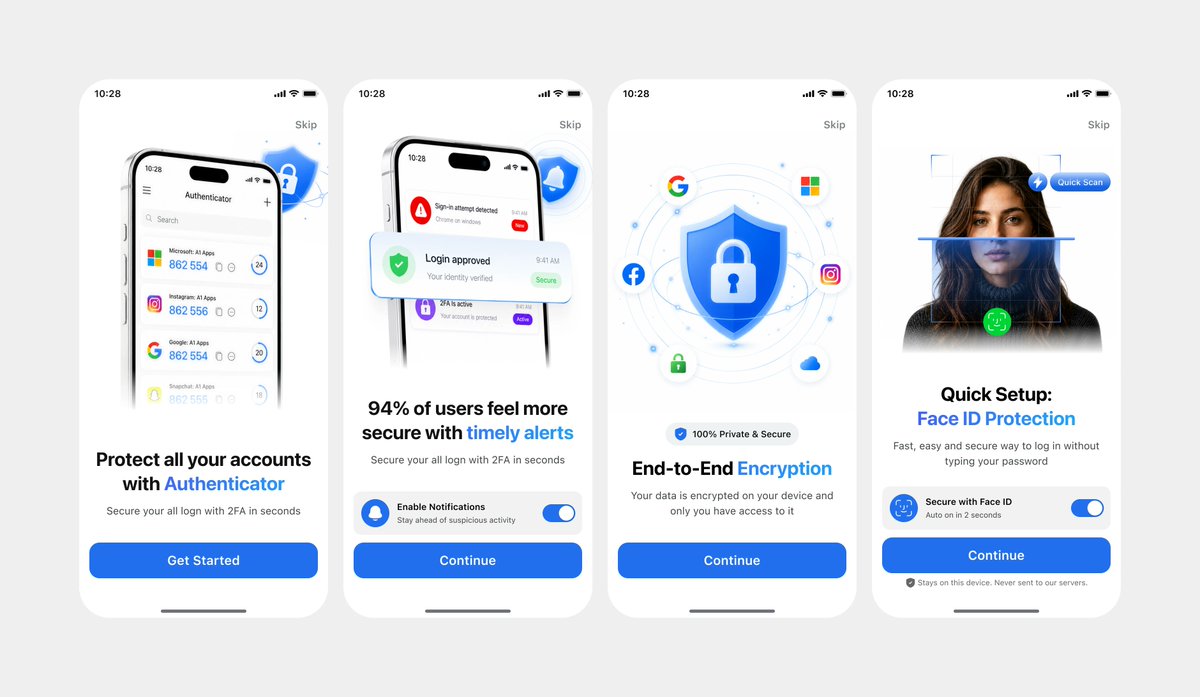
Authenticator Onboarding UI — 4-Screen Clean Model
Generate a polished 4-screen mobile Authenticator onboarding flow with customizable branding, ideal for app demos and design iterations.
PROMPT · EN
以 REFERENCE_1 作为主要 UI 参考,仅在需要深色变体细节时使用 REFERENCE_0,将移动端入门引导流程重新创建为简洁的正面设计模型,而非拍摄的笔记本电脑屏幕。提取并拉直四个 iPhone 风格的屏幕,去除所有相机透视、反光、浏览器边框、笔记本电脑边缘及周围环境,并将屏幕均匀地放置在浅灰色画布上。保持原有的白色/浅色主题、圆角手机卡片、蓝色安全品牌标识、排版层级、图标、插图以及 CTA 样式。从左到右精确生成 4 个入门引导屏幕:1) Authenticator 账户列表,标题为“Protect all your accounts with Authenticator”,CTA 为“Get Started”;2) 安全警报通知,标题为“94% of users feel more secure with timely alerts”,CTA 为“Continue”;3) 盾牌/锁加密插图,标题为“End-to-End Encryption”,CTA 为“Continue”;4) Face ID 快速设置,包含人像/扫描图形、标题“Quick Setup: Face ID Protection”、安全的 Face ID 开关卡片、隐私说明及 CTA“Continue”。使用 argprimary color: bright blue 作为主要强调色,保留应用名称为 argapp name: Authenticator,并将状态栏时间保留为 argstatus time: 10:28。使最终效果看起来像精美的 Figma 导出图或产品演示,清晰且高分辨率,不含任何现实照片的瑕疵。
Sobre este prompt
Generate a polished 4-screen mobile Authenticator onboarding flow with customizable branding, ideal for app demos and design iterations. Use it as a Arte Conceptual starting point for GPT Image 2: keep the visual structure and style constraints intact, then swap in your own subject, brand, or scene.
Start by replacing primary color, app name, and status time, then keep the camera, composition, and material cues in the same order. This makes the output easier to compare across variations.
Cómo usar este prompt
- Copy the prompt and paste it into an AI model that supports image generation like Sora 2.
- Choose a model version capable of generating high-fidelity UI mockups.
- Adjust the
{primary color}and{app name}variables to match your brand. - Generate the image and download the resulting 4-screen layout.


