GPT Image 2Prompt de IA

DeepSeek V3 vs V4: Ultimate Transformer Blueprint

Generate a crisp side-by-side infographic comparing DeepSeek V3 and V4 Transformer architectures, perfect for presentations and tech analysis.
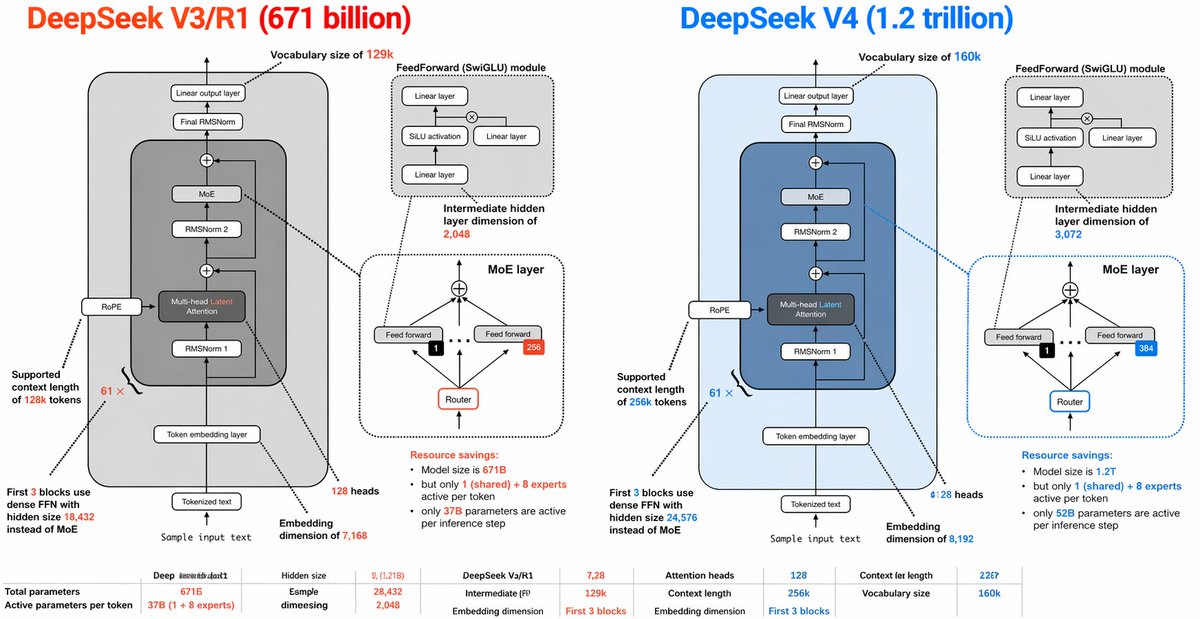
DeepSeek V3 vs V4: Ultimate Transformer Blueprint
PROMPT · EN
type
并排 AI 架构对比信息图
style
简洁的技术图表,白色背景,细黑色轮廓,圆角矩形,虚线标注框,颜色编码高亮,演示文稿风格,矢量信息图
canvas
aspect_ratio
2:1
resolution
宽横向
title_row
left_title
DeepSeek V3/R1 (6710 亿参数)
right_title
DeepSeek V4 (1.2 万亿参数)
left_title_color
亮橙红色
right_title_color
亮蓝色
layout
columns
2
sections
item 1
title
DeepSeek V3/R1 (6710 亿参数)
position
左半部分
count
9
labels
item 1
词汇表大小 129k
item 2
FeedForward (SwiGLU) 模块
item 3
中间隐藏层维度 2,048
item 4
MoE 层
item 5
支持 128k token 上下文长度
item 6
前 3 个块使用隐藏大小为 18,432 的密集 FFN 而非 MoE
item 7
示例文本输入
item 8
嵌入维度 7,168
item 9
128 个注意力头
item 2
title
DeepSeek V4 (1.2 万亿参数)
position
右半部分
count
9
labels
item 1
词汇表大小 160k
item 2
FeedForward (SwiGLU) 模块
item 3
中间隐藏层维度 3,072
item 4
MoE 层
item 5
支持 256k token 上下文长度
item 6
前 3 个块使用隐藏大小为 24,576 的密集 FFN 而非 MoE
item 7
示例文本输入
item 8
嵌入维度 8,192
item 9
128 个注意力头
item 3
title
底部对比表
position
底部全宽
count
10
labels
item 1
总参数量
item 2
每个 token 的活跃参数量
item 3
隐藏层大小
item 4
示例维度
item 5
DeepSeek V3/R1
item 6
中间层 (FF)
item 7
注意力头
item 8
上下文长度
item 9
嵌入维度
item 10
词汇表大小
left_panel
background
浅灰色圆角矩形
main_stack
count
8
blocks
item 1
Token 化文本
item 2
Token 嵌入层
item 3
RMSNorm 1
item 4
多头潜在注意力 (MLA)
item 5
RMSNorm 2
item 6
MoE
item 7
最终 RMSNorm
item 8
线性输出层
side_module
RoPE 连接到左侧的注意力块
attention_block
label
多头潜在注意力 (MLA)
accent
Latent 一词使用橙红色文字
feedforward_inset
title
FeedForward (SwiGLU) 模块
count
4
blocks
item 1
线性层
item 2
SiLU 激活函数
item 3
线性层
item 4
线性层
diagram
两个分支相乘,然后进行投影
moe_inset
title
MoE 层
count
5
blocks
item 1
顶部组合节点
item 2
前馈网络
item 3
前馈网络
item 4
路由
item 5
专家计数徽章 256
details
带有 1 个选中专家的小黑方块,箭头指向专家,虚线分隔符
annotations
vocab
词汇表大小 129k
ff_dim
中间隐藏层维度 2,048
context
支持 128k token 上下文长度
dense_first_blocks
前 3 个块使用隐藏大小为 18,432 的密集 FFN 而非 MoE
resource_savings
资源节省:模型大小为 671B,但每个 token 仅激活 1 个(共享)+ 8 个专家;每次推理步骤仅激活 37B 参数
bottom_stats
count
10
items
item 1
总参数量:671B
item 2
每个 token 活跃参数:37B (1 + 8 个专家)
item 3
隐藏层大小:7,128
item 4
示例维度:28,432
item 5
中间层 (FF):2,048
item 6
注意力头:128
item 7
上下文长度:128k
item 8
嵌入维度:前 3 个块
item 9
上下文长度:22G7
item 10
词汇表大小:129k
right_panel
background
浅蓝色圆角矩形
main_stack
count
8
blocks
item 1
Token 化文本
item 2
Token 嵌入层
item 3
RMSNorm 1
item 4
多头潜在注意力 (MLA)
item 5
RMSNorm 2
item 6
MoE
item 7
最终 RMSNorm
item 8
线性输出层
side_module
RoPE 连接到左侧的注意力块
attention_block
label
多头潜在注意力 (MLA)
accent
Latent 一词使用蓝色文字
feedforward_inset
title
FeedForward (SwiGLU) 模块
count
4
blocks
item 1
线性层
item 2
SiLU 激活函数
item 3
线性层
item 4
线性层
diagram
与左侧面板结构相同
moe_inset
title
MoE 层
count
5
blocks
item 1
顶部组合节点
item 2
前馈网络
item 3
前馈网络
item 4
路由
item 5
专家计数徽章 384
details
带有 1 个选中专家的小黑方块,箭头指向专家,虚线分隔符,蓝色边框强调
annotations
vocab
词汇表大小 160k
ff_dim
中间隐藏层维度 3,072
context
支持 256k token 上下文长度
dense_first_blocks
前 3 个块使用隐藏大小为 24,576 的密集 FFN 而非 MoE
resource_savings
资源节省:模型大小为 1.2T,但每个 token 仅激活 1 个(共享)+ 8 个专家;每次推理步骤仅激活 52B 参数
bottom_stats
count
10
items
item 1
总参数量:1.2T
item 2
每个 token 活跃参数:52B (1 + 8 个专家)
item 3
隐藏层大小:7,2B
item 4
示例维度:28,432
item 5
中间层 (FF):3,072
item 6
注意力头:128
item 7
上下文长度:256k
item 8
嵌入维度:前 3 个块
item 9
上下文长度:22G7
item 10
词汇表大小:160k
global_notes
创建一个高度详细的 Transformer 架构对比图,采用镜像布局。每一半包含一个大型模型堆栈图和 2 个插图:1 个前馈模块和 1 个 MoE 层。在块之间使用箭头,添加微小的技术标签,并使用连接线将标签指向相关组件。保持排版紧凑且具有演示文稿感,所有 V3/R1 的强调使用橙红色,所有 V4 的强调使用蓝色。在底部包含一行跨越全宽的紧凑指标表。保留略显不完美的手绘信息图风格,文字较小且标注密集。

Sobre este prompt

Generate a crisp side-by-side infographic comparing DeepSeek V3 and V4 Transformer architectures, perfect for presentations and tech analysis. Use it as a Arte Conceptual starting point for GPT Image 2: keep the visual structure and style constraints intact, then swap in your own subject, brand, or scene.

This prompt is organized as structured JSON with fields such as type, style, canvas, title row, layout, left panel, and right panel. Keeping that hierarchy helps the model separate the subject, layout, interface elements, and detail constraints.

Start with small changes to subject, scene, camera, and color, then generate a few variations to compare composition and detail without turning the page copy into keyword stuffing.

Cómo usar este prompt

  1. Copy the provided JSON prompt from the page.
  2. Choose an AI model capable of interpreting structured infographic prompts (e.g., a custom GPT or image generation tool).
  3. Adjust any labels, color codes, or dimensions to suit your content needs.
  4. Submit the prompt and generate your side-by-side architecture infographic.

Preguntas frecuentes

Más de GPT Image 2

Ver todo

Crea más rápido con prompts de Sora2Hub.

Usa páginas de prompts curadas como entradas buscables y salta directo a generar con el contexto correcto.

Explorar prompts