
Surreal Ribbon Cityscape Watercolor Poster Prompt
Create a stunning watercolor poster where a flowing red ribbon transforms into a surreal blend of traditional and modern city landmarks, featuring customizable text and art style.
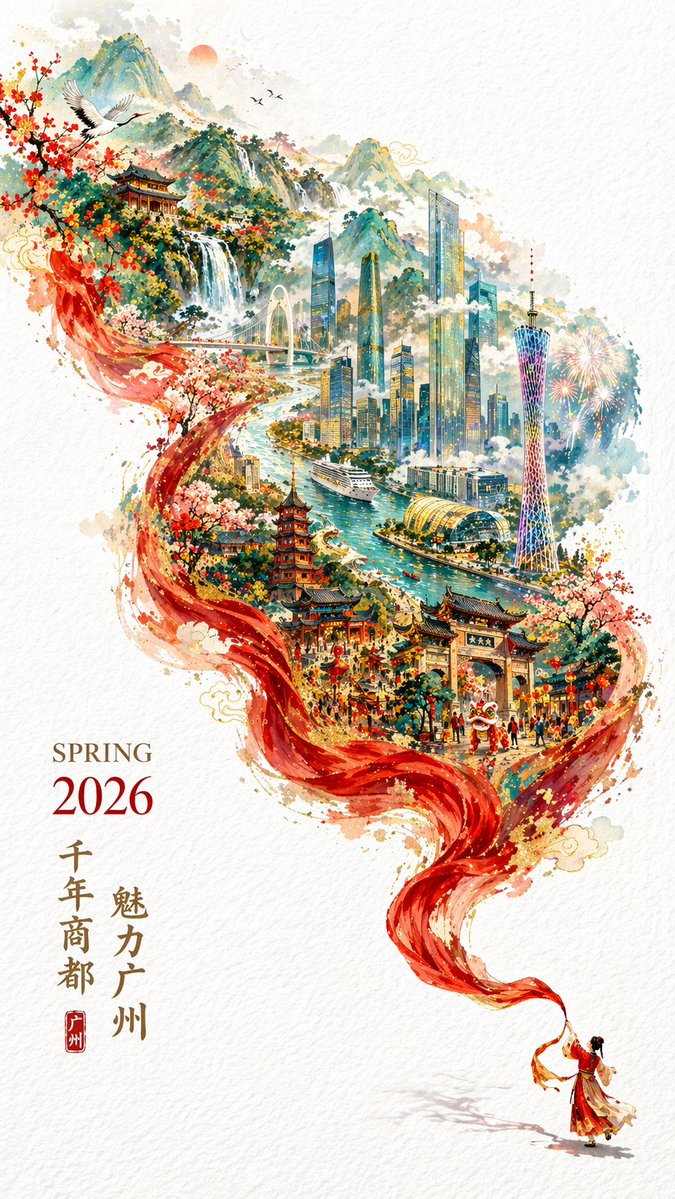
A argart style: vibrant watercolor painting poster on textured white paper. A tiny figure in red Hanfu at the bottom right holds a flowing red silk ribbon that sweeps upward, transforming into a surreal, detailed landscape of argcity name: Guangzhou. The lower ribbon depicts traditional Chinese architecture, a lion dance festival, and cherry blossoms. The middle transitions to a winding river, a cruise ship, modern skyscrapers, and a glowing TV tower. The top fades into green mountains, a waterfall, flying cranes, and fireworks. The scenery is contained within the dynamic ribbon shape against white negative space. Bottom left typography reads "argseason and year: SPRING 2026" with the year in red, alongside vertical Chinese calligraphy "argmain slogan: 魅力广州" and "argsecondary slogan: 千年商都" with a red seal stamp.
Sobre este prompt
Create a stunning watercolor poster where a flowing red ribbon transforms into a surreal blend of traditional and modern city landmarks, featuring customizable text and art style. Use it as a Arte Conceptual starting point for GPT Image 2: keep the visual structure and style constraints intact, then swap in your own subject, brand, or scene.
Common directions include gptimage2api prompts, gptimage2api, and en. Treat these tags as creative cues; the prompt structure and preview image are the more useful guide.
Start by replacing art style, city name, season and year, and main slogan, then keep the camera, composition, and material cues in the same order. This makes the output easier to compare across variations.
Cómo usar este prompt
- Copy the entire prompt code below.
- Choose a compatible image generation AI model like Sora 2 or a similar text-to-image model.
- Replace the default values in the curly braces
{ }with your desired city, season, slogans, and art style. - Paste the customized prompt into the AI model's input field.
- Generate the image and review the output, refining the prompt if needed.


