
Sora2 Hub
Sora2 Hub
  • Biblioteca de Prompts
  • Precios
  • Galería
Sora2 Hub
Sora2 Hub
Sora2 Hub

Sora2 Hub

Plataforma de creación profesional de IA impulsada por Sora 2, Veo 3.1 y Nano Banana Pro. Cree videos impresionantes e imágenes de calidad de estudio con control avanzado, calidad HD y sin marcas de agua.

Email:support@sora2hub.org

Generador de Video IA

  • Texto a Video
  • Imagen a Video
  • Veo 3.1
  • Sora 2
  • Kling 3.0
  • Kling 2.6
  • Kling 2.5
  • Runway
  • Wan 2.6
  • Seedance 2.0
  • Hailuo 2.3
  • Grok Imagine
  • HappyHorse-1.0

Generador de Imagen IA

  • Texto a Imagen
  • Imagen a Imagen
  • Nano Banana Pro
  • Nano Banana
  • 4o Image
  • Flux Kontext
  • Z Image
  • Seedream 4.5
  • Seedream 5.0 Lite
  • Nano Banana 2
  • GPT Image 2
  • Ampliador de Imagen IA

Efectos IA

  • Filtro de Edad IA
  • Cambio de Género IA
  • Beso IA
  • Abrazo IA
  • Imagen Ghibli
  • Filtro Sirena IA
  • Sacudida Corporal IA
  • Filtro de Sonrisa
  • Gordo IA
  • Figura de Acción

Producto

  • Características
  • Escaparates
  • Precios

Empresa

  • Acerca de
  • Contacto

© 2025 • Sora2 Hub ORG Todos los derechos reservados.

  • Política de Privacidad
  • Términos de Servicio
  • Política de Reembolso
  1. Inicio
  2. /
  3. Prompts
  4. /
  5. GPT Image 2
  6. /
  7. Japanese AI Education Promotional Banner — Sora 2 Prompt
GPT Image 2Prompt de IA

Japanese AI Education Promotional Banner — Sora 2 Prompt

Creates a detailed, text-heavy corporate banner for a Japanese AI guide, featuring a spokesperson, multiple feature lists, and a clean, professional design.
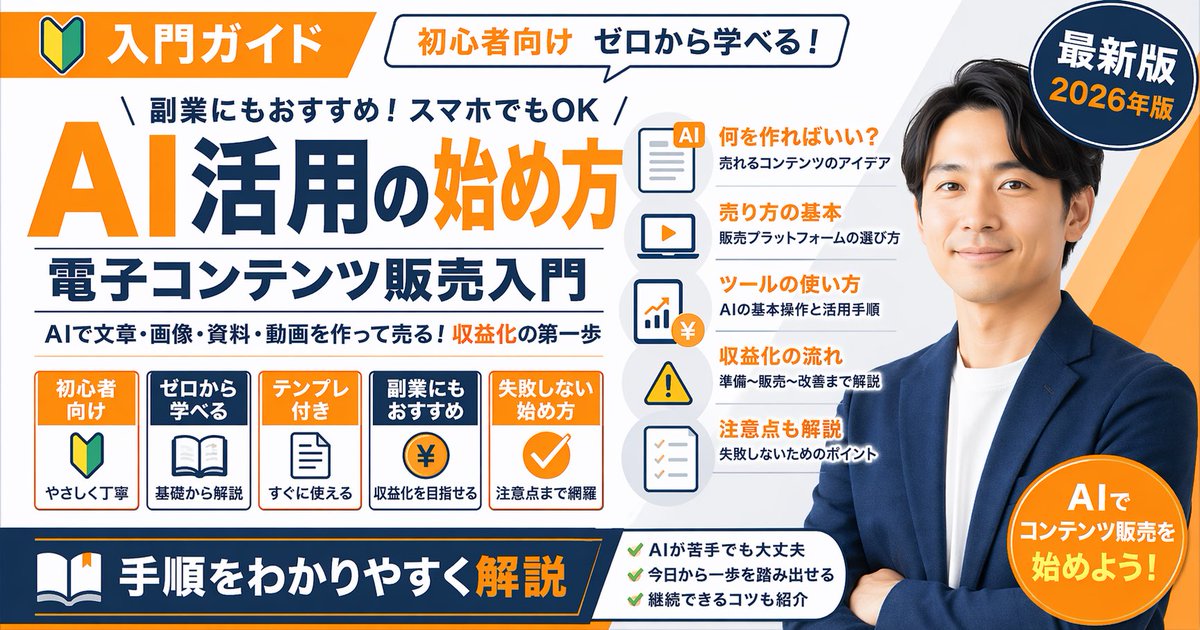
Japanese AI Education Promotional Banner — Sora 2 Prompt
PROMPT · EN
type
promotional banner infographic
style
clean, professional, flat design, corporate educational graphic, white background with orange and dark blue accents
subject
{argument name="spokesperson" default="smiling Asian man in a blue blazer and white t-shirt, arms crossed"}
layout
top_section
left_badge
Orange banner with beginner mark icon and text '入門ガイド'
speech_bubble
White bubble with text '初心者向け ゼロから学べる!'
right_badge
Dark blue circle with text '最新版' and '{argument name="year edition" default="2026年版"}'
main_title_section
top_small_text
\ 副業にもおすすめ!スマホでもOK /
large_title
{argument name="main title" default="AI活用の始め方"}
subtitle
{argument name="subtitle" default="電子コンテンツ販売入門"}
bottom_small_text
AIで文章・画像・資料・動画を作って売る!収益化の第一歩
middle_sections
item 1
position
middle-left
type
feature boxes
count
5
items
item 1
Orange box: '初心者向け', beginner mark icon, 'やさしく丁寧'
item 2
Blue box: 'ゼロから学べる', open book icon, '基礎から解説'
item 3
Orange box: 'テンプレ付き', document icon, 'すぐに使える'
item 4
Blue box: '副業にもおすすめ', coin with ¥ icon, '収益化を目指せる'
item 5
Orange box: '失敗しない始め方', checkmark icon, '注意点まで網羅'
item 2
position
middle-center
type
list items with icons
count
5
items
item 1
Document icon: '何を作ればいい?' / '売れるコンテンツのアイデア'
item 2
Laptop icon: '売り方の基本' / '販売プラットフォームの選び方'
item 3
Chart icon: 'ツールの使い方' / 'AIの基本操作と活用手順'
item 4
Warning icon: '収益化の流れ' / '準備〜販売〜改善まで解説'
item 5
Checklist icon: '注意点も解説' / '失敗しないためのポイント'
bottom_section
left_banner
Dark blue banner with book icon and text '{argument name="bottom banner text" default="手順をわかりやすく解説"}'
center_checklist
count
3
items
item 1
AIが苦手でも大丈夫
item 2
今日から一歩を踏み出せる
item 3
継続できるコツも紹介
right_badge
Orange circle with text 'AIでコンテンツ販売を始めよう!'

Sobre este prompt

Creates a detailed, text-heavy corporate banner for a Japanese AI guide, featuring a spokesperson, multiple feature lists, and a clean, professional design. Use it as a Arte Conceptual starting point for GPT Image 2: keep the visual structure and style constraints intact, then swap in your own subject, brand, or scene.

This prompt is organized as structured JSON with fields such as type, style, subject, and layout. Keeping that hierarchy helps the model separate the subject, layout, interface elements, and detail constraints.

Start with small changes to subject, scene, camera, and color, then generate a few variations to compare composition and detail without turning the page copy into keyword stuffing.

Cómo usar este prompt

  1. Copy the full prompt JSON and paste it into a compatible AI image generator like Sora 2.
  2. Use the variables (spokesperson, year edition, main title, subtitle) to customize the subject and text.
  3. Adjust the prompt's style or layout instructions if you need a different visual tone.
  4. Generate the image and review the output for accurate text rendering and design.
  5. Use the final banner for social media, courses, or YouTube thumbnails.

Preguntas frecuentes

ナーガ@X女帝

@prompts→

Publicado
30 abr 2026
Idioma original
EN
Modelo
GPT Image 2
Categoría
Arte Conceptual
GPT Image 2Arte Conceptualgpt-image-2gptimage2api promptsgptimage2apien
Vistas
102
Copias
13
Me gusta
5

Compartir

Más de GPT Image 2

Ver todo
Guangzhou 2026 Poster: Silk Ribbon Cityscape — Sora 2 Prompt

Guangzhou 2026 Poster: Silk Ribbon Cityscape — Sora 2 Prompt

@alanlovelq
Ultra-Realistic 3D Exploded View Prompt: Sony BRAVIA 8K TV

Ultra-Realistic 3D Exploded View Prompt: Sony BRAVIA 8K TV

@Ankit_patel211
Photorealistic Fashion Magazine Cover — Sora 2 Prompt

Photorealistic Fashion Magazine Cover — Sora 2 Prompt

@aichof21

Crea más rápido con prompts de Sora2Hub.

Usa páginas de prompts curadas como entradas buscables y salta directo a generar con el contexto correcto.

Explorar prompts

