
GPT Image 2Prompt de IA

Japanese Spring Supermarket Flyer — Detailed Retail Layout

Creates a realistic, festive Japanese supermarket flyer with a 12-item product grid, seasonal cherry blossom theme, and custom store details.
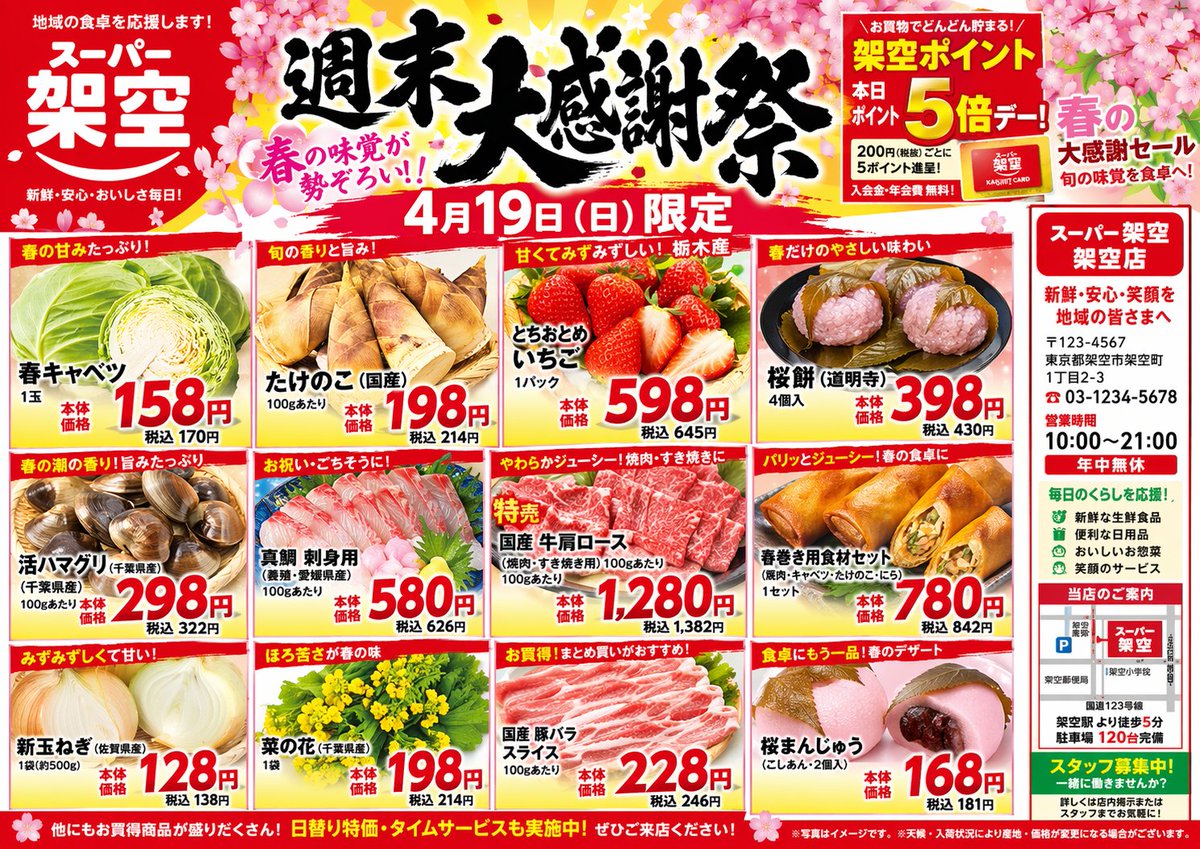
Japanese Spring Supermarket Flyer — Detailed Retail Layout
PROMPT · EN
type
Japanese supermarket promotional flyer
theme
Spring festival, cherry blossom graphics, vibrant red and yellow color palette
header
store_name
{argument name="store name" default="スーパー 架空"}
main_title
{argument name="main headline" default="週末大感謝祭"}
date
{argument name="sale date" default="4月19日 (日) 限定"}
badges
item 1
Point card 5x multiplier
item 2
Spring flavor catchphrase
layout
structure
Grid with 12 product panels (3 rows by 4 columns) and a right-side vertical sidebar
product_panels
count
12
items
item 1
Spring Cabbage with red price tag 158
item 2
Bamboo Shoots with red price tag 198
item 3
Strawberries with red price tag 598
item 4
Sakura Mochi with red price tag 398
item 5
Live Clams with red price tag 298
item 6
Sea Bream Sashimi with red price tag 580
item 7
Beef Shoulder Roast with red price tag 1280
item 8
Spring Roll Ingredients with red price tag 780
item 9
New Onions with red price tag 128
item 10
Canola Flower with red price tag 198
item 11
Pork Belly Slices with red price tag 228
item 12
Sakura Manju with red price tag 168
sidebar
position
right
section_count
4
sections
item 1
Store address, phone number, and hours
item 2
Green bulleted list of store features
item 3
Small local map with parking info
item 4
Green staff recruitment banner
footer
Full-width red banner with white promotional text and fine print

Sobre este prompt

Creates a realistic, festive Japanese supermarket flyer with a 12-item product grid, seasonal cherry blossom theme, and custom store details. Use it as a Arte Conceptual starting point for GPT Image 2: keep the visual structure and style constraints intact, then swap in your own subject, brand, or scene.

This prompt is organized as structured JSON with fields such as type, theme, header, and layout. Keeping that hierarchy helps the model separate the subject, layout, interface elements, and detail constraints.

Start with small changes to subject, scene, camera, and color, then generate a few variations to compare composition and detail without turning the page copy into keyword stuffing.

Cómo usar este prompt

  1. Copy the prompt JSON into your chosen AI image generator.
  2. Replace the default arguments in curly braces with your store name, sale date, or headlines.
  3. Select a model that handles complex text and detailed layouts well.
  4. Generate the image and refine the prompt if needed for better text clarity or layout balance.

Preguntas frecuentes

Más de GPT Image 2

Ver todo

Crea más rápido con prompts de Sora2Hub.

Usa páginas de prompts curadas como entradas buscables y salta directo a generar con el contexto correcto.

Explorar prompts

