
GPT Image 2Prompt de IA
Cyberpunk X/Twitter 3D Walkout Portrait — Sora 2 Prompt
Create a cinematic 3D profile image of a figure stepping out from a glowing, futuristic X/Twitter post card into a neon-lit studio scene.
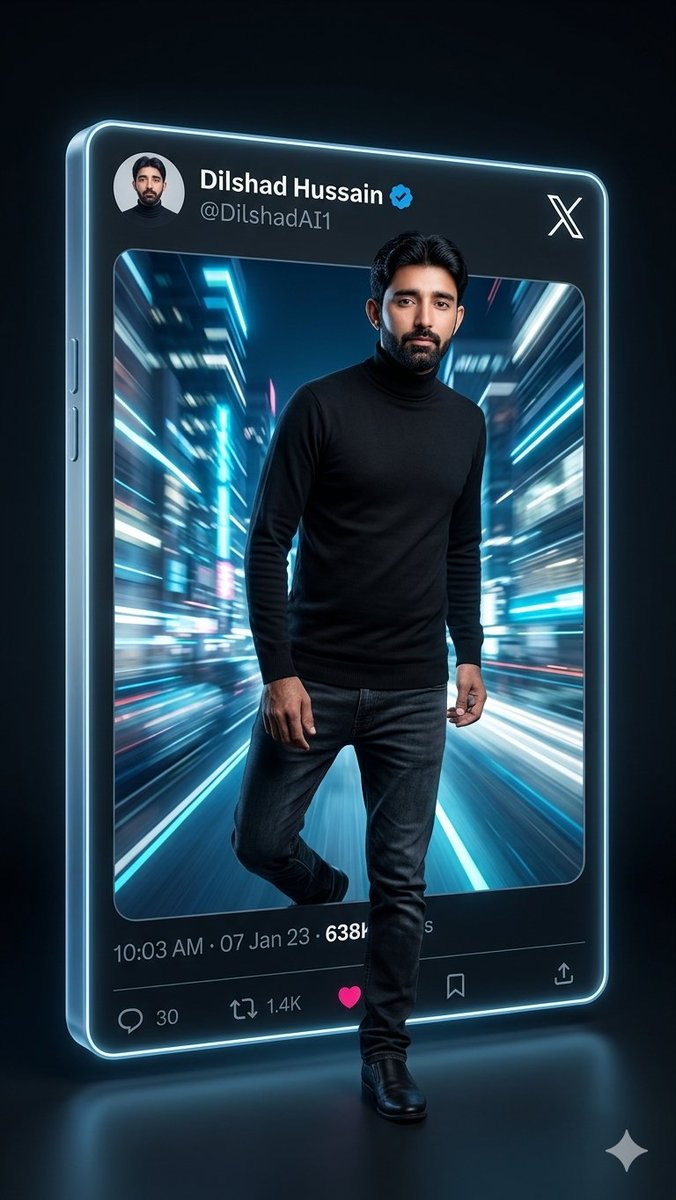
PROMPT · EN
{"type":"电影感 3D 社交媒体个人资料插图","scene":"一位成年男性全身像,仿佛打破屏幕般从巨大的悬浮 X/Twitter 帖子卡片中走出,融合了写实肖像摄影与未来感 3D UI 设计。深色光泽摄影棚背景,青色霓虹轮廓光,反光地板,柔和的蓝色光晕,高对比度赛博朋克氛围。","main subject":{"description":"一名成年男性,面部可自定义,正从卡片中向前迈步,一条腿伸出画面外","pose":"自信的向前迈步姿态,手臂自然放松,身体略微朝向观众","outfit":{"count":4,"items":["黑色高领毛衣","深色修身牛仔裤","黑色皮鞋","小耳环"]},"hair":"深色短发,打理整齐","face":"使用 argcharacter face: 一张写实的成年男性面孔"},"floating post card":{"platform":"X / Twitter 风格帖子","appearance":"大型垂直圆角矩形玻璃手机状卡片,带有厚实的半透明边缘、发光的青色轮廓、斜面 3D 深度,从左前方视角观察","top bar":{"count":5,"items":["左上角圆形头像","显示名称文本: argdisplay name: Dilshad Hussain","蓝色认证徽章","账号 ID 文本: arghandle: @DilshadAI1","右上角大型白色 X logo"]},"main image area":"帖子内圆角矩形照片,展示了一条未来感城市街道隧道,强烈的青色、蓝色、白色和洋红色动态模糊光轨在人物身后汇聚,营造出速度感","metadata row":{"count":3,"items":["时间和日期文本: argtimestamp: 10:03 AM · 07 Jan 23","浏览量文本: argview count: 638K","部分可见的浏览量标签"]},"engagement bar":{"count":5,"items":["回复图标及计数 30","转发图标及计数 1.4K","亮粉色心形点赞图标","书签图标","分享/上传图标"]}},"composition":"卡片占据画面大部分空间,略微向后向左倾斜,人物从图像区域走出并覆盖在底部 UI 上。在身体穿过卡片边缘处添加深度阴影。保持霓虹边框清晰明亮,整个卡片周围有细腻的光晕效果。","style":"超写实 3D 渲染,电影感肖像布光,光泽感科幻界面,浅景深,高细节,戏剧性的青色和蓝绿色调,9:16 垂直构图,社交媒体爆款个人资料美学","negative prompts":"避免多余人物,避免肢体扭曲,避免主名称和账号 ID 无法辨认,避免扁平 2D UI,避免背景杂乱,避免卡通风格"}Sobre este prompt
Create a cinematic 3D profile image of a figure stepping out from a glowing, futuristic X/Twitter post card into a neon-lit studio scene. Use it as a Arte Conceptual starting point for GPT Image 2: keep the visual structure and style constraints intact, then swap in your own subject, brand, or scene.
Start by replacing character face, display name, handle, and timestamp, then keep the camera, composition, and material cues in the same order. This makes the output easier to compare across variations.
Cómo usar este prompt
- Copy the entire prompt text from the page.
- Select a compatible AI image generator (like Sora 2).
- Paste the prompt into the input field.
- Customize the variables in curly braces (e.g.,
{character face},{display name}) with your own details. - Generate and refine the output for your perfect social media profile picture.


