
Sora2 Hub
Sora2 Hub
  • Biblioteca de Prompts
  • Precios
  • Galería
Sora2 Hub
Sora2 Hub
Sora2 Hub

Sora2 Hub

Plataforma de creación profesional de IA impulsada por Sora 2, Veo 3.1 y Nano Banana Pro. Cree videos impresionantes e imágenes de calidad de estudio con control avanzado, calidad HD y sin marcas de agua.

Email:support@sora2hub.org

Generador de Video IA

  • Texto a Video
  • Imagen a Video
  • Veo 3.1
  • Sora 2
  • Kling 3.0
  • Kling 2.6
  • Kling 2.5
  • Runway
  • Wan 2.6
  • Seedance 2.0
  • Hailuo 2.3
  • Grok Imagine
  • HappyHorse-1.0

Generador de Imagen IA

  • Texto a Imagen
  • Imagen a Imagen
  • Nano Banana Pro
  • Nano Banana
  • 4o Image
  • Flux Kontext
  • Z Image
  • Seedream 4.5
  • Seedream 5.0 Lite
  • Nano Banana 2
  • GPT Image 2
  • Ampliador de Imagen IA

Efectos IA

  • Filtro de Edad IA
  • Cambio de Género IA
  • Beso IA
  • Abrazo IA
  • Imagen Ghibli
  • Filtro Sirena IA
  • Sacudida Corporal IA
  • Filtro de Sonrisa
  • Gordo IA
  • Figura de Acción

Producto

  • Características
  • Escaparates
  • Precios

Empresa

  • Acerca de
  • Contacto

© 2025 • Sora2 Hub ORG Todos los derechos reservados.

  • Política de Privacidad
  • Términos de Servicio
  • Política de Reembolso
  1. Inicio
  2. /
  3. Prompts
  4. /
  5. GPT Image 2
  6. /
  7. Japanese Webinar Thumbnail Generator — Sora 2 Prompt
GPT Image 2Prompt de IA

Japanese Webinar Thumbnail Generator — Sora 2 Prompt

Create professional Japanese webinar thumbnails with clear text layout in 16:9 widescreen format using this prompt.
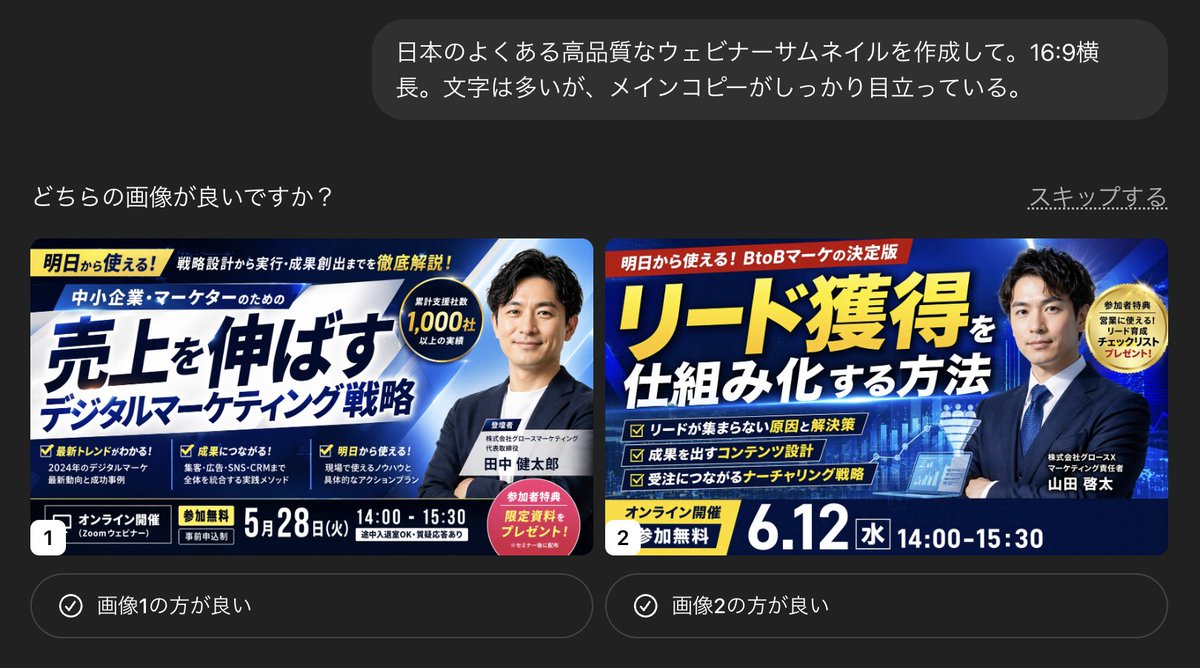
Japanese Webinar Thumbnail Generator — Sora 2 Prompt
PROMPT · EN
创建一个高质量的日语 argthumbnail type: 网络研讨会缩略图。argaspect ratio: 16:9 宽屏。虽然包含大量文字,但主文案清晰突出。

Sobre este prompt

Create professional Japanese webinar thumbnails with clear text layout in 16:9 widescreen format using this prompt. Use it as a Arte Conceptual starting point for GPT Image 2: keep the visual structure and style constraints intact, then swap in your own subject, brand, or scene.

Start by replacing thumbnail type and aspect ratio, then keep the camera, composition, and material cues in the same order. This makes the output easier to compare across variations.

Cómo usar este prompt

  1. Copy the prompt above.
  2. Open Sora 2 or a compatible AI model and paste the prompt.
  3. Modify the thumbnail type variable (e.g., "YouTube thumbnail") if needed.
  4. Adjust the aspect ratio variable if a different size is required.
  5. Generate the image and refine as necessary for optimal results.

Preguntas frecuentes

KAWAI

@kawai_design→

Publicado
25 abr 2026
Idioma original
EN
Modelo
GPT Image 2
Categoría
Arte Conceptual
GPT Image 2Arte Conceptualgpt-image-2twitter
Vistas
116
Copias
13
Me gusta
6

Compartir

Más de GPT Image 2

Ver todo
Cyberpunk AI Launch Banner — Cinematic Neon Poster Prompt

Cyberpunk AI Launch Banner — Cinematic Neon Poster Prompt

@ObieriI
Cyberpunk Catgirl Soda Splash — Sora 2 Prompt

Cyberpunk Catgirl Soda Splash — Sora 2 Prompt

@kuso_seisakusyo
Celebrity Crossover — Sora 2 Prompt

Celebrity Crossover — Sora 2 Prompt

@Conor_D_Dart

Crea más rápido con prompts de Sora2Hub.

Usa páginas de prompts curadas como entradas buscables y salta directo a generar con el contexto correcto.

Explorar prompts

