
GPT Image 2Prompt de IA
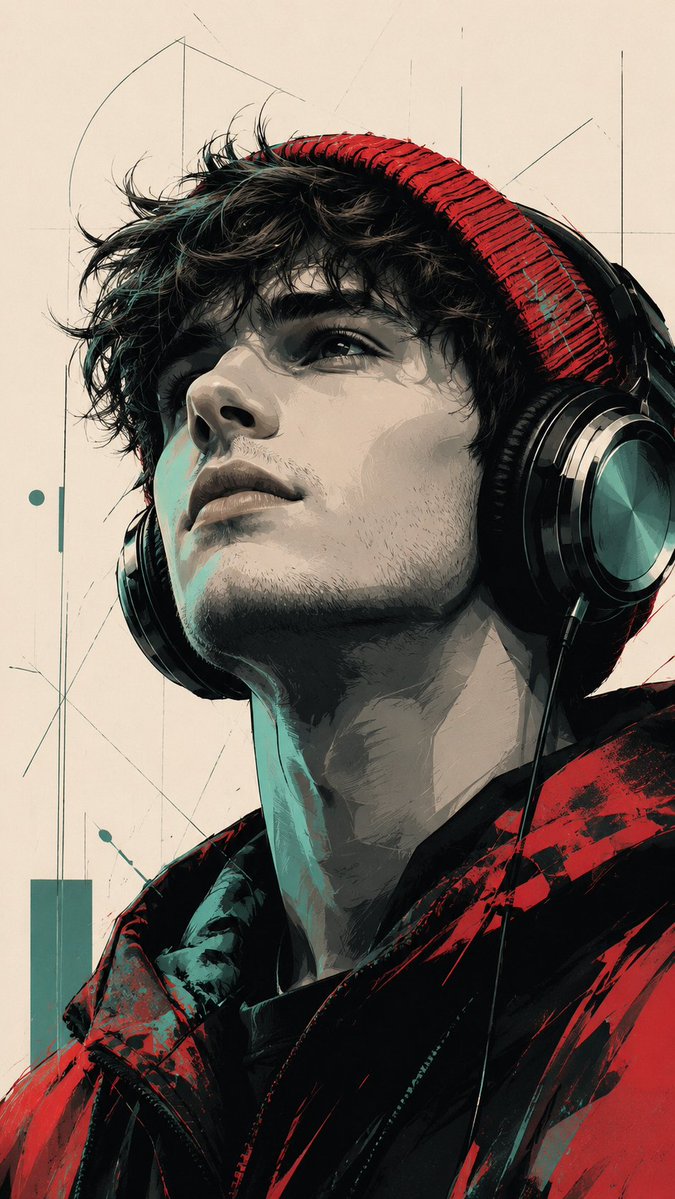
Modern Pop Art Vector Portrait — Stylized Urban Vibe
Generate a striking, stylized portrait blending bold pop art shadows with clean digital vector lines for a cinematic, high-contrast look.
1 / 2
PROMPT · EN
主体与构图:一张风格化的低角度肖像,主角是 argsubject: 年轻男子,神情宁静地向上仰望。他戴着一副大型头戴式耳机,头上戴着一顶有质感的 argbeanie color: 红色 冷帽。构图为特写镜头,聚焦于侧脸和颈部,采用电影级视角拍摄。
艺术风格:融合了现代波普艺术与数字矢量插画。图像运用了大胆的高对比度阴影和干净的线条。
阴影采用“赛璐珞”或海报风格渲染,呈现出明显的色块,而非平滑的渐变。
色彩搭配:引人注目的有限配色方案,包括深黑色、柔和的灰色、鲜艳的红色,以及特定的 argaccent color: 青色/薄荷绿 点缀色。背景为平坦的中性灰白色,带有微妙、纤细的几何草图线条。
细节与质感:人物的夹克和冷帽上带有红色和青色的表现主义笔触。耳机具有光泽的金属质感,并带有逼真的反射效果。皮肤以灰色调和青色高光渲染,以强调来自上方的戏剧性光影。
氛围:都市、艺术且略带忧郁,让人联想到高端图像小说封面或现代街头艺术壁画。 宽高比为 9:16
Sobre este prompt
Generate a striking, stylized portrait blending bold pop art shadows with clean digital vector lines for a cinematic, high-contrast look. Use it as a Arte Conceptual starting point for GPT Image 2: keep the visual structure and style constraints intact, then swap in your own subject, brand, or scene.
Start by replacing subject, beanie color, and accent color, then keep the camera, composition, and material cues in the same order. This makes the output easier to compare across variations.
Cómo usar este prompt
- Copy the entire prompt text from the body above.
- Choose your preferred AI image generation model (e.g., Sora, Midjourney, or DALL·E).
- Customize the placeholder variables like
{subject},{beanie color}, and{accent color}to personalize the output. - Paste the modified prompt into your chosen model's input field.
- Generate and refine the result until you achieve the perfect urban, artistic portrait.


