
GPT Image 2Prompt de IA
Tinder Profile Screenshot Replica — Sora 2 Prompt
Generate a pixel-perfect Tinder UI mockup with customizable character details, perfect for social media content or app design previews.
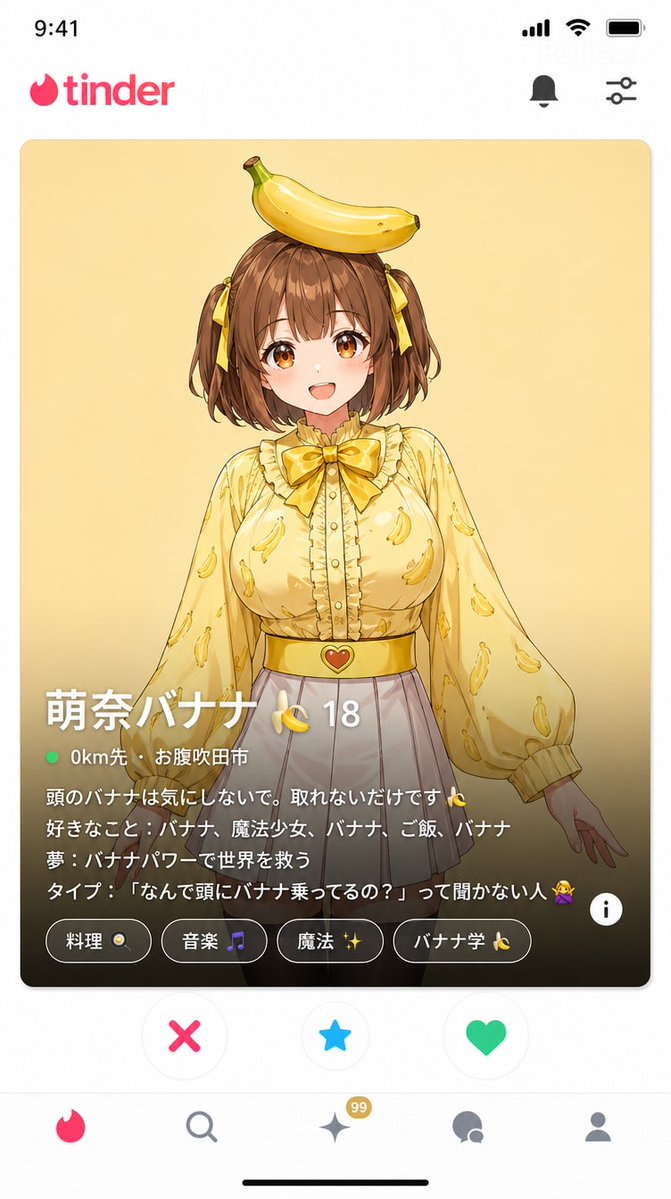
PROMPT · EN
一张约会软件 "Tinder" 的截图风格图像(9:16 纵横比)。 完全复刻 Tinder UI:
- 顶部显示 "Tinder" 标志
- 中心滑动卡片:argcharacter name: Mona 的照片(头上顶着香蕉,身穿黄色衬衫,白色短裙)。面带微笑,面向前方。 卡片底部的信息(Tinder 特有设计):
个人资料名称:"argprofile name: Mona Banana 🍌"
年龄:"argage: 18"
距离:"argdistance: 0km away · Suita City" 个人简介(正文)文本:
"别在意我头上的香蕉,它就是拿不下来 🍌
爱好:香蕉、魔法少女、香蕉、米饭、香蕉
梦想:用香蕉的力量拯救世界
理想型:不问我‘为什么你头上顶着香蕉?’的人 🙅" 兴趣标签:"烹饪 🍳"、"音乐 🎵"、"魔法 ✨"、"香蕉研究 🍌" 底部用于 "喜欢 / 超级喜欢 / 跳过" 的按钮 UI 一张看起来与真实 Tinder 应用完全一致的截图。
Sobre este prompt
Generate a pixel-perfect Tinder UI mockup with customizable character details, perfect for social media content or app design previews. Use it as a Arte Conceptual starting point for GPT Image 2: keep the visual structure and style constraints intact, then swap in your own subject, brand, or scene.
Start by replacing character name, profile name, age, and distance, then keep the camera, composition, and material cues in the same order. This makes the output easier to compare across variations.
Cómo usar este prompt
- Copy the entire prompt and paste it into a compatible AI image generator.
- Select a model that excels in UI rendering and text generation (e.g., Sora 2).
- Customize the character details by changing the
{argument}tags (e.g., name, age, bio). - Adjust the aspect ratio to 9:16 for a mobile-optimized view.
- Generate and refine until the Tinder interface and text appear accurate.


