
Magnus Effect Academic Infographic — Sora 2 Prompt
Create a visually stunning, clean academic infographic explaining the Magnus Effect with elegant typography, diagrams, and a premium textbook aesthetic.
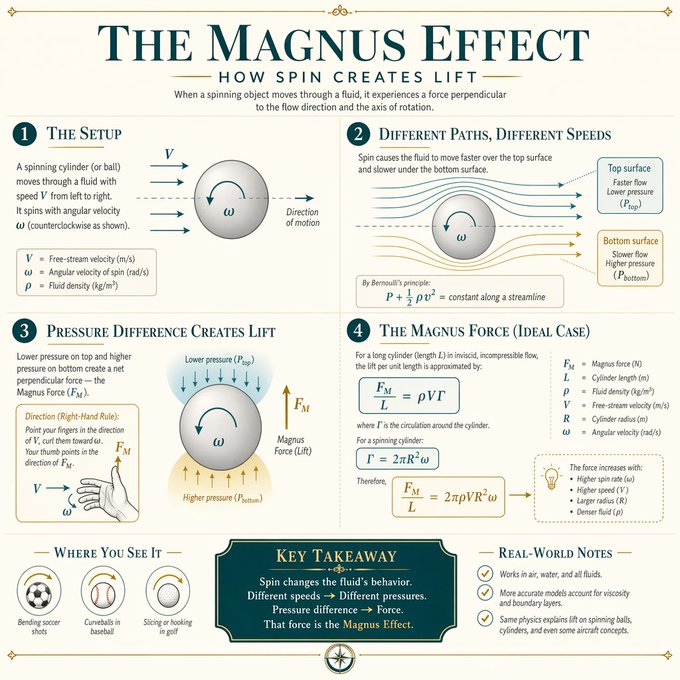
Create a visually stunning educational infographic explaining Magnus Effect in a clean, modern academic style. Use a soft neutral background (cream or light beige), elegant serif typography for titles, and minimalist sans-serif for body text. Structure the layout into clearly separated numbered sections (e.g., 1, 2, 3, 4), each with a concise heading and short explanation. Include subtle dividing lines and balanced spacing. Incorporate mathematical notation, symbols, and step-by-step visual diagrams (like grids, arrows, highlights, or boxed elements) to illustrate the concept clearly. Use a limited color palette (teal, gold accents, dark gray text) with soft highlights for emphasis. Add visual cues like arrows, dotted lines, or highlighted boxes to guide the viewer’s eye through the logic. Maintain symmetry, alignment, and a polished “textbook meets modern design” aesthetic. The final design should feel like a premium educational poster - minimal, elegant, highly readable, and intellectually satisfying.
Sobre este prompt
Create a visually stunning, clean academic infographic explaining the Magnus Effect with elegant typography, diagrams, and a premium textbook aesthetic. Use it as a Arte Conceptual starting point for an AI model: keep the visual structure and style constraints intact, then swap in your own subject, brand, or scene.
Common directions include chatgpt, 信息图, 学术风, and 物理学. Treat these tags as creative cues; the prompt structure and preview image are the more useful guide.
Start with small changes to subject, scene, camera, and color, then generate a few variations to compare composition and detail without turning the page copy into keyword stuffing.
Cómo usar este prompt
- Copy the prompt to your clipboard.
- Paste into Sora 2 or any AI image generator (DALL·E 3, Midjourney).
- Modify any design variables like color palette or text labels as needed.
- Generate the infographic and adjust the layout using in-painting if required.
- Export your premium educational poster for prints or digital sharing.


