
GPT Image 2Prompt de IA
Mechanical Keyboard E-Commerce Mockup — Sora 2 Prompt
Generate a high-fidelity desktop e-commerce mockup for a premium mechanical keyboard with customizable variables.
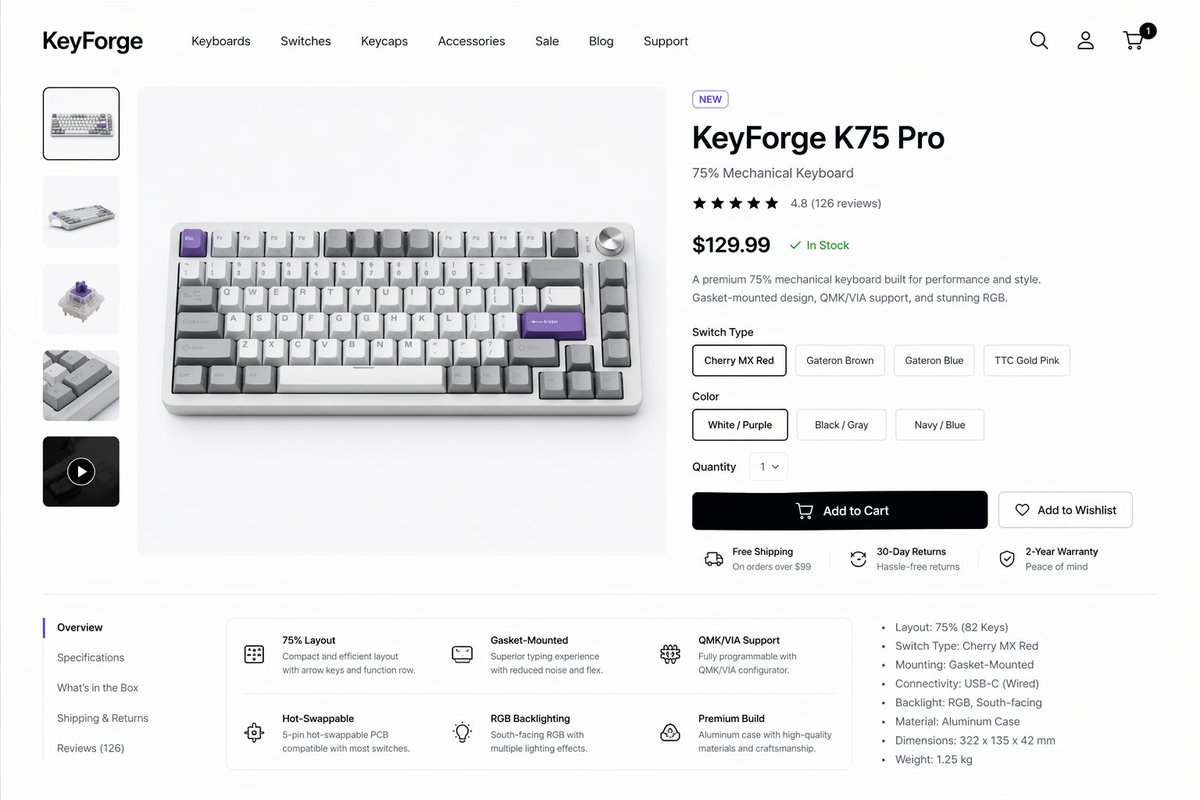
PROMPT · EN
创建一个简洁现代的电商产品详情页,用于展示名为 argbrand name: KeyForge 的高端机械键盘品牌。页面呈现为高保真桌面端网站模型,背景为白色,配有浅灰色分割线和宽裕的留白。布局为一个统一的店面场景,包含顶部导航栏、左侧产品缩略图栏、中央大型产品主图以及右侧购买信息面板。在页眉处,最左侧放置加粗的品牌字标,随后是 7 个导航项,依次为“Keyboards”、“Switches”、“Keycaps”、“Accessories”、“Sale”、“Blog”和“Support”;最右侧放置搜索、账户和购物车 3 个图标,购物车图标上带有一个显示“1”的黑色小通知角标。中央展示的主产品是一款 75% 配列的紧凑型机械键盘,以略微俯视的前侧角度拍摄,置于浅灰色展台上,采用银色铝合金外壳,搭配白色和灰色键帽,点缀几颗淡紫色功能键,右上角配有银色音量旋钮。左侧垂直画廊包含 5 个缩略图:1 个选中的正面产品图、1 个键盘侧视图、1 个机械轴体特写、1 个键帽纹理特写以及 1 个带有圆形播放图标的深色视频缩略图。右侧产品面板包含一个写有“NEW”的小型胶囊标签、加粗的大字产品名称 argproduct name: KeyForge K75 Pro、副标题“75% Mechanical Keyboard”、一行 4.8 分的 5 星评分及“(126 reviews)”、加粗的大字价格 argprice: $129.99 以及随后的绿色“In Stock”状态,下方是关于卓越性能、Gasket 结构设计、QMK/VIA 支持及 RGB 灯效的简短两句描述。在此之下,包含一个“Switch Type”选择器,设有 4 个胶囊按钮,分别标注为“Cherry MX Red”、“Gateron Brown”、“Gateron Blue”和“TTC Gold Pink”,默认选中第一个;一个“Color”选择器,设有 3 个胶囊按钮,分别标注为“White / Purple”、“Black / Gray”和“Navy / Blue”,默认选中第一个;一个设为“1”的“Quantity”下拉菜单;一个带有购物车图标的大号黑色主按钮,标注为“Add to Cart”;以及一个带有心形图标的轮廓风格次要按钮,标注为“Add to Wishlist”。在按钮下方,展示 3 个带有小图标的横向服务亮点:“Free Shipping”及其副标题“On orders over $99”、“30-Day Returns”及其副标题“Hassle-free returns”以及“2-Year Warranty”及其副标题“Peace of mind”。在下方内容区域,创建一个由细线分隔的两栏式板块。左侧为垂直标签列表,包含 5 个项目:选中状态的“Overview”,以及“Specifications”、“What’s in the Box”、“Shipping & Returns”和“Reviews (126)”。在标签右侧,放置一个圆角白色功能卡片网格,包含 2 行 3 列共 6 个功能块,每个功能块配有简单的线条图标、加粗标题和简短说明文字:“75% Layout”、“Gasket-Mounted”、“QMK/VIA Support”、“Hot-Swappable”、“RGB Backlighting”和“Premium Build”。在该区域的最右侧,添加一个包含 7 个要点的规格列表:“Layout: 75% (82 Keys)”、“Switch Type: Cherry MX Red”、“Mounting: Gasket-Mounted”、“Connectivity: USB-C (Wired)”、“Backlight: RGB, South-facing”、“Material: Aluminum Case”和“Dimensions: 322 x 135 x 42 mm”,并增加最后一条“Weight: 1.25 kg”。采用精致的极简主义产品设计美学,具备真实的 UI 间距、类似 Inter 或 SF Pro 的简洁无衬线字体、柔和阴影、细微圆角、单色图标以及精炼的初创公司风格消费电子产品展示效果。
Sobre este prompt
Generate a high-fidelity desktop e-commerce mockup for a premium mechanical keyboard with customizable variables. Use it as a Arte Conceptual starting point for GPT Image 2: keep the visual structure and style constraints intact, then swap in your own subject, brand, or scene.
Start by replacing brand name, product name, and price, then keep the camera, composition, and material cues in the same order. This makes the output easier to compare across variations.
Cómo usar este prompt
- Copy the entire prompt from the page.
- Paste it into an AI image generation model like Sora 2 or DALL-E.
- Modify the variables (brand name, product name, price) to match your preferences.
- Generate the image. For best results, use a model that supports high-fidelity design details.
- Download the output and use it in your UI/UX presentations or concept designs.


