
GPT Image 2Prompt de IA
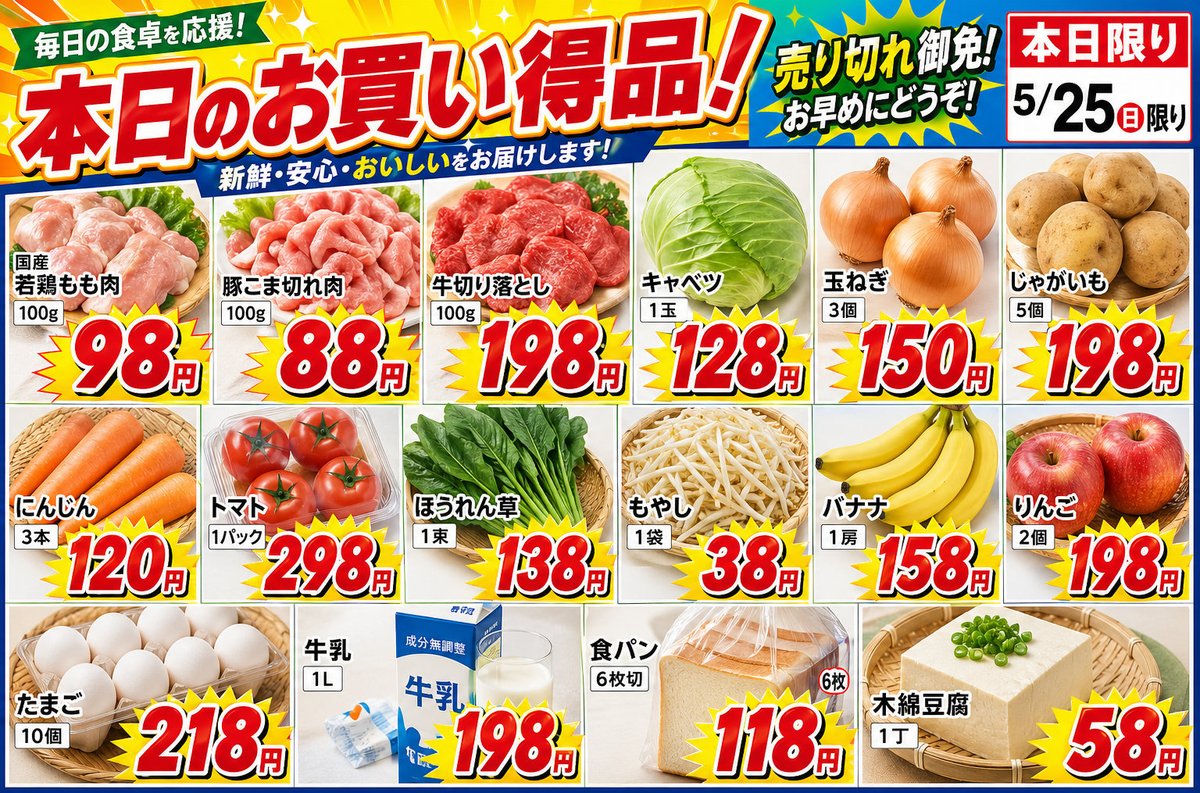
Japanese Supermarket Sale Flyer — Realistic Promo Layout
Generate a photorealistic Japanese grocery flyer with bold prices, fresh product photos, and a clean horizontal layout for print or digital use.
PROMPT · EN
创建一个 argstore type: 超市 传单。arglayout: 横向排版。照片应看起来新鲜美观,价格数字应采用流行且醒目的设计。商品列表如下:
产品=国产鸡腿肉,数量=100g,价格=98 日元
产品=猪肉块,数量=100g,价格=88 日元
产品=牛肉切片,数量=100g,价格=198 日元
产品=卷心菜,数量=1 颗,价格=128 日元
产品=洋葱,数量=3 个,价格=150 日元
产品=土豆,数量=5 个,价格=198 日元
产品=胡萝卜,数量=3 根,价格=120 日元
产品=番茄,数量=1 包,价格=298 日元
产品=菠菜,数量=1 把,价格=138 日元
产品=豆芽,数量=1 袋,价格=38 日元
产品=香蕉,数量=1 把,价格=158 日元
产品=苹果,数量=2 个,价格=198 日元
产品=鸡蛋,数量=10 枚,价格=218 日元
产品=牛奶,数量=1L,价格=198 日元
产品=面包,数量=6 片,价格=118 日元
产品=棉豆腐,数量=1 块,价格=58 日元
Sobre este prompt
Generate a photorealistic Japanese grocery flyer with bold prices, fresh product photos, and a clean horizontal layout for print or digital use. Use it as a Arte Conceptual starting point for GPT Image 2: keep the visual structure and style constraints intact, then swap in your own subject, brand, or scene.
Start by replacing store type and layout, then keep the camera, composition, and material cues in the same order. This makes the output easier to compare across variations.
Cómo usar este prompt
- Copy the full prompt into your preferred AI image generator (e.g., Sora, Midjourney, DALL·E).
- Choose a model that supports detailed text rendering for best price-tag clarity.
- Adjust the
{store type}variable to "コンビニ" or "八百屋" for different store vibes. - Modify the
{layout}variable to "縦向排版" if you need a portrait orientation. - Generate and refine—tweak product quantities or swap items to match your promotion.


