
Prompt de IA
Realistic WeChat Chat Photo — Sora 2 Prompt
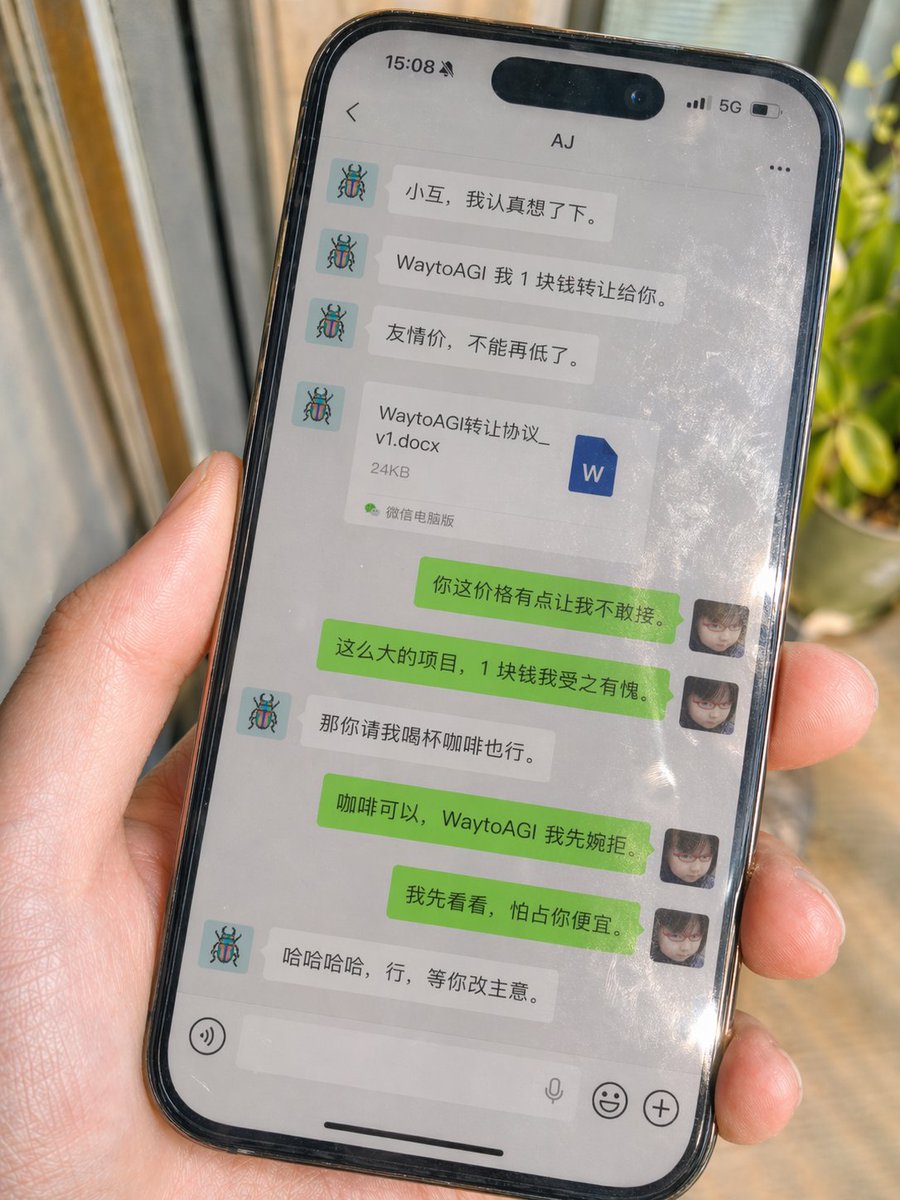
Generate a photorealistic WeChat chat photo with natural reflections and a file attachment—perfect for mockups.
PROMPT · EN
Generate image, aspect ratio 3:4 A real shot iPhone casual photo, handheld shot, screen displays a real WeChat chat interface, environmental natural light, with slight sunlight reflection, slightly tilted frame, slice-of-life, imperfect composition, strong sense of reality, high detail, 4K, obvious fingerprints, oil stains, tiny scratches on the screen glass surface, with natural reflections, partial glare, and screen contamination feel of real photography Reference image 1 as my avatar
Reference image 2 as the other party's avatar Contact: [Contact Name] Chat content is supplemented by GPT itself
Requirement is natural Chinese WeChat dialogue, conforming to real chat habits, revolving around this theme:
[Scene Theme] The dialogue must include a Word file attachment
File name: [File Name].docx
File size: [File Size] The interface must look like real WeChat
Left side is the other party, right side is me
Top bar, bubbles, avatars, time separation, whitespace all conform to real WeChat style
The bottom input bar must strictly be:
Left side voice button, middle white long input box, microphone icon on the right side inside the input box, rightmost emoji button and plus button No periods
No extra spaces
No design draft feel
No UI schematic feel
Must look like a WeChat chat photo taken by a real phone
Sobre este prompt
Generate a photorealistic WeChat chat photo with natural reflections and a file attachment—perfect for mockups. Use it as a Arte Conceptual starting point for an AI model: keep the visual structure and style constraints intact, then swap in your own subject, brand, or scene.
Common directions include chatgpt, 微信, 随手拍, and 真实感. Treat these tags as creative cues; the prompt structure and preview image are the more useful guide.
Start with small changes to subject, scene, camera, and color, then generate a few variations to compare composition and detail without turning the page copy into keyword stuffing.
Cómo usar este prompt
- Copy the prompt text from this page.
- Paste it into your AI image generator (Sora 2, Midjourney, or similar).
- Replace bracketed placeholders like
[Contact Name],[File Name], and[Scene Theme]with your own details. - Upload your avatar and the other party's avatar as reference images.
- Generate the image and adjust the prompt if you want more or less natural flaws.


