
Golden Hour Fashion Editorial — Sora 2 Prompt
Generate a hyper-realistic fashion editorial featuring a naturally posed model bathed in golden hour light, with cinematic bokeh and premium film-like tones.
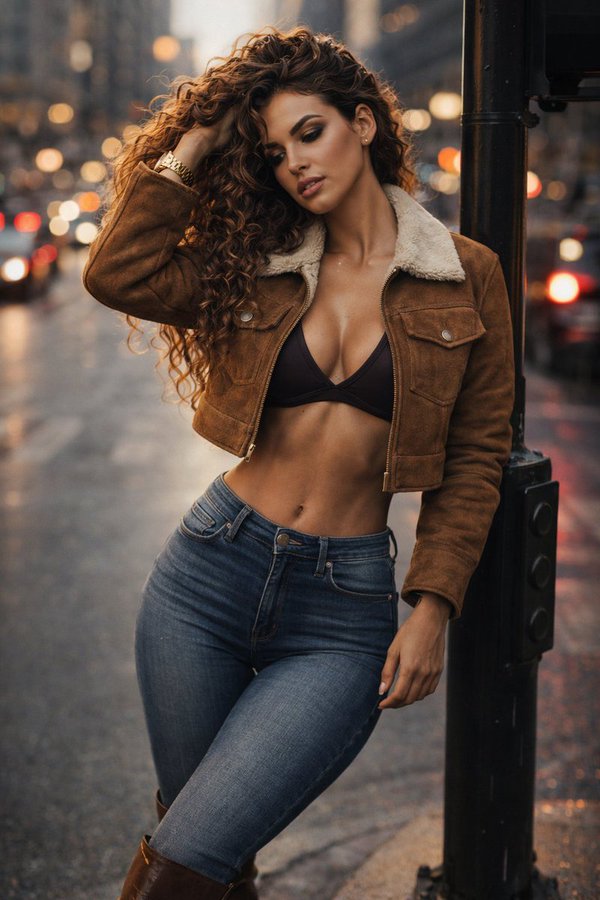
A hyper-realistic cinematic fashion photograph of a stunning young woman in her early 20s, full body visible, standing in a modern city center during golden hour.
She leans casually with one shoulder against a traffic light pole, unaware of the camera, as if the moment was captured naturally.
She wears skinny blue jeans, brown leather boots, and a cropped brown suede jacket with a soft shearling collar. Under the jacket, a minimal dark crop top reveals a subtle cleavage and toned midriff. Her physique is naturally feminine, balanced and elegant, with confident posture.
One hand runs through her long, voluminous curly light-brown hair, lifting it back in motion. Her head is turned slightly toward that side, eyes looking away naturally, not posing. Skin tone is lightly sun-kissed with a soft creamy glow, realistic skin texture, subtle pores and highlights — no plastic look.
Makeup is striking but refined: defined eyes, bold lashes, sculpted cheeks, soft contour, and natural glossy lips — editorial beauty campaign quality.
Lighting is warm golden hour sunlight, wrapping around her silhouette and hair, creating soft highlights and cinematic contrast.
Background is an urban street with cars and city lights rendered in strong bokeh, shallow depth of field — focus locked on the woman. Shot on a full-frame cinema camera, 85mm lens, f/1.8, ultra-realistic detail, high dynamic range, cinematic color grading, film-like tones, premium fashion editorial aesthetic, high-budget movie still feeling.
Sobre este prompt
Generate a hyper-realistic fashion editorial featuring a naturally posed model bathed in golden hour light, with cinematic bokeh and premium film-like tones. Use it as a Arte Conceptual starting point for an AI model: keep the visual structure and style constraints intact, then swap in your own subject, brand, or scene.
Common directions include chatgpt, 时尚, 街拍, and 电影感. Treat these tags as creative cues; the prompt structure and preview image are the more useful guide.
Start with small changes to subject, scene, camera, and color, then generate a few variations to compare composition and detail without turning the page copy into keyword stuffing.
Cómo usar este prompt
- Copy the prompt from the page.
- Paste into your AI image model (e.g., Sora 2, Midjourney, or DALL·E 3).
- Choose a generation aspect ratio (16:9 recommended) and model version.
- Run the prompt and refine keywords to adjust pose, lighting, or details as needed.
- Save your favorite output and upscale for high-resolution use.


