
GPT Image 2Prompt de IA
2026 Spring Festival City Poster — Sora 2 Prompt
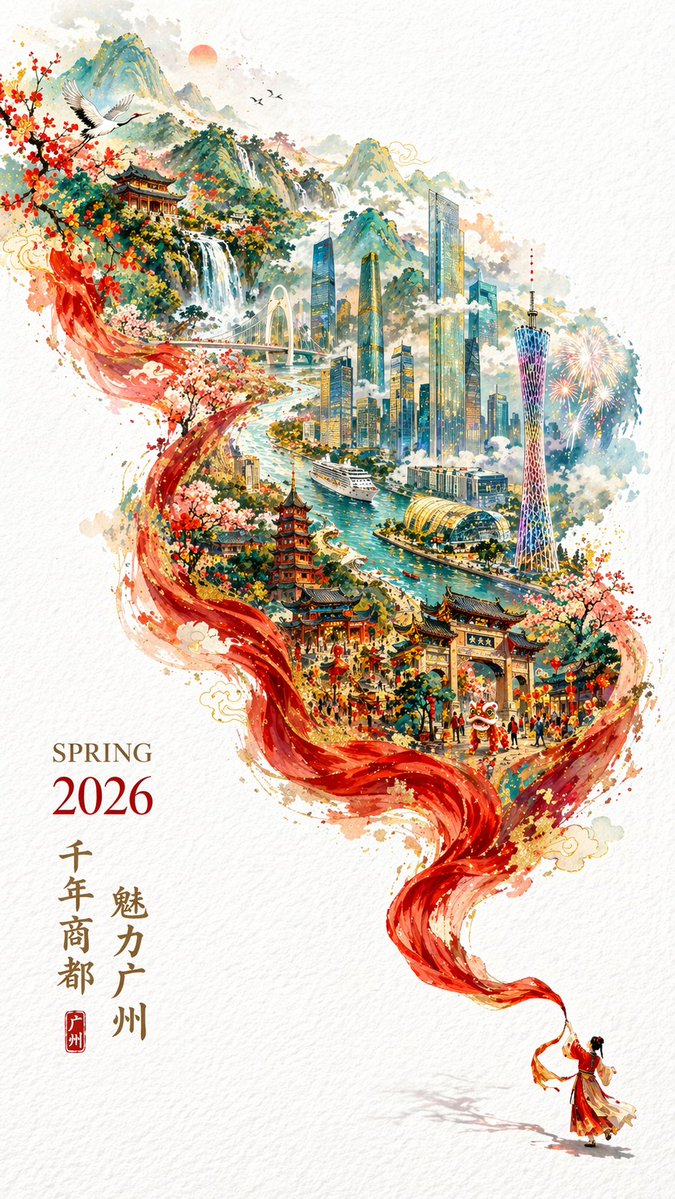
Create an elegant double-exposure promotional poster with flowing silk, mythical landscapes, and custom city landmarks for Chinese New Year.
PROMPT · EN
一张充满春节庆典氛围又不失优雅格调的 argyear: 2026 年城市宣传海报。采用双重曝光,构图呈 S 型流线;在纯白纹理背景的右下角,一位身着中国传统服饰的小人儿正挥舞着长长的红绸带。绸带在空中舞动,展现出柔顺的丝绸质感,并向左上方飘动时神奇地幻化为壮丽的山川河流。在这条“河流”中,叠加了一幅手绘的 argcity name: 广州 城市地图,包含山脉、海洋与河流。国潮风格,震撼且宏伟。arglandmarks: 广州塔、珠江新城建筑群、珠江、古建筑、游船、白云山。云雾缭绕,意境空灵,色彩与细节丰富,同时因大面积留白而显得精致。左下角排布着“SPRING 2026”和竖排标语,象征着“千年商都,魅力广州”。字体排版优美清晰,比例 9:16。
Sobre este prompt
Create an elegant double-exposure promotional poster with flowing silk, mythical landscapes, and custom city landmarks for Chinese New Year. Use it as a Arte Conceptual starting point for GPT Image 2: keep the visual structure and style constraints intact, then swap in your own subject, brand, or scene.
Start by replacing year, city name, and landmarks, then keep the camera, composition, and material cues in the same order. This makes the output easier to compare across variations.
Cómo usar este prompt
- Copy the prompt, including the
<argument>tags for year, city name, and landmarks. - Paste it into your preferred AI image generator (e.g., Sora, Midjourney).
- Replace the default arguments with your own city, year, and key landmarks.
- Adjust any stylistic keywords if needed, then generate.
- For best results, use a 9:16 aspect ratio as specified.


