
GPT Image 2Prompt de IA
Restaurant Camera Angle Change — Sora 2 Prompt
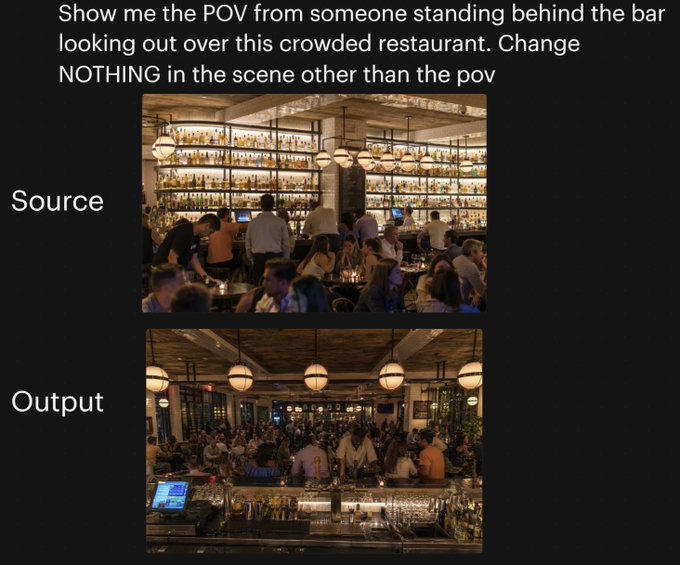
Generate a side-by-side comparison showing how changing only the camera angle transforms a crowded restaurant scene, demonstrating precise viewpoint control.
PROMPT · EN
一张黑色背景下的并排对比图,展示了同一餐厅场景中摄像机角度的变化。顶部为醒目的白色无衬线大字,内容为:“向我展示有人站在吧台后俯瞰这家拥挤餐厅的视角。除了视角外,不要改变场景中的任何内容”。下方垂直居中放置两张堆叠的矩形照片:顶部图片左侧用白色大字标注为“源图像”(Source),底部图片左侧用白色大字标注为“输出图像”(Output)。顶部照片展示了一个灯光温暖、高档且拥挤的餐厅内部,视角从餐厅用餐区看向吧台,吧台后方的整面墙架上摆满了发光的酒瓶,吧台前有调酒师和顾客,环境采用琥珀色灯光,配有球形吊灯、木质天花板、米色立柱,前景坐满了用餐的客人。底部照片展示了完全相同的餐厅、相同的客流密度、相同的暖色灯光、相同的装饰、相同的吧台货架、相同的球形吊灯以及相同的整体构图元素,但视角变成了站在吧台后向外俯瞰整个拥挤的餐厅;前景包括带有玻璃器皿、金属吧台工具、酒瓶和左下角可见的销售终端(POS)屏幕的吧台,中间区域挤满了顾客和员工,用餐区延伸至背景。请保持两张图片之间仅摄像机位置发生变化,场景中没有其他改动的视觉观感。
Sobre este prompt
Generate a side-by-side comparison showing how changing only the camera angle transforms a crowded restaurant scene, demonstrating precise viewpoint control. Use it as a Arte Conceptual starting point for GPT Image 2: keep the visual structure and style constraints intact, then swap in your own subject, brand, or scene.
Start with small changes to subject, scene, camera, and color, then generate a few variations to compare composition and detail without turning the page copy into keyword stuffing.
Cómo usar este prompt
- Copy the exact prompt text provided.
- Open your AI image generator (e.g., Sora 2, Midjourney, DALL·E).
- Paste the prompt and adjust any style or detail variables if desired.
- Generate the image to visualize the camera angle transformation while preserving scene elements.


