
GPT Image 2Prompt de IA
Cyberpunk Neon Flash Sale Landing Page — Sora 2 Prompt
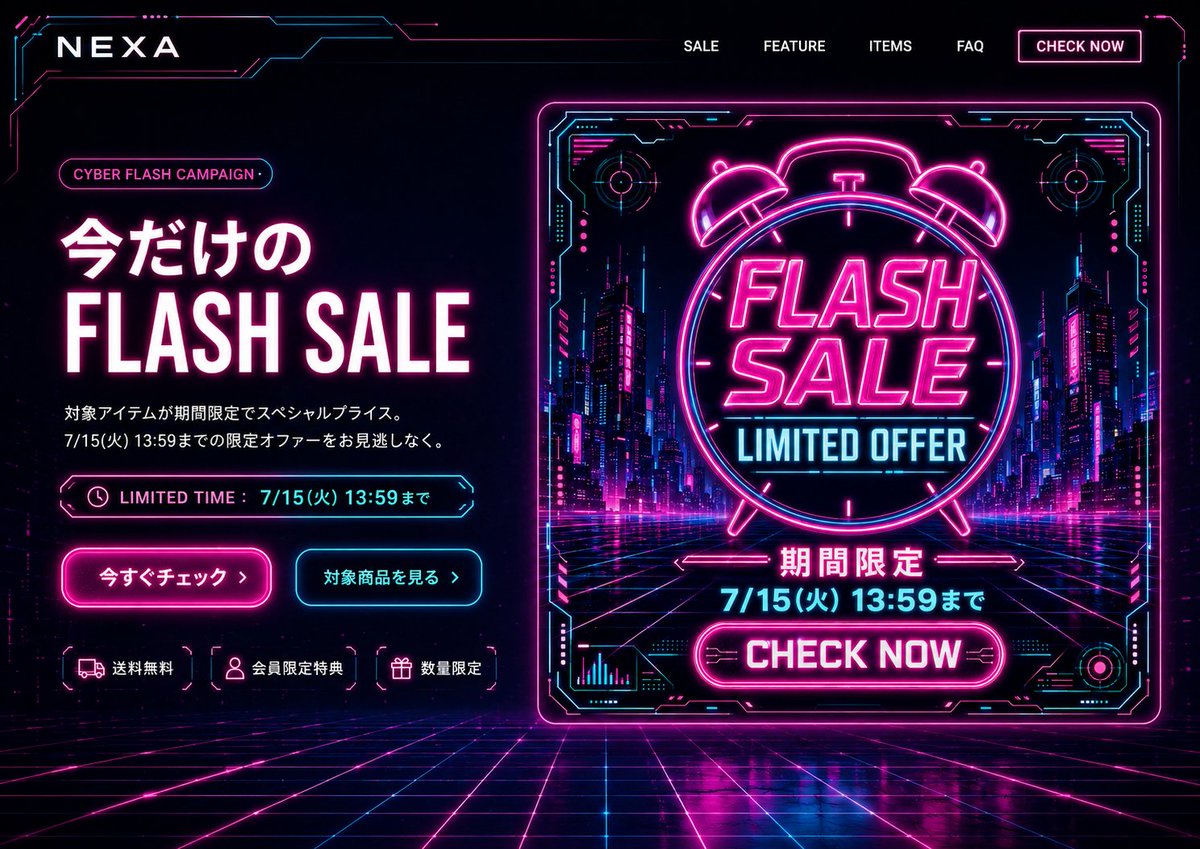
Create a high-contrast, neon-drenched desktop e-commerce hero section with a cyberpunk grid, Japanese text, and a promotional poster for a flash sale campaign.
PROMPT · EN
目标:为 argbrand name: NEXA 创建一个赛博朋克风格的桌面端电商首屏落地页,以霓虹未来主义风格推广限时 argcampaign name: CYBER FLASH CAMPAIGN 活动。 画布:16:9 宽屏网站首屏,深黑/深海军蓝背景,全屏铺满透视效果的赛博网格地面,边缘由发光的洋红色和青色电路环绕。高对比度,光泽反射,电光霓虹晕影,未来感 HUD 美学。 布局:顶部导航栏,左侧为品牌 Logo,右侧包含 5 个导航项:“SALE”、“FEATURE”、“ITEMS”、“FAQ”以及一个带霓虹边框的按钮“CHECK NOW”。首屏分为左右两栏:左侧为文案与 CTA 区域,右侧为大型促销海报图。 左侧首屏内容:添加一个小的圆角胶囊标签,文字为 argcampaign name: CYBER FLASH CAMPAIGN。主标题采用日文与英文结合:“今だけの”位于巨大的粗体“FLASH SALE”上方,白色字母带有洋红色光晕。下方是两行简短的日文描述:“対象アイテムが期間限定でスペシャルプライス。”以及“7/15(火) 13:59までの限定オファーをお見逃しなく。”添加一个带有时钟图标和文字“LIMITED TIME : 7/15(火) 13:59まで”的霓虹边框限时条。下方设有 2 个 CTA 按钮:一个洋红色填充的发光按钮“今すぐチェック ›”和一个青色边框按钮“対象商品を見る ›”。左栏底部展示 3 个带有图标的小型权益标签:卡车图标“送料無料”、用户图标“会員限定特典”、礼品图标“数量限定”。 右侧宣传图:一张大型方形/近方形的霓虹海报卡片,带有发光的洋红色边框和青色 HUD 角落细节,位于画面中心偏右。卡片内部展示未来感夜间城市街道,包含摩天大楼、洋红色/青色灯光和透视网格道路。中心放置一个巨大的霓虹闹钟轮廓,内部堆叠粗体文字“FLASH SALE”和青色文字“LIMITED OFFER”。下方添加日文“期間限定”,随后是截止日期 argdeadline text: 7/15(火) 13:59まで,以及一个亮洋红色的圆角按钮“CHECK NOW”。海报周围包含装饰性的 HUD 图表、圆形目标、电路标记和箭头,但需确保所有文字清晰可读。 视觉风格:使用黑色、深海军蓝、亮洋红、电光青和白色。英文促销文字使用粗体压缩无衬线字体,日文文案使用简洁的现代日文无衬线字体。添加强烈的霓虹光晕、细电路边框、色差高光以及网格地面上的抛光反射效果。 约束:仅限桌面端网站首屏,无浏览器边框,无人像,无额外产品图,无水印。保持精确的可见数量:5 个导航项,2 个 CTA 按钮,3 个权益标签,以及 1 张右侧大型促销海报。构图需呈现出基于横幅设计完成的 PC 端落地页首屏效果。
Sobre este prompt
Create a high-contrast, neon-drenched desktop e-commerce hero section with a cyberpunk grid, Japanese text, and a promotional poster for a flash sale campaign. Use it as a Arte Conceptual starting point for GPT Image 2: keep the visual structure and style constraints intact, then swap in your own subject, brand, or scene.
Start by replacing brand name, campaign name, and deadline text, then keep the camera, composition, and material cues in the same order. This makes the output easier to compare across variations.
Cómo usar este prompt
- Copy the prompt and replace the variables (
brand name,campaign name,deadline text) with your own details. - Choose a capable AI image generation model (like Sora 2, DALL-E 3, or Midjourney).
- Paste the customized prompt into the model's input field.
- Generate the image and iterate if needed, perhaps by tweaking the layout or color emphasis.


