
GPT Image 2Prompt de IA
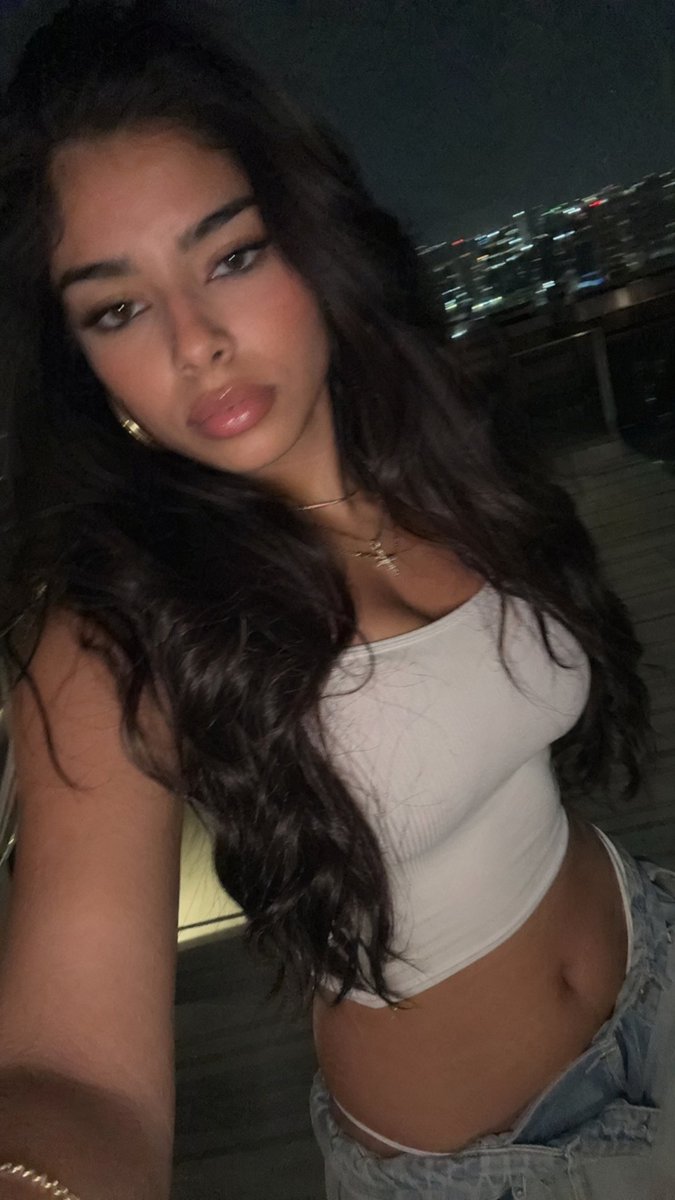
Balcony Flash Selfie — Realistic Night Portrait Prompt
Generate an authentic late-night balcony selfie with flash lighting, perfect for casual social-media style portraits with moody, candid energy.
PROMPT · EN
一张年轻女性在夜晚阳台上的抓拍自拍,由手持手机以略高的角度拍摄,面部大部分被阴影和构图遮挡,重点突出穿搭和氛围而非面部细节。她留着 arghair color: 深棕色 的长波浪卷发,自然垂落在双肩,肤色为中等小麦色,佩戴 2 条精致的金项链,一条为细链,另一条带有十字架小吊坠,手腕处可见一条低调的手链。她身穿一件修身的白色无袖短款背心和 argbottoms: 浅蓝色低腰牛仔裤,露出腰部。姿势放松且略微前倾,一只手臂伸出持机,呈现出休闲的出门穿搭风格。场景设定在夜晚的现代公寓阳台,配有玻璃栏杆,背景是模糊的远方城市天际线,点缀着细小的光斑。使用昏暗的环境光配合手机直闪,照亮躯干和头发,营造出强烈的对比感、柔和的噪点、轻微的动态模糊,以及真实感十足的深夜社交媒体自拍效果。竖屏构图,从上胸部到臀部的近景裁剪,写实摄影,情绪化,私密感,未经修饰,自然比例。
Sobre este prompt
Generate an authentic late-night balcony selfie with flash lighting, perfect for casual social-media style portraits with moody, candid energy. Use it as a Arte Conceptual starting point for GPT Image 2: keep the visual structure and style constraints intact, then swap in your own subject, brand, or scene.
Start by replacing hair color and bottoms, then keep the camera, composition, and material cues in the same order. This makes the output easier to compare across variations.
Cómo usar este prompt
- Copy the full prompt and paste it into your preferred AI image generator.
- Select a photorealistic model (e.g., Sora 2 or similar) best suited for realistic portrait rendering.
- Customize variables like
hair colorandbottomsto match your desired look. - Adjust aspect ratio to vertical/portrait orientation for the intended framing.
- Generate and refine — tweak lighting keywords or pose details if the output needs fine-tuning.


