
ElectroVid: Steampunk Video Platform Homepage Prompt
Generate a detailed steampunk Victorian video streaming homepage with brass UI, glowing Edison bulbs, and antique wood textures — ideal for showcasing advanced text rendering and thematic design.
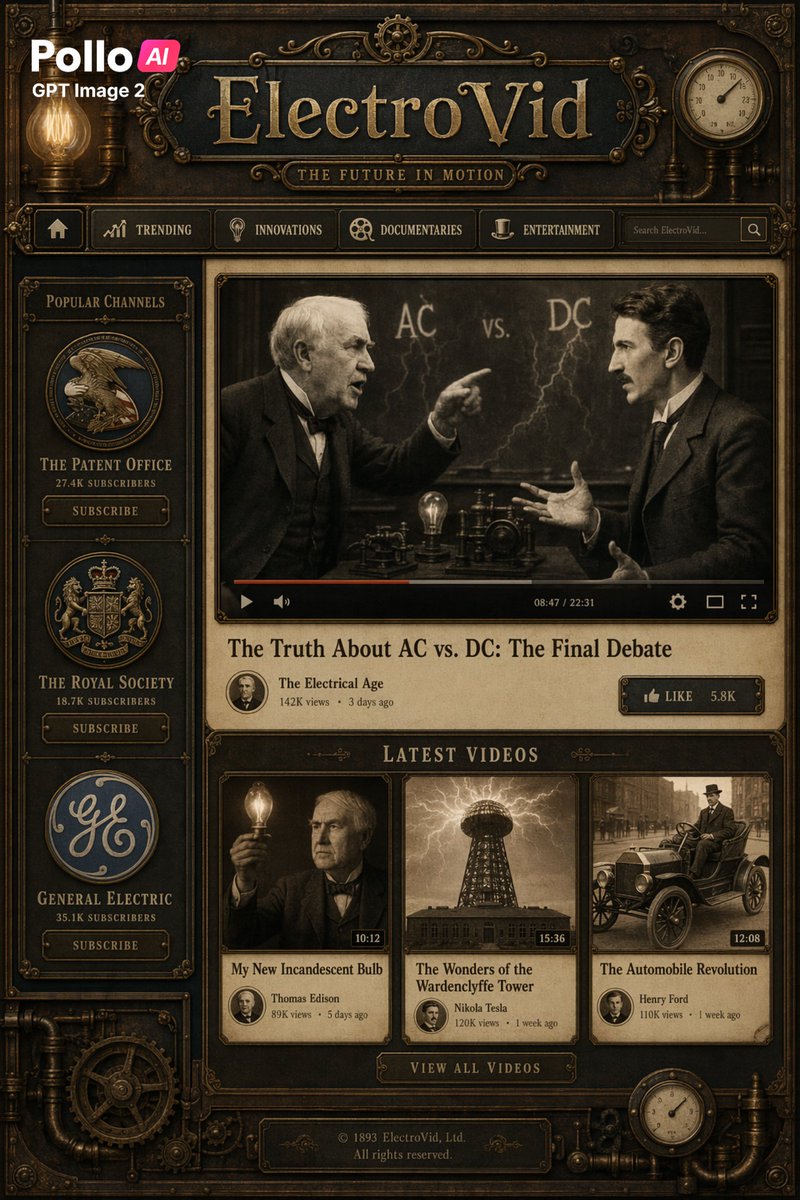
创建一个全屏的虚构视频平台主页,采用细节丰富的蒸汽朋克维多利亚风格,设计成古董黄铜与木质网页界面,带有深青铜金属边框、雕刻装饰、铆钉、管道、外露齿轮、发光的爱迪生灯泡以及贯穿始终的棕褐色纹理。在顶部中央,一个巨大的浮雕标题显示为 argsite name: ElectroVid,采用华丽的金色衬线字体刻在深色牌匾上,下方有一个较小的副标题牌匾,写着“THE FUTURE IN MOTION”。在左上角,叠加一个现代品牌标志,以简洁的现代字体显示“Pollo AI”和“GPT Image 2”,与古董界面形成对比。在右上角添加一个圆形模拟仪表。在页眉下方,放置一个包含 6 个项目的导航栏:一个主页图标、“TRENDING”、“INNOVATIONS”、“DOCUMENTARIES”、“ENTERTAINMENT”,以及一个显示 argsearch placeholder: Search ElectroVid... 的搜索框和一个搜索图标。主布局为双栏式:一个窄左侧边栏和一个较大的主要内容区域。在左侧边栏中,添加一个标题为“POPULAR CHANNELS”的部分,包含 3 个垂直堆叠的频道卡片,每张卡片都有一个圆形徽标、频道名称、订阅者数量和一个“SUBSCRIBE”按钮:“THE PATENT OFFICE”及“27.4K SUBSCRIBERS”、“THE ROYAL SOCIETY”及“18.7K SUBSCRIBERS”以及“GENERAL ELECTRIC”及“35.1K SUBSCRIBERS”。在主要内容区域,设置一个由华丽黄铜边框包裹的大型中央视频播放器。暂停的视频画面是一个棕褐色的历史场景,两名穿着西装的男子在写有“AC vs. DC”及闪电草图的黑板前辩论,一人指点,另一人做手势,两人的脸部均有柔和模糊的遮挡块。在播放器底部边缘包含一个视频进度条和控件,以及显示为“08:47 / 22:31”的时间戳。在播放器下方,以大号衬线字体显示标题 argfeatured video title: The Truth About AC vs. DC: The Final Debate,随后是“The Electrical Age”的频道元数据、“142K views”、“3 days ago”,以及右侧标注为“LIKE”和“5.8K”的点赞按钮。在此下方,创建一个标题为“LATEST VIDEOS”的部分,并在同一行显示 3 张缩略图卡片。卡片 1 显示托马斯·爱迪生手持发光灯泡的棕褐色肖像,时长“10:12”,标题“My New Incandescent Bulb”,元数据“Thomas Edison”、“89K views”、“5 days ago”。卡片 2 显示特斯拉线圈塔在电弧下的戏剧性棕褐色图像,时长“15:36”,标题“The Wonders of the Wardenclyffe Tower”,元数据“Nikola Tesla”、“120K views”、“1 week ago”。卡片 3 显示街上一辆古董汽车,时长“12:08”,标题“The Automobile Revolution”,元数据“Henry Ford”、“110K views”、“1 week ago”。在行下方居中位置,添加一个写有“VIEW ALL VIDEOS”的按钮。在底部中央,添加一个版权牌匾,写着“© 1893 ElectroVid, Ltd. All rights reserved.”。使用对称、精心制作的界面,具有逼真的深度、浮雕排版、柔和的暖光、旧羊皮纸面板、维多利亚时代的雕刻美学,以及由黄铜、铜、深色木材、黑钢和古董金组成的精致电影感棕褐色调。
Sobre este prompt
Generate a detailed steampunk Victorian video streaming homepage with brass UI, glowing Edison bulbs, and antique wood textures — ideal for showcasing advanced text rendering and thematic design. Use it as a Arte Conceptual starting point for GPT Image 2: keep the visual structure and style constraints intact, then swap in your own subject, brand, or scene.
Start by replacing site name, search placeholder, and featured video title, then keep the camera, composition, and material cues in the same order. This makes the output easier to compare across variations.
Cómo usar este prompt
- Copy the prompt from sora2hub.com.
- Paste it into an AI image model like Sora 2, GPT Image 2, or Midjourney.
- Customize placeholder arguments (site name, search text, featured title) if desired.
- Generate the image and iterate with variations for refined results.
- Use the output for UI inspiration, concept art, or design mockups.


