
GPT Image 2Prompt de IA

Cat Livestream UI Prompt — Customizable Sign & Chat Overlay

Generate a realistic mobile livestream screenshot featuring a cute cat holding a customizable sign, complete with chat messages, gift notifications, and UI overlay.
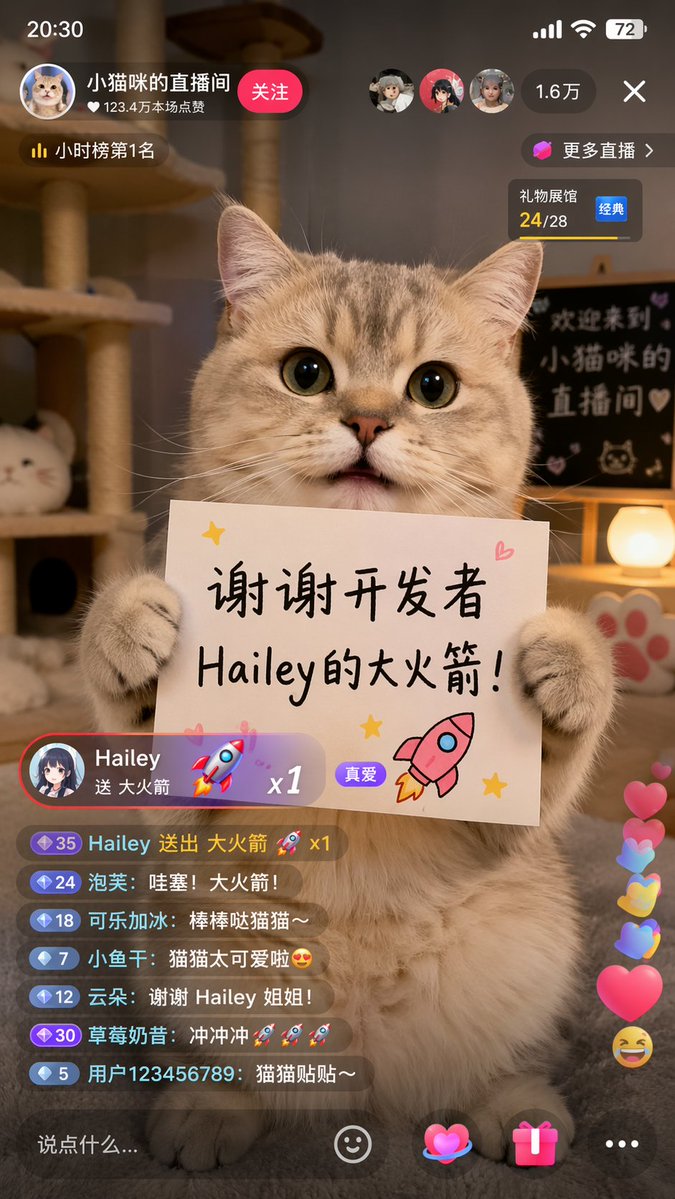
Cat Livestream UI Prompt — Customizable Sign & Chat Overlay
PROMPT · EN
type
移动端直播 App 截图
subject
description
一只毛茸茸的可爱虎斑猫端坐着,两只前爪扶着一块白色长方形标语牌
sign_content
text
{argument name="sign text" default="谢谢开发者 Hailey的大火箭!"}
illustrations
item 1
粉色火箭
item 2
黄色星星
item 3
粉色爱心
background
setting
光线温暖的舒适房间
elements
item 1
猫爬架
item 2
发光的球形灯
item 3
猫爪印装饰
blackboard_text
{argument name="background text" default="欢迎来到 小猫咪的 直播间"}
ui_layout
status_bar
time
20:30
battery
72
header
host_info
name
{argument name="host name" default="小猫咪的直播间"}
likes
123.4 万本场点赞
button
关注
rank
小时榜第 1 名
viewers
count
1.6 万
avatars_count
3
widgets
item 1
更多直播 >
item 2
礼物展馆 24/28 经典
gift_notification
sender
{argument name="gift sender" default="Hailey"}
action
送 {argument name="gift name" default="大火箭"}
multiplier
x1
badge
真爱
chat_box
message_count
7
messages
item 1
35 Hailey 送出 大火箭 🚀 x1
item 2
24 泡芙: 哇塞!大火箭!
item 3
18 可乐加冰: 棒棒哒猫猫~
item 4
7 小鱼干: 猫猫太可爱啦😍
item 5
12 云朵: 谢谢 Hailey 姐姐!
item 6
30 草莓奶昔: 冲冲冲🚀🚀🚀
item 7
5 用户123456789: 猫猫贴贴~
floating_reactions
item 1
粉色爱心
item 2
黄色爱心
item 3
蓝色爱心
item 4
大笑表情
bottom_bar
input_placeholder
说点什么...
icons_count
4
icons
item 1
笑脸
item 2
爱心
item 3
礼物盒
item 4
省略号

Sobre este prompt

Generate a realistic mobile livestream screenshot featuring a cute cat holding a customizable sign, complete with chat messages, gift notifications, and UI overlay. Use it as a Arte Conceptual starting point for GPT Image 2: keep the visual structure and style constraints intact, then swap in your own subject, brand, or scene.

This prompt is organized as structured JSON with fields such as type, subject, background, and ui layout. Keeping that hierarchy helps the model separate the subject, layout, interface elements, and detail constraints.

Start with small changes to subject, scene, camera, and color, then generate a few variations to compare composition and detail without turning the page copy into keyword stuffing.

Cómo usar este prompt

  1. Copy the entire prompt code from above.
  2. Paste it into your preferred AI image generation tool (e.g., Midjourney, DALL·E, or Stable Diffusion).
  3. Modify the argument variables like sign text, background text, gift sender, etc., to your desired text.
  4. Generate the image and review the output. Adjust the prompt or model settings if needed for finer details.


Preguntas frecuentes

Más de GPT Image 2

Ver todo

Crea más rápido con prompts de Sora2Hub.

Usa páginas de prompts curadas como entradas buscables y salta directo a generar con el contexto correcto.

Explorar prompts
