
7-Eleven Net Print Guide — Japanese Infographic for Elderly Users
Generates a clear, high-contrast Japanese infographic with step-by-step instructions for printing two reserved documents at a 7-Eleven copy machine, designed for easy comprehension by seniors.
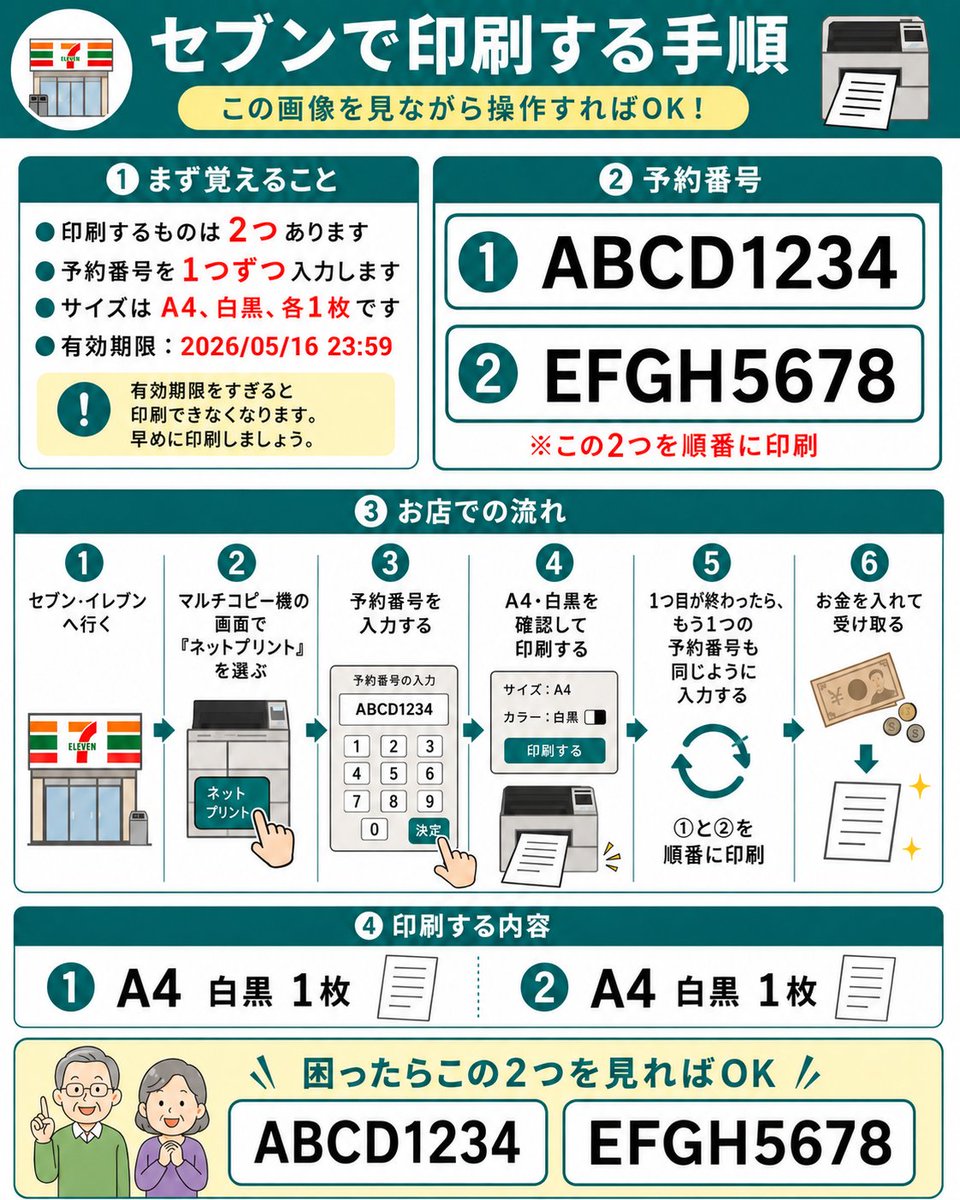
目标:制作一份友好的日文分步操作指南,用于在 7-Eleven 多功能复印机上打印两份预留的网络打印文档,设计风格需确保老年长辈仅通过查看即可理解。 画布:正方形 1:1 信息图,白色背景,配有青色边框和圆角卡片,粗体青色章节标题,红色强调文字,简洁的扁平化矢量图标。整体风格整洁、高对比度,采用大号易读的日文字体,类似于塑封的操作指南。 主标题:顶部为一个深青色横幅,左侧带有圆形 7-Eleven 店面图标,右侧为打印机图标。居中放置大号白色标题 argheadline text: セブンで印刷する手順。下方放置一个浅黄色圆角胶囊形副标题 argsubtitle text: この画像を見ながら操作すればOK!。 第 1 部分,左上角卡片,标题 argsection one title: ① まず覚えること:包含 4 个青色项目符号和 1 个黄色警告框。项目符号内容为日文,说明共有 2 份文件需要打印,需逐个输入预约号码,规格为 A4 黑白各 1 份,过期时间为 2026 年 5 月 16 日 23:59。用红色强调数字 2、1、A4、黑白、各 1 份以及日期。警告框包含一个青色感叹号图标和文字,提示过期后将无法打印,请尽早打印。 第 2 部分,右上角卡片,标题 argsection two title: ② 予約番号:展示 2 行带有青色圆圈数字的大号预约号码:第 1 行是 argfirst reservation number: ABCD1234,第 2 行是 argsecond reservation number: EFGH5678。每行位于带有青色轮廓的白色圆角矩形内。下方添加红色备注:请按顺序打印这两份文件。 第 3 部分,中间全宽卡片,标题为日文的“店内操作流程”:展示 6 个带编号的垂直步骤,步骤间以细青色线条分隔,每步上方带有青色圆圈数字。步骤 1:前往 7-Eleven,配店面图标。步骤 2:在多功能复印机屏幕上选择“Net Print”,配复印机触摸屏和手指点击图标。步骤 3:输入预约号码,配显示 ABCD1234 的键盘屏幕和手指点击确认图标。步骤 4:确认 A4 黑白并打印,配设置面板和打印输出图标。步骤 5:第一份完成后,以同样方式输入第二个预约号码,配循环箭头和提示按 1 到 2 顺序打印的文字。步骤 6:投入硬币并取走打印件,配纸币、硬币、向下箭头、纸张和闪光图标。 第 4 部分,下方卡片,标题为日文的“打印内容”:展示 2 个内容项。项目 1:青色圆圈 1,大号文字“A4 黑白 1 份”,配小纸张图标。项目 2:青色圆圈 2,大号文字“A4 黑白 1 份”,配小纸张图标。两项之间用青色虚线分隔。 底部帮助条:浅黄色圆角矩形,左侧带有两个友好的老年人图标,面部模糊或简化处理。添加青色标题,提示如果感到困惑,只需查看这两个号码即可。展示 2 个带有边框的大号方框,分别包含 ABCD1234 和 EFGH5678。 约束:使用 4 个主要编号章节加上底部帮助条,正好 2 个预约号码,正好 6 个工作流程步骤,正好 2 个打印内容项,第 1 部分正好 4 个项目符号,除简化的 7-Eleven 店面图案外不添加额外标志。保持所有日文文字大号、易读且整齐对齐。
À propos de ce prompt
Generates a clear, high-contrast Japanese infographic with step-by-step instructions for printing two reserved documents at a 7-Eleven copy machine, designed for easy comprehension by seniors. Use it as a Art Conceptuel starting point for GPT Image 2: keep the visual structure and style constraints intact, then swap in your own subject, brand, or scene.
Start by replacing headline text, subtitle text, section one title, and section two title, then keep the camera, composition, and material cues in the same order. This makes the output easier to compare across variations.
Comment utiliser ce prompt
- Copy the entire prompt into a compatible AI image generator like Sora 2.
- Select a model that excels at text-rich, instructional graphics.
- Customize the
argumentvariables (e.g., reservation numbers, headline text) to fit your specific documents. - Generate the image and review the output for clarity and accuracy of the Japanese text and layout.
- Use the final infographic as a digital or printed visual aid for the user.


