Sora2 Hub
Sora2 Hub
  • Bibliothèque de prompts
  • Tarifs
  • Galerie
Sora2 Hub
Sora2 Hub
Sora2 Hub

Sora2 Hub

Plateforme de création IA professionnelle propulsée par Sora 2, Veo 3.1 et Nano Banana Pro. Créez des vidéos époustouflantes et des images de qualité studio avec un contrôle avancé, une qualité HD et sans filigrane.

Email:support@sora2hub.org

Générateur Vidéo IA

  • Texte vers Vidéo
  • Image vers Vidéo
  • Veo 3.1
  • Sora 2
  • Kling 3.0
  • Kling 2.6
  • Kling 2.5
  • Runway
  • Wan 2.6
  • Seedance 2.0
  • Hailuo 2.3
  • Grok Imagine
  • HappyHorse-1.0
  • HappyHorse 1.1
  • Kling 3.0 Turbo
  • Volcengine Video-to-Video Lip Sync
  • OmniHuman 1.5
  • Grok Imagine Video 1.5
  • Gemini Omni
  • Wan 2.7 Video
  • Seedance 2.0 Mini

Générateur d'Image IA

  • Texte vers Image
  • Image vers Image
  • Nano Banana Pro
  • Nano Banana
  • 4o Image
  • Flux Kontext
  • Z Image
  • Seedream 4.5
  • Seedream 5.0 Lite
  • Nano Banana 2
  • GPT Image 2
  • Agrandisseur d'Image IA
  • Seedream 5.0 Pro
  • Nano Banana 2 Lite
  • Qwen Image 2.0

Effets IA

  • Filtre d'Âge IA
  • Échange de Genre IA
  • Baiser IA
  • Câlin IA
  • Image Ghibli
  • Filtre Sirène IA
  • Secousse Corporelle IA
  • Filtre Sourire
  • Gros IA
  • Figurine d'Action

Produit

  • Fonctionnalités
  • Vitrines
  • Tarifs

Entreprise

  • À propos
  • Contact

© 2025 • Sora2 Hub ORG Tous droits réservés.

  • Politique de confidentialité
  • Conditions d'utilisation
  • Politique de remboursement
  1. Accueil
  2. /
  3. Prompts
  4. /
  5. GPT Image 2
  6. /
  7. AI Coding Assistant Infographic Poster — Glassmorphism Style
GPT Image 2Prompt IA

AI Coding Assistant Infographic Poster — Glassmorphism Style

Create a polished, modern promotional poster for a coding assistant app featuring a 2x2 grid of feature cards, code snippets, and a benefits section.
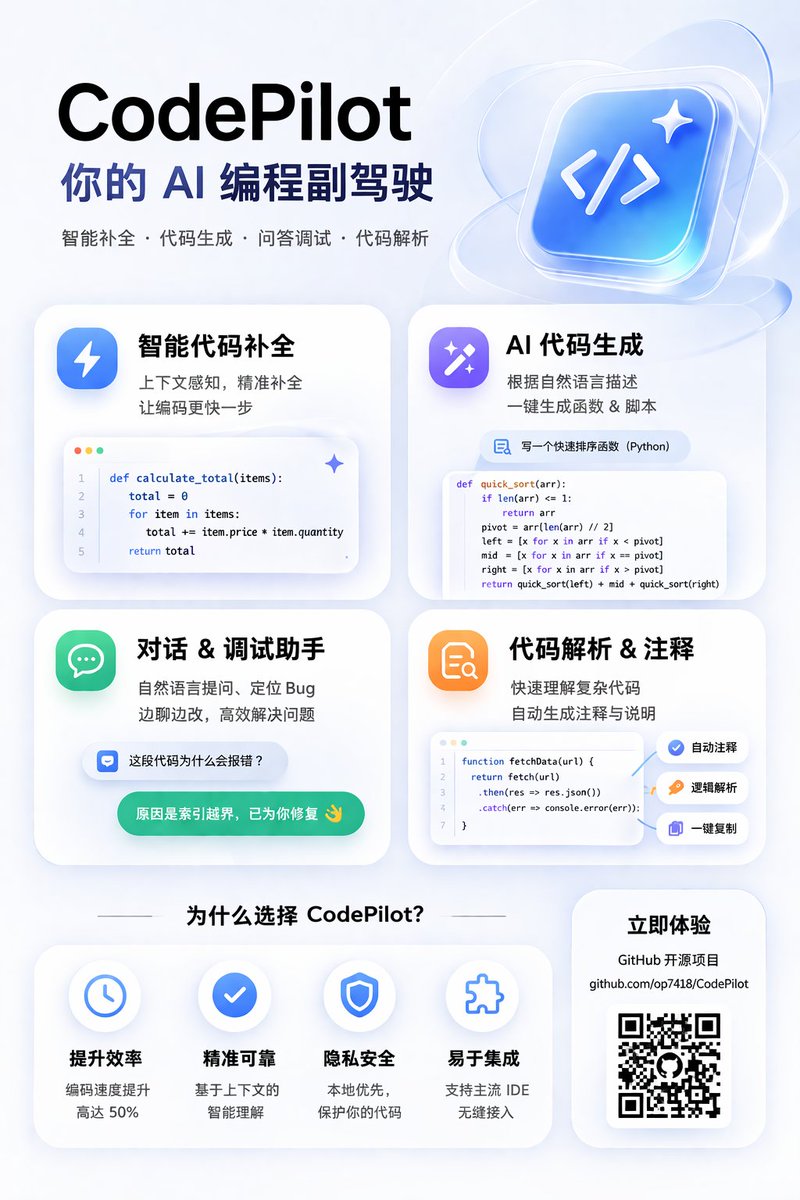
AI Coding Assistant Infographic Poster — Glassmorphism Style
PROMPT · EN
type
app promotional infographic poster
style
clean, modern, glassmorphism, soft shadows, 3D icons
theme
{argument name="primary color theme" default="blue and white"}
header
title
{argument name="app name" default="CodePilot"}
subtitle
{argument name="subtitle" default="你的 AI 编程副驾驶"}
features_list
智能补全 · 代码生成 · 问答调试 · 代码解析
main_icon
glossy 3D rounded square, blue gradient, white {argument name="main icon symbol" default="</>"} and sparkles
layout
sections
item 1
title
feature_cards
position
middle grid
count
4
items
item 1
label
智能代码补全
icon
blue lightning bolt
description
上下文感知, 精准补全 让编码更快一步
ui_element
macOS style code window with Python calculate_total function
item 2
label
AI 代码生成
icon
purple magic wand
description
根据自然语言描述 一键生成函数 & 脚本
ui_element
chat prompt bubble and code window with Python quick_sort function
item 3
label
对话 & 调试助手
icon
green chat bubble
description
自然语言提问、定位 Bug 边聊边改, 高效解决问题
ui_element
chat interface with user question and green AI resolution bubble
item 4
label
代码解析 & 注释
icon
orange document with magnifying glass
description
快速理解复杂代码 自动生成注释与说明
ui_element
code window with JS fetchData function and 3 floating action tags: 自动注释, 逻辑解析, 一键复制
item 2
title
为什么选择 CodePilot?
position
bottom left
count
4
labels
item 1
提升效率
item 2
精准可靠
item 3
隐私安全
item 4
易于集成
icons
item 1
clock
item 2
checkmark
item 3
shield
item 4
puzzle piece
item 3
title
立即体验
position
bottom right
count
1
elements
item 1
GitHub 开源项目
item 2
{argument name="github link" default="github.com/op7418/CodePilot"}
item 3
QR code

À propos de ce prompt

Create a polished, modern promotional poster for a coding assistant app featuring a 2x2 grid of feature cards, code snippets, and a benefits section. Use it as a Art Conceptuel starting point for GPT Image 2: keep the visual structure and style constraints intact, then swap in your own subject, brand, or scene.

This prompt is organized as structured JSON with fields such as type, style, theme, header, and layout. Keeping that hierarchy helps the model separate the subject, layout, interface elements, and detail constraints.

Start with small changes to subject, scene, camera, and color, then generate a few variations to compare composition and detail without turning the page copy into keyword stuffing.

Comment utiliser ce prompt

  1. Copy the entire JSON prompt block.
  2. Paste it into your preferred AI image generator that supports detailed prompts (e.g., Sora 2, Midjourney).
  3. Customize the primary color theme, app name, subtitle, and main icon symbol variables to match your branding.
  4. Generate the image and review the layout, icons, and text elements.
  5. Regenerate or adjust the prompt if specific sections need refinement.
FAQ

歸藏(guizang.ai)

@prompts→

Publié
30 avr. 2026
Langue source
EN
Modèle
GPT Image 2
Catégorie
Art Conceptuel
GPT Image 2Art Conceptuelgpt-image-2gptimage2api promptsgptimage2apien
Vues
50
Copies
7
J’aime
2

Partager

Plus de GPT Image 2

Tout voir
Dynamic Nike Ad Poster — Sora 2 Prompt with Sydney Sweeney

Dynamic Nike Ad Poster — Sora 2 Prompt with Sydney Sweeney

@im_shahid7
Cyberpunk AI Launch Banner — Cinematic Neon Poster Prompt

Cyberpunk AI Launch Banner — Cinematic Neon Poster Prompt

@ObieriI
Cyberpunk Catgirl Soda Splash — Sora 2 Prompt

Cyberpunk Catgirl Soda Splash — Sora 2 Prompt

@kuso_seisakusyo

Créez plus vite avec les prompts Sora2Hub.

Utilisez des pages de prompts curées comme entrées recherchables, puis générez avec le bon contexte de modèle.

Explorer les prompts