
Sora2 Hub
Sora2 Hub
  • Bibliothèque de prompts
  • Tarifs
  • Galerie
Sora2 Hub
Sora2 Hub
Sora2 Hub

Sora2 Hub

Plateforme de création IA professionnelle propulsée par Sora 2, Veo 3.1 et Nano Banana Pro. Créez des vidéos époustouflantes et des images de qualité studio avec un contrôle avancé, une qualité HD et sans filigrane.

Email:support@sora2hub.org

Générateur Vidéo IA

  • Texte vers Vidéo
  • Image vers Vidéo
  • Veo 3.1
  • Sora 2
  • Kling 3.0
  • Kling 2.6
  • Kling 2.5
  • Runway
  • Wan 2.6
  • Seedance 2.0
  • Hailuo 2.3
  • Grok Imagine
  • HappyHorse-1.0

Générateur d'Image IA

  • Texte vers Image
  • Image vers Image
  • Nano Banana Pro
  • Nano Banana
  • 4o Image
  • Flux Kontext
  • Z Image
  • Seedream 4.5
  • Seedream 5.0 Lite
  • Nano Banana 2
  • GPT Image 2
  • Agrandisseur d'Image IA

Effets IA

  • Filtre d'Âge IA
  • Échange de Genre IA
  • Baiser IA
  • Câlin IA
  • Image Ghibli
  • Filtre Sirène IA
  • Secousse Corporelle IA
  • Filtre Sourire
  • Gros IA
  • Figurine d'Action

Produit

  • Fonctionnalités
  • Vitrines
  • Tarifs

Entreprise

  • À propos
  • Contact

© 2025 • Sora2 Hub ORG Tous droits réservés.

  • Politique de confidentialité
  • Conditions d'utilisation
  • Politique de remboursement
  1. Accueil
  2. /
  3. Prompts
  4. /
  5. GPT Image 2
  6. /
  7. Dark AI Analytics Dashboard — SaaS UI Prompt
GPT Image 2Prompt IA

Dark AI Analytics Dashboard — SaaS UI Prompt

Create a stunning dark-mode analytics dashboard for AI coding platforms, featuring metric cards, charts, and a sleek sidebar. Ideal for SaaS prototypes and data-heavy UI designs.
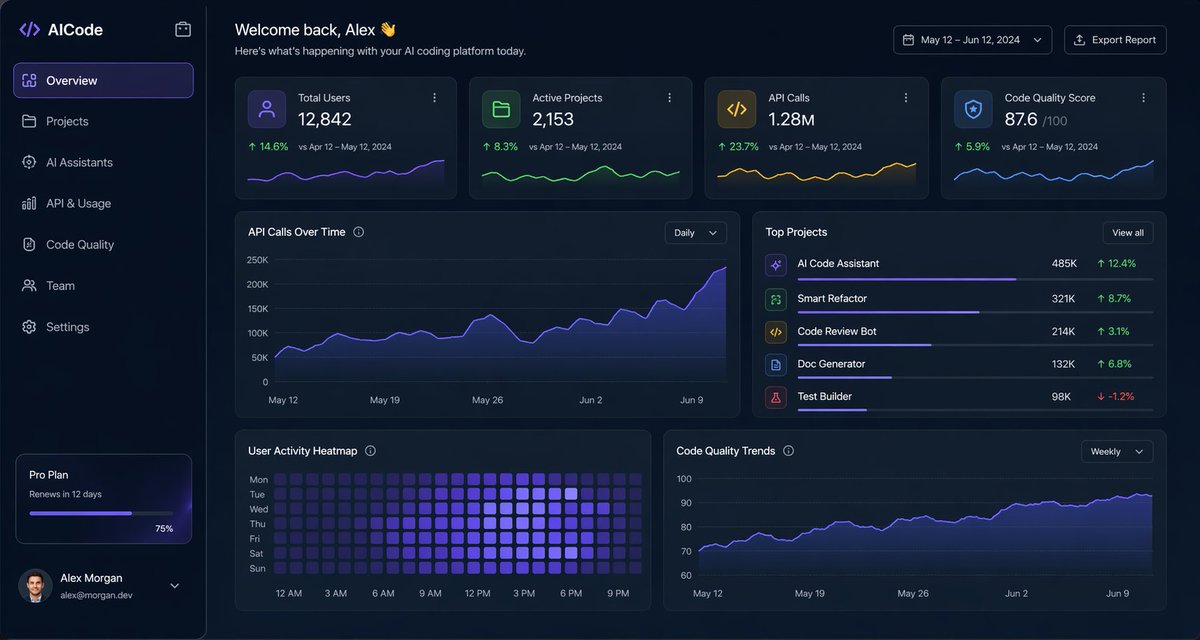
Dark AI Analytics Dashboard — SaaS UI Prompt
PROMPT · EN
type
深色 SaaS 分析仪表盘 UI
product
brand
{argument name="brand name" default="AICode"}
theme
深海军蓝磨砂玻璃质感界面,带有微妙的渐变、柔和光晕、圆角卡片、细边框,现代开发者工具美学
canvas
aspect_ratio
16:9
background
深午夜蓝,带有淡淡的暗角和柔和的径向光效
layout
structure
左侧边栏加主内容区域
sections
item 1
title
侧边栏
position
左侧
count
8
labels
item 1
AICode
item 2
概览
item 3
项目
item 4
AI Assistants
item 5
API 与使用情况
item 6
代码质量
item 7
团队
item 8
设置
details
顶部显示 Logo,选中“概览”并带有紫色高亮,底部订阅卡片显示 Pro Plan,12 天后到期,水平进度条显示 75%,底部用户个人资料包含头像、{argument name="user name" default="Alex Morgan"} 以及邮箱 alex.dev
item 2
title
页眉
position
顶部主区域
count
4
labels
item 1
欢迎回来,Alex 👋
item 2
这是您 AI 编程平台今日的动态。
item 3
2024 年 5 月 12 日 – 6 月 12 日
item 4
导出报告
details
左侧为大号问候语,右侧为日期范围选择器和导出按钮
item 3
title
指标卡片
position
页眉下方第一行
count
4
labels
item 1
总用户数
item 2
活跃项目
item 3
API 调用量
item 4
代码质量评分
values
item 1
12,842
item 2
2,153
item 3
1.28M
item 4
876
details
每张卡片包含一个小图标、大号主数值,以及与 2024 年 4 月 12 日 – 5 月 12 日的对比文本,正向增长百分比分别为 14.6%、8.3%、23.7%、5.9%,底部带有迷你折线图;颜色分别为紫色、绿色、琥珀色和蓝色
item 4
title
主要分析面板
position
中间和底部行
count
4
labels
item 1
API 调用趋势
item 2
热门项目
item 3
用户活跃热力图
item 4
代码质量趋势
details
“API 调用趋势”为宽幅面积图,带有“每日”下拉菜单,紫色折线呈上升趋势,终点接近 250K;“热门项目”为包含 5 个项目的排名列表,带有进度条和百分比变化;“用户活跃热力图”为 7 行周热力图,带有从上午 12 点到晚上 9 点的小时标签;“代码质量趋势”为折线图,带有“每周”下拉菜单,紫色曲线平滑上升,从约 70 升至 90 出头
item 5
title
热门项目列表
position
中间右侧面板
count
5
labels
item 1
AI Code Assistant
item 2
Smart Refactor
item 3
Code Review Bot
item 4
Doc Generator
item 5
Test Builder
values
item 1
485K
item 2
321K
item 3
214K
item 4
132K
item 5
98K
details
前四项的绿色正向增长分别为 12.4%、8.7%、3.1%、6.8%,Test Builder 为红色负增长 -1.2%;每一行都有一个彩色方形图标和细水平进度条
style
visual_language
高端金融科技与 AI 产品设计原型
rendering
清晰的高保真 UI 原型,微妙的阴影,霓虹边缘光效,精致的图表,简洁的无衬线字体
primary_accent
{argument name="accent color" default="电光紫"}
secondary_accents
item 1
翡翠绿
item 2
琥珀黄
item 3
青蓝色
density
信息丰富且空间感强,网格平衡,高度易读

À propos de ce prompt

Create a stunning dark-mode analytics dashboard for AI coding platforms, featuring metric cards, charts, and a sleek sidebar. Ideal for SaaS prototypes and data-heavy UI designs. Use it as a Art Conceptuel starting point for GPT Image 2: keep the visual structure and style constraints intact, then swap in your own subject, brand, or scene.

This prompt is organized as structured JSON with fields such as type, product, canvas, layout, and style. Keeping that hierarchy helps the model separate the subject, layout, interface elements, and detail constraints.

Start with small changes to subject, scene, camera, and color, then generate a few variations to compare composition and detail without turning the page copy into keyword stuffing.

Comment utiliser ce prompt

  1. Copy the prompt template from this page.
  2. Open your preferred AI image generator (e.g., Midjourney, DALL-E 3, Stable Diffusion).
  3. Replace {argument} placeholders with your own values or keep the defaults.
  4. Paste the full prompt into the generator and run it.
  5. Review the output; tweak variables or prompt details to refine the result.

FAQ

轩辕的编程宇宙

@xuanyuanzhifeng→

Publié
25 avr. 2026
Langue source
EN
Modèle
GPT Image 2
Catégorie
Art Conceptuel
GPT Image 2Art Conceptuelgpt-image-2twitter
Vues
639
Copies
46
J’aime
25

Partager

Plus de GPT Image 2

Tout voir
Guangzhou 2026 Poster: Silk Ribbon Cityscape — Sora 2 Prompt

Guangzhou 2026 Poster: Silk Ribbon Cityscape — Sora 2 Prompt

@alanlovelq
Anime Schoolgirls Sharing Transparent Umbrella — Sora 2 Prompt

Anime Schoolgirls Sharing Transparent Umbrella — Sora 2 Prompt

@yB7CqdfoDmrbhgD
Ultra-Realistic 3D Exploded View Prompt: Sony BRAVIA 8K TV

Ultra-Realistic 3D Exploded View Prompt: Sony BRAVIA 8K TV

@Ankit_patel211

Créez plus vite avec les prompts Sora2Hub.

Utilisez des pages de prompts curées comme entrées recherchables, puis générez avec le bon contexte de modèle.

Explorer les prompts

