
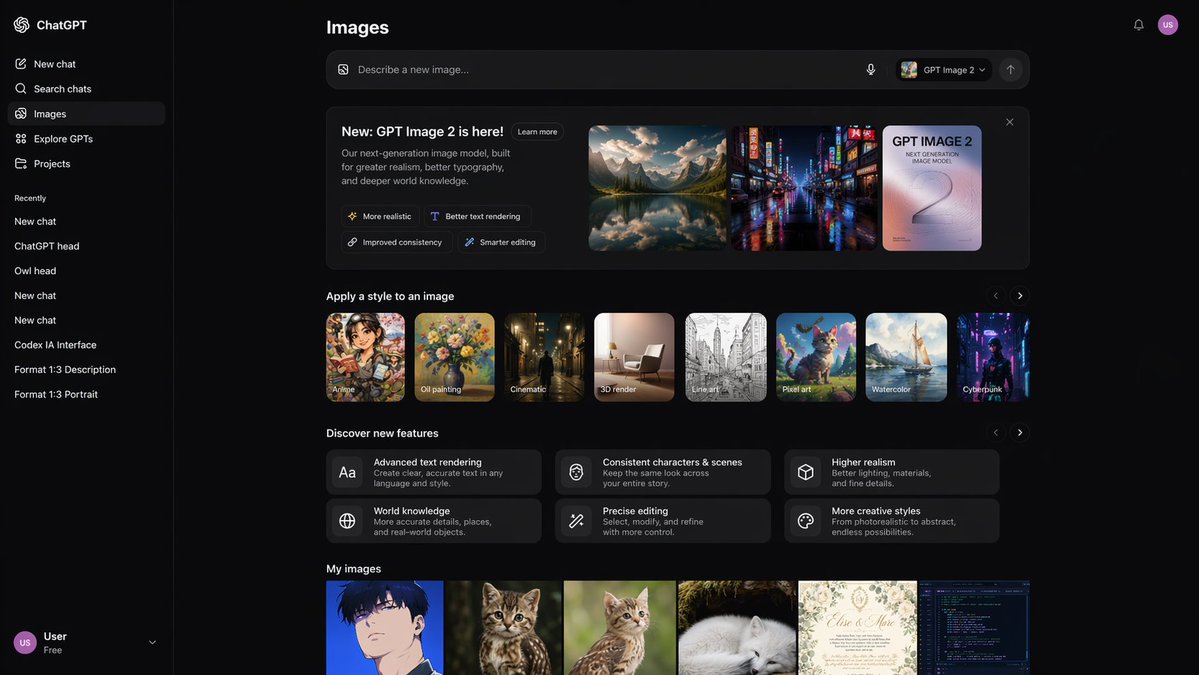
Deep Mode AI Image Generator UI Prototype with Sidebar
Create a sleek, dark mode UI prototype for an AI image generator complete with sidebar navigation, style thumbnails, and image gallery.
À propos de ce prompt
Create a sleek, dark mode UI prototype for an AI image generator complete with sidebar navigation, style thumbnails, and image gallery. Use it as a Art Conceptuel starting point for GPT Image 2: keep the visual structure and style constraints intact, then swap in your own subject, brand, or scene.
This prompt is organized as structured JSON with fields such as type, theme, sidebar, and main content. Keeping that hierarchy helps the model separate the subject, layout, interface elements, and detail constraints.
Start with small changes to subject, scene, camera, and color, then generate a few variations to compare composition and detail without turning the page copy into keyword stuffing.
Comment utiliser ce prompt
- Copy the provided JSON prompt.
- Paste it into an AI image model that supports custom UI generation (e.g., Sora 2 or DALL·E with structure).
- Modify optional arguments like
app name,input placeholder, ormodel nameto match your branding. - Generate to receive a high-fidelity dark mode app UI prototype.
- Refine by adjusting section titles, image descriptions, or feature tags.


