
GPT Image 2Prompt IA

Anime Character Design Sheet — Full Reference Template

Creates a complete character reference sheet with pose, detail panels, color palette, and material swatches for consistent AI art generation.
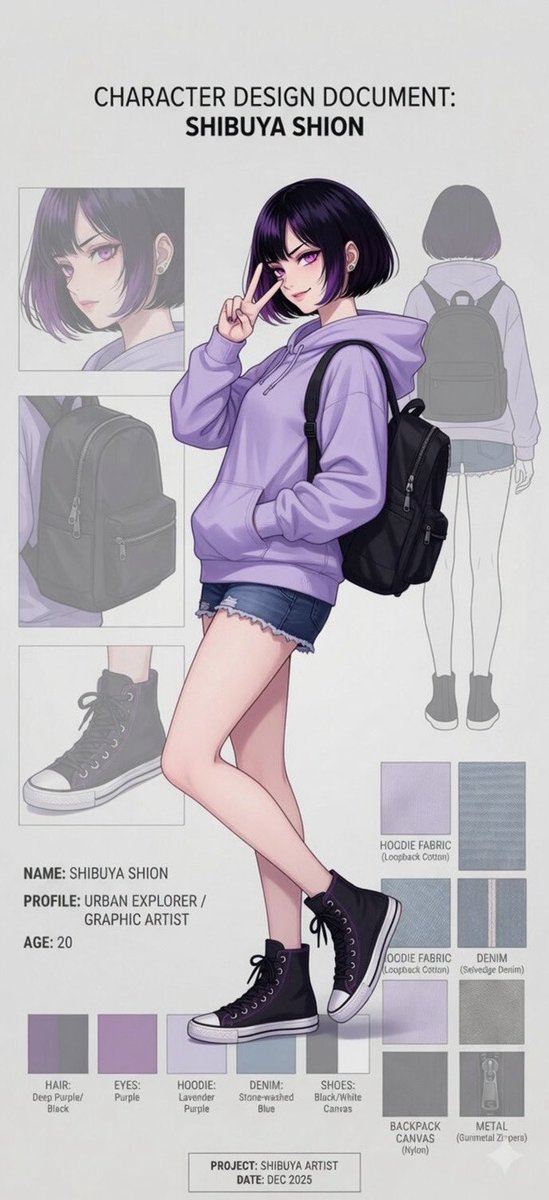
Anime Character Design Sheet — Full Reference Template
PROMPT · EN
type
character design document
header
CHARACTER DESIGN DOCUMENT: {argument name="character name" default="SHIBUYA SHION"}
character
hair
{argument name="hair color" default="black bob with purple highlights"}
eyes
purple
outfit
{argument name="hoodie color" default="lavender"} oversized hoodie, distressed denim shorts, black high-top canvas sneakers, black backpack
pose
standing, making a peace sign near face, one hand in hoodie pocket
layout
centerpiece
full-body anime illustration of the character
top_right
back view of the character in flat color/line art
left_panels
count
3
descriptions
item 1
close-up portrait of the character's face
item 2
close-up of the black backpack
item 3
close-up of the black high-top sneaker
text_blocks
item 1
position
bottom left
content
item 1
NAME: {argument name="character name" default="SHIBUYA SHION"}
item 2
PROFILE: {argument name="profile description" default="URBAN EXPLORER / GRAPHIC ARTIST"}
item 3
AGE: 20
item 2
position
bottom center footer
content
item 1
PROJECT: {argument name="project name" default="SHIBUYA ARTIST"}
item 2
DATE: DEC 2025
swatches
color_palette
count
5
labels
item 1
HAIR: Deep Purple/Black
item 2
EYES: Purple
item 3
HOODIE: Lavender Purple
item 4
DENIM: Stone-washed Blue
item 5
SHOES: Black/White Canvas
material_textures
count
5
labels
item 1
HOODIE FABRIC (Loopback Cotton)
item 2
HOODIE FABRIC (Loopback Cotton)
item 3
DENIM (Selvedge Denim)
item 4
BACKPACK CANVAS (Nylon)
item 5
METAL (Gunmetal Zippers)

À propos de ce prompt

Creates a complete character reference sheet with pose, detail panels, color palette, and material swatches for consistent AI art generation. Use it as a Art Conceptuel starting point for GPT Image 2: keep the visual structure and style constraints intact, then swap in your own subject, brand, or scene.

This prompt is organized as structured JSON with fields such as type, header, character, and layout. Keeping that hierarchy helps the model separate the subject, layout, interface elements, and detail constraints.

Start with small changes to subject, scene, camera, and color, then generate a few variations to compare composition and detail without turning the page copy into keyword stuffing.

Comment utiliser ce prompt

  1. Copy the prompt into your preferred AI image generator like Sora 2 or Midjourney.
  2. Replace the customizable variables (character name, hair color, hoodie color, etc.) with your own character details.
  3. Adjust the project name and description to match your creative vision.
  4. Generate the image to receive a professional-quality character design document with full-body illustration and detail panels.
  5. Use the consistent visual reference to maintain character accuracy across multiple art pieces.

FAQ

Plus de GPT Image 2

Tout voir

Créez plus vite avec les prompts Sora2Hub.

Utilisez des pages de prompts curées comme entrées recherchables, puis générez avec le bon contexte de modèle.

