
Sora2 Hub
Sora2 Hub
  • Bibliothèque de prompts
  • Tarifs
  • Galerie
Sora2 Hub
Sora2 Hub
Sora2 Hub

Sora2 Hub

Plateforme de création IA professionnelle propulsée par Sora 2, Veo 3.1 et Nano Banana Pro. Créez des vidéos époustouflantes et des images de qualité studio avec un contrôle avancé, une qualité HD et sans filigrane.

Email:support@sora2hub.org

Générateur Vidéo IA

  • Texte vers Vidéo
  • Image vers Vidéo
  • Veo 3.1
  • Sora 2
  • Kling 3.0
  • Kling 2.6
  • Kling 2.5
  • Runway
  • Wan 2.6
  • Seedance 2.0
  • Hailuo 2.3
  • Grok Imagine
  • HappyHorse-1.0

Générateur d'Image IA

  • Texte vers Image
  • Image vers Image
  • Nano Banana Pro
  • Nano Banana
  • 4o Image
  • Flux Kontext
  • Z Image
  • Seedream 4.5
  • Seedream 5.0 Lite
  • Nano Banana 2
  • GPT Image 2
  • Agrandisseur d'Image IA

Effets IA

  • Filtre d'Âge IA
  • Échange de Genre IA
  • Baiser IA
  • Câlin IA
  • Image Ghibli
  • Filtre Sirène IA
  • Secousse Corporelle IA
  • Filtre Sourire
  • Gros IA
  • Figurine d'Action

Produit

  • Fonctionnalités
  • Vitrines
  • Tarifs

Entreprise

  • À propos
  • Contact

© 2025 • Sora2 Hub ORG Tous droits réservés.

  • Politique de confidentialité
  • Conditions d'utilisation
  • Politique de remboursement
  1. Accueil
  2. /
  3. Prompts
  4. /
  5. GPT Image 2
  6. /
  7. Anime Character Reference Sheet — Full Model Sheet Prompt
GPT Image 2Prompt IA

Anime Character Reference Sheet — Full Model Sheet Prompt

Create a complete, multi-panel character design document with turnarounds, expressions, prop details, and a color palette for any anime character.
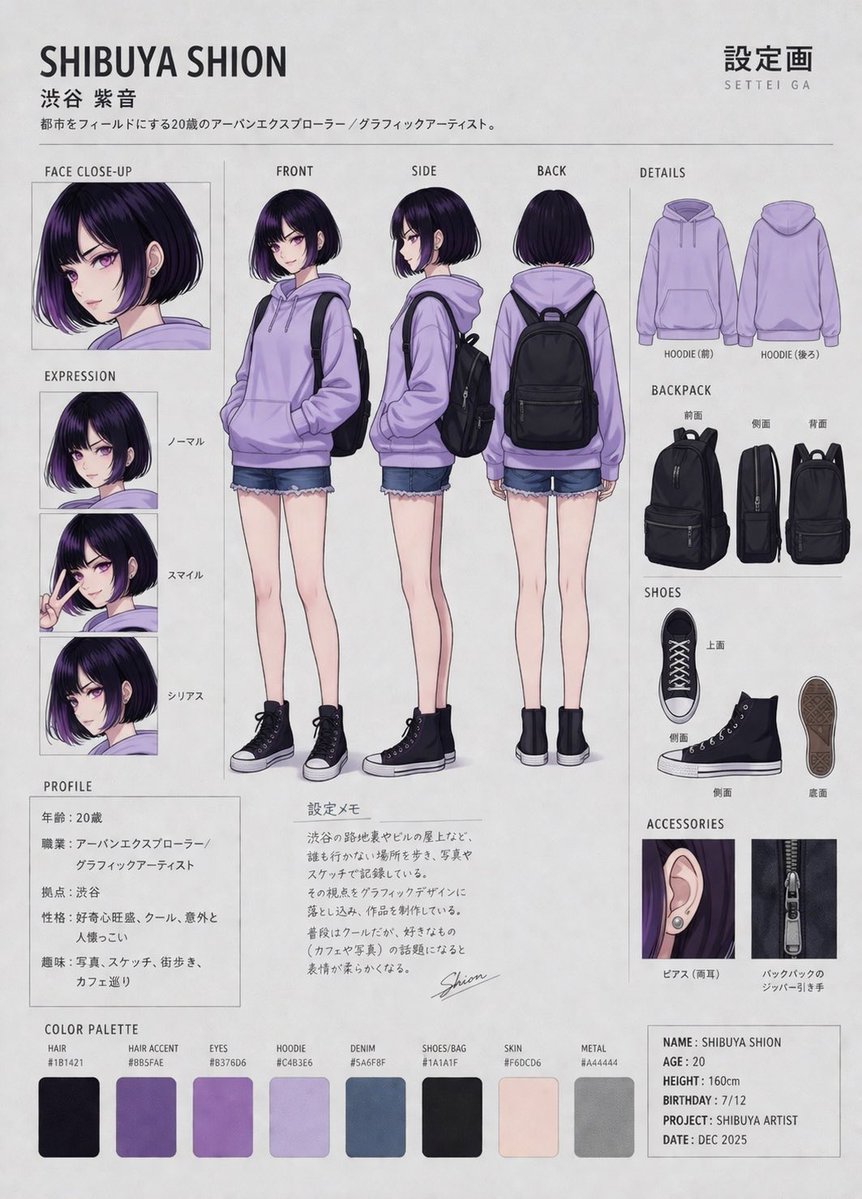
Anime Character Reference Sheet — Full Model Sheet Prompt
PROMPT · EN
type
anime character reference sheet
header
title
{argument name="character name" default="SHIBUYA SHION"}
subtitle
渋谷 紫音
description
都市をフィールドにする20歳のアーバンエクスプローラー / グラフィックアーティスト。
top_right_text
{argument name="main title" default="設定画 SETTEI GA"}
character
hair
{argument name="hair color" default="dark purple with lighter purple tips"}
eyes
{argument name="eye color" default="purple"}
outfit
{argument name="outfit" default="light purple hoodie, denim shorts, black high-top sneakers, black backpack"}
layout
centerpiece
count
3
labels
item 1
FRONT
item 2
SIDE
item 3
BACK
description
full-body standing poses
left_column
item 1
title
FACE CLOSE-UP
count
1
item 2
title
EXPRESSION
count
3
labels
item 1
ノーマル
item 2
スマイル
item 3
シリアス
item 3
title
PROFILE
type
text_box
content_fields
item 1
年齢:20歳
item 2
職業:アーバンエクスプローラー/グラフィックアーティスト
item 3
拠点:渋谷
item 4
性格:好奇心旺盛、クール、意外と人懐っこい
item 5
趣味:写真、スケッチ、街歩き、カフェ巡り
right_column
item 1
title
DETAILS
items
item 1
subtitle
HOODIE
count
2
labels
item 1
HOODIE (前)
item 2
HOODIE (後ろ)
item 2
subtitle
BACKPACK
count
3
labels
item 1
前面
item 2
側面
item 3
背面
item 3
subtitle
SHOES
count
4
labels
item 1
上面
item 2
側面
item 3
側面
item 4
底面
item 4
subtitle
ACCESSORIES
count
2
labels
item 1
ピアス (両耳)
item 2
バックパックのジッパー引き手
bottom_section
item 1
title
設定メモ
type
text_box
description
handwritten lore paragraph with signature 'Shion'
item 2
title
COLOR PALETTE
count
8
labels
item 1
HAIR
item 2
HAIR ACCENT
item 3
EYES
item 4
HOODIE
item 5
DENIM
item 6
SHOES/BAG
item 7
SKIN
item 8
METAL
item 3
title
INFO BOX
type
text_box
content_fields
item 1
NAME: SHIBUYA SHION
item 2
AGE: 20
item 3
HEIGHT: 160cm
item 4
BIRTHDAY: 7/12
item 5
PROJECT: SHIBUYA ARTIST
item 6
DATE: DEC 2025

À propos de ce prompt

Create a complete, multi-panel character design document with turnarounds, expressions, prop details, and a color palette for any anime character. Use it as a Art Conceptuel starting point for GPT Image 2: keep the visual structure and style constraints intact, then swap in your own subject, brand, or scene.

This prompt is organized as structured JSON with fields such as type, header, character, and layout. Keeping that hierarchy helps the model separate the subject, layout, interface elements, and detail constraints.

Start with small changes to subject, scene, camera, and color, then generate a few variations to compare composition and detail without turning the page copy into keyword stuffing.

Comment utiliser ce prompt

  1. Copy the entire prompt and paste it into your chosen AI image generator (e.g., Sora 2, Midjourney).
  2. Find and edit the customizable variables like {argument name="character name"} to set your character's name, hair, outfit, etc.
  3. Select your preferred model and aspect ratio (landscape is recommended for this layout).
  4. Generate the image. The AI will produce a detailed, organized character sheet based on your inputs.


FAQ

サモ(Futoshi Iwasawa)

@prompts→

Publié
30 avr. 2026
Langue source
EN
Modèle
GPT Image 2
Catégorie
Art Conceptuel
GPT Image 2Art Conceptuelgpt-image-2gptimage2api promptsgptimage2apien
Vues
10.8K
Copies
1.6K
J’aime
297

Partager

Plus de GPT Image 2

Tout voir
Gothic Anime Girl with Hidden Face — Sora 2 Prompt

Gothic Anime Girl with Hidden Face — Sora 2 Prompt

@hoshi122221
Anime Schoolgirls Sharing Transparent Umbrella — Sora 2 Prompt

Anime Schoolgirls Sharing Transparent Umbrella — Sora 2 Prompt

@yB7CqdfoDmrbhgD
Futuristic Google Search Ad — AI Prompt

Futuristic Google Search Ad — AI Prompt

@AiWithTariq

Créez plus vite avec les prompts Sora2Hub.

Utilisez des pages de prompts curées comme entrées recherchables, puis générez avec le bon contexte de modèle.

Explorer les prompts
