
GPT Image 2Prompt IA
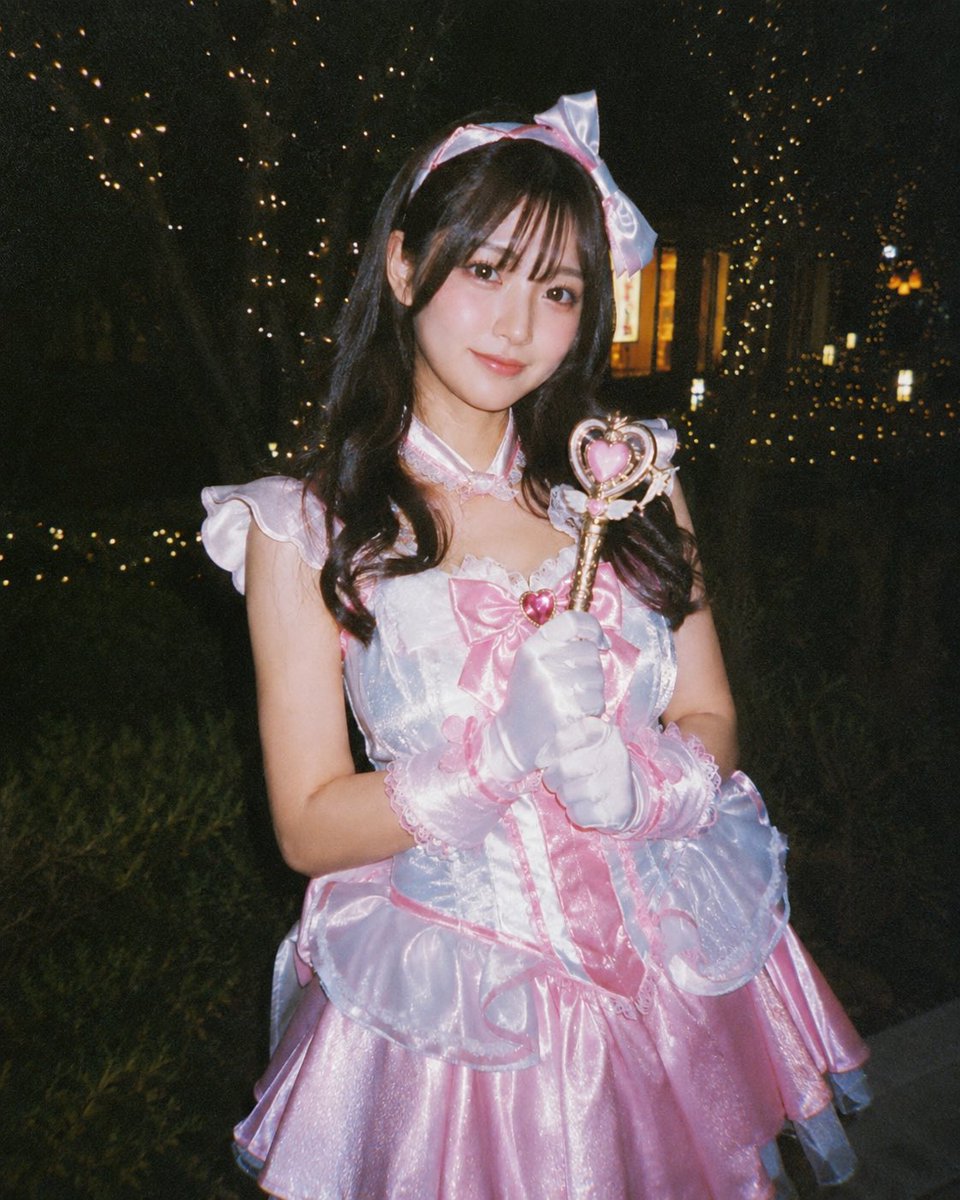
Disposable Film Flash — Magical Girl Portrait Prompt
Create nostalgic, flash-lit cosplay portraits with customizable costume, prop, and location variables for a retro amateur photo aesthetic.
PROMPT · EN
创作一张怀旧的一次性胶片相机风格夜间人像,主角是一位身着粉白配色偶像装的年轻女性,正在进行魔法少女 Cosplay。拍摄地点位于户外昏暗的公园或花园,背景中的树木缠绕着温暖的仙女灯。她以半身像姿势居中站立,戴着手套的双手捧在胸前,握着一支带有金色手柄和粉色心形装饰的心形魔法棒。服装材质为光泽缎面和欧根纱:淡粉色百褶裙、白色虹彩紧身胸衣、胸前饰有红心宝石的大粉色蝴蝶结、荷叶边泡泡袖、蕾丝饰边、半透明褶皱罩裙、白色缎面手套配粉色蕾丝袖口,以及带有大号淡粉色蝴蝶结的配套发带。她留着长长的深色波浪卷发,垂落在肩头,但面部刻意采用了柔和的方形隐私模糊处理。使用强烈的直射闪光灯、高 ISO 噪点、轻微曝光不足、温暖的橙色光斑虚化、深邃的黑色阴影,呈现出抓拍风格的业余 Cosplay 活动摄影效果,4:5 竖构图,逼真的面料光泽,略显随意的构图,无文字或水印。可通过以下参数自定义:argcostume colors: 淡粉色和白色(服装颜色)、argmagical prop: 心形魔法棒(道具)、argnight location: 带有仙女灯的昏暗公园(场景)、argcamera style: 一次性胶片相机闪光灯(相机风格)以及 argface treatment: 柔和方形隐私模糊(面部处理)。
À propos de ce prompt
Create nostalgic, flash-lit cosplay portraits with customizable costume, prop, and location variables for a retro amateur photo aesthetic. Use it as a Art Conceptuel starting point for GPT Image 2: keep the visual structure and style constraints intact, then swap in your own subject, brand, or scene.
Start by replacing costume colors, magical prop, night location, and camera style, then keep the camera, composition, and material cues in the same order. This makes the output easier to compare across variations.
Comment utiliser ce prompt
- Copy the entire prompt text and paste it into your preferred Sora 2 compatible AI model.
- Choose the appropriate model setting (e.g., Sora 2 or similar image generation model).
- Customize the variables like costume colors, magical prop, night location, camera style, and face treatment to match your vision.
- Generate the image and refine as needed by adjusting parameters or regenerating for variation.


