
GPT Image 2Prompt IA
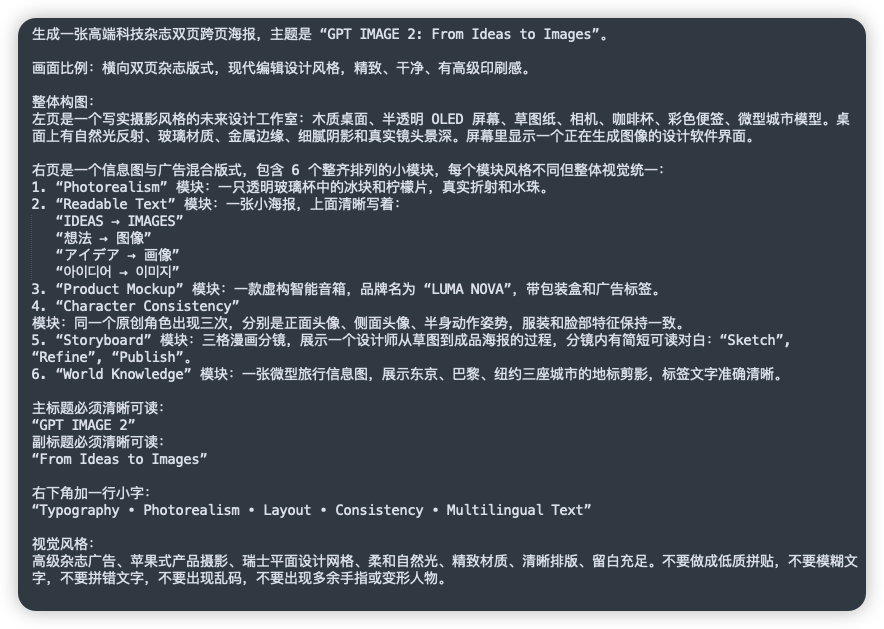
GPT IMAGE 2 Chinese Prompt UI Screenshot — Dark Tech Card
Showcase complex AI image generation instructions with this sleek dark UI screenshot featuring detailed Chinese prompt text, ideal for tech presentations and social posts.
PROMPT · EN
一张简洁的截图风格图像,展示了一个深炭灰色圆角矩形面板,上面布满了密集的白色无衬线字体简体中文提示词,呈现为平坦深色背景上的文本文档或笔记。构图为一个带有充足留白和细微阴影的单幅全屏面板,如同现代 UI 卡片。顶部是一句描述创作高端科技杂志双页跨页海报的句子,并附有英文标题:“GPT IMAGE 2: From Ideas to Images”。下方是多段左对齐的中文文本,行间距统一,描述了布局比例、现代编辑设计风格以及详细的双页构图。中间部分是一个包含 6 个项目的编号列表,标注为 1 到 6,每个项目均以引号括起的英文模块名称开头,后接中文解释。这 6 个模块名称分别为:“Photorealism”、“Readable Text”、“Product Mockup”、“Character Consistency”、“Storyboard” 和 “World Knowledge”。在第 2 项下方,包含 5 行独立的引号多语言文本作为子项,内容如下:“IDEAS → IMAGES”、“想法 → 图像”、“アイデア → 画像”、“아이디어 → 이미지” 以及 “فكرة → صورة”。在文本后段,添加一个明确指定主标题和副标题的部分,使用清晰易读的英文引号行:“GPT IMAGE 2” 和 “From Ideas to Images”。在下部区域,添加一行中文介绍右下角的小标题,后接精确的英文引号标题:“Typography • Photorealism • Layout • Consistency • Multilingual Text”。底部包含一段关于视觉风格要求的中文段落,例如高端广告质感、Apple 风格的产品摄影、瑞士平面设计、柔和自然光、精致材质、清晰布局、充足留白,并避免低质量纹理、模糊文字、乱码或手指变形。文本应清晰易读,具有逼真的屏幕截图保真度、高对比度、细微的抗锯齿边缘,不含插图、图标、照片,除单张深色卡片外不含多余的界面元素,整体呈现出精致的编辑科技风格。
À propos de ce prompt
Showcase complex AI image generation instructions with this sleek dark UI screenshot featuring detailed Chinese prompt text, ideal for tech presentations and social posts. Use it as a Art Conceptuel starting point for GPT Image 2: keep the visual structure and style constraints intact, then swap in your own subject, brand, or scene.
Start with small changes to subject, scene, camera, and color, then generate a few variations to compare composition and detail without turning the page copy into keyword stuffing.
Comment utiliser ce prompt
- Copy the full prompt provided above.
- Paste it into a high-resolution text-to-image model like Sora 2, Midjourney v6, or DALL·E 3.
- Ensure the model supports text rendering and high detail for best results.
- (Optional) Edit the Chinese text or module names to fit your specific use case.
- Generate and review; re-run with slight tweaks if the text clarity or layout needs refinement.


