
360° Ink Panorama — Tokyo Backstreet Scene
Create immersive VR-ready equirectangular line art of a quiet Japanese neighborhood with manga-sketch detail, a figure, and a cat.
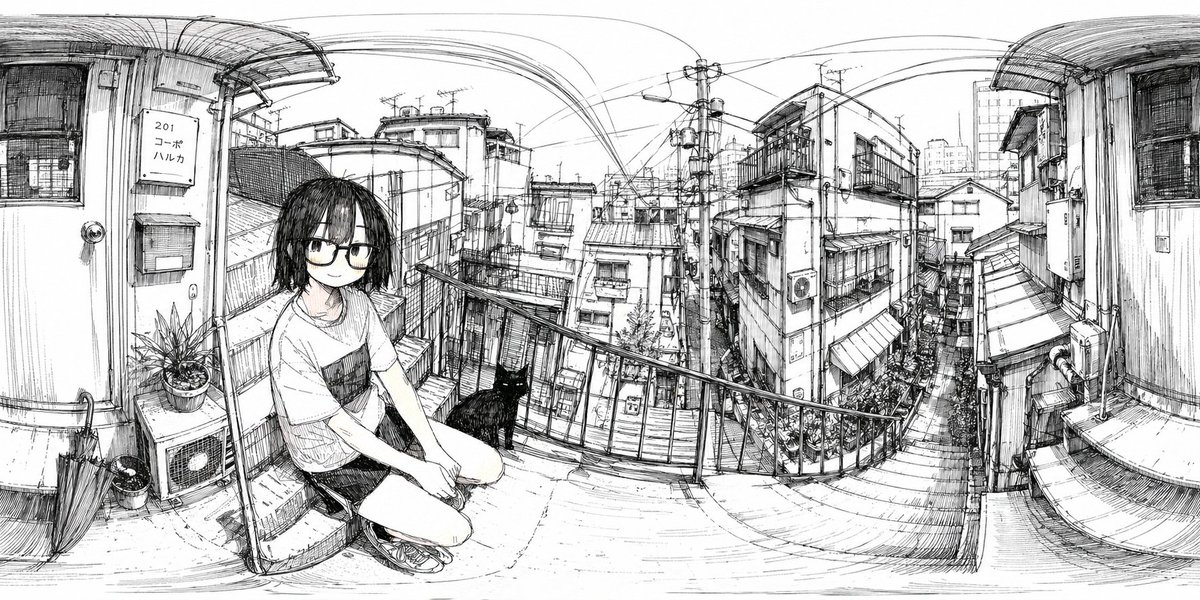
A monochrome black-ink line drawing designed specifically as a 360-degree panorama in equirectangular projection, with strong panoramic warping and curved architectural lines across the entire extra-wide frame. The scene is a narrow outdoor landing or walkway in a dense Japanese urban residential neighborhood, viewed from eye level, with the left and right edges bending upward as if wrapped for VR or polar panorama conversion. In the left foreground, a young woman with a deliberately blurred face crouches on the concrete floor near a metal railing, wearing a loose short-sleeve T-shirt with a dark chest pocket, shorts, and sneakers; her medium-length dark hair hangs forward. Next to her, exactly 1 black cat sits on the ground facing toward the city view. Also in the left foreground are exactly 1 closed umbrella leaning against the wall, exactly 2 plant pots, exactly 1 outdoor air-conditioning unit, exactly 1 mailbox, exactly 1 doorbell/intercom, and exactly 1 vertical apartment sign reading “201 コーポ ハルカ.” The midground opens to a descending staircase and tightly packed houses and apartment buildings with balconies, awnings, windows, utility boxes, and narrow alleyways. The background is filled with an intricate web of power poles, transformers, and overhead electrical wires stretching across the sky in dramatic arcs. Render everything with fine pen-and-ink hatching, sketchbook crosshatching, architectural detail, and a quiet observational manga-travel-sketch aesthetic on a clean white background, no color, no gray wash except the intentional face blur. Emphasize everyday realism, dense city texture, slight fisheye distortion, and the feeling of standing inside a hand-drawn panoramic slice of Tokyo. Use argaspect ratio: 2:1 panoramic composition and preserve the image as a seamless 360 environment illustration suitable for conversion into a polar panorama. Optionally let the crouching subject be argcharacter description: young woman in casual summer clothes and the neighborhood be arglocation style: dense Japanese residential backstreet.
À propos de ce prompt
Create immersive VR-ready equirectangular line art of a quiet Japanese neighborhood with manga-sketch detail, a figure, and a cat. Use it as a Art Conceptuel starting point for GPT Image 2: keep the visual structure and style constraints intact, then swap in your own subject, brand, or scene.
Common directions include gptimage2api prompts, gptimage2api, and ko. Treat these tags as creative cues; the prompt structure and preview image are the more useful guide.
Start by replacing aspect ratio, character description, and location style, then keep the camera, composition, and material cues in the same order. This makes the output easier to compare across variations.
Comment utiliser ce prompt
- Copy the full prompt text from the page.
- Paste it into your preferred AI image generator (e.g., Sora 2, Midjourney, or DALL·E).
- Choose an equirectangular or panoramic aspect ratio if available (e.g., 2:1).
- Tweak details like the apartment sign text, number of pots, or figure pose to personalize.
- Generate and download your 360°-ready sketch for VR viewers or panoramic display.


