Sora2 Hub
Sora2 Hub
  • Bibliothèque de prompts
  • Tarifs
  • Galerie
Sora2 Hub
Sora2 Hub
Sora2 Hub

Sora2 Hub

Plateforme de création IA professionnelle propulsée par Sora 2, Veo 3.1 et Nano Banana Pro. Créez des vidéos époustouflantes et des images de qualité studio avec un contrôle avancé, une qualité HD et sans filigrane.

Email:support@sora2hub.org

Générateur Vidéo IA

  • Texte vers Vidéo
  • Image vers Vidéo
  • Veo 3.1
  • Sora 2
  • Kling 3.0
  • Kling 2.6
  • Kling 2.5
  • Runway
  • Wan 2.6
  • Seedance 2.0
  • Hailuo 2.3
  • Grok Imagine
  • HappyHorse-1.0
  • HappyHorse 1.1
  • Kling 3.0 Turbo
  • Volcengine Video-to-Video Lip Sync
  • OmniHuman 1.5
  • Grok Imagine Video 1.5
  • Gemini Omni
  • Wan 2.7 Video
  • Seedance 2.0 Mini

Générateur d'Image IA

  • Texte vers Image
  • Image vers Image
  • Nano Banana Pro
  • Nano Banana
  • 4o Image
  • Flux Kontext
  • Z Image
  • Seedream 4.5
  • Seedream 5.0 Lite
  • Nano Banana 2
  • GPT Image 2
  • Agrandisseur d'Image IA
  • Seedream 5.0 Pro
  • Nano Banana 2 Lite
  • Qwen Image 2.0

Effets IA

  • Filtre d'Âge IA
  • Échange de Genre IA
  • Baiser IA
  • Câlin IA
  • Image Ghibli
  • Filtre Sirène IA
  • Secousse Corporelle IA
  • Filtre Sourire
  • Gros IA
  • Figurine d'Action

Produit

  • Fonctionnalités
  • Vitrines
  • Tarifs

Entreprise

  • À propos
  • Contact

© 2025 • Sora2 Hub ORG Tous droits réservés.

  • Politique de confidentialité
  • Conditions d'utilisation
  • Politique de remboursement
  1. Accueil
  2. /
  3. Prompts
  4. /
  5. GPT Image 2
  6. /
  7. Manga Style Comparison Prompt — Generic vs. Gag-Manga
GPT Image 2Prompt IA

Manga Style Comparison Prompt — Generic vs. Gag-Manga

Generate a side-by-side classroom manga comparison graphic highlighting the difference between a polished anime style and a unique gag-manga style.
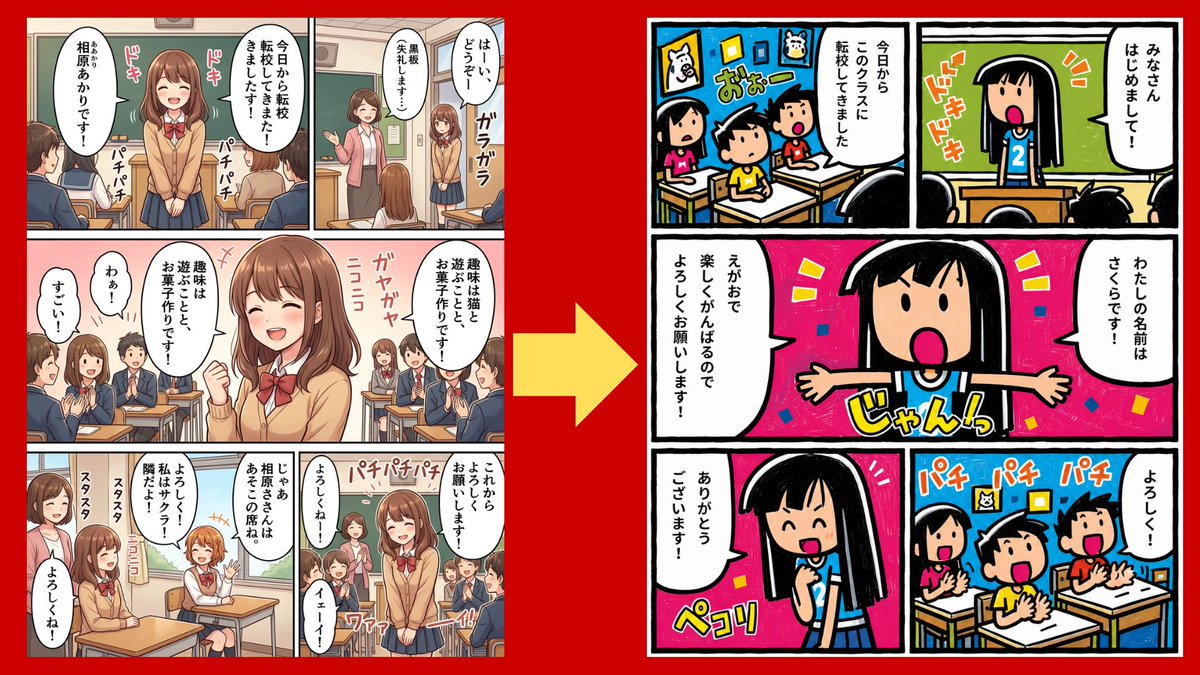
Manga Style Comparison Prompt — Generic vs. Gag-Manga
PROMPT · EN
type
side-by-side comparison graphic showing the importance of manga art style
canvas
16:9 horizontal composition with a solid vivid red background
main_elements
count
3
items
item 1
left manga page in generic polished anime style
item 2
large yellow arrow pointing from left to right in the center
item 3
right manga page in a distinctive simple gag-manga style
left_page
position
left third of canvas
panel_count
7
style
modern clean school manga, soft shading, semi-realistic anime proportions, detailed classroom backgrounds, beige and brown palette, thin panel gutters, speech bubbles filled with Japanese text, classmates in navy uniforms, teacher at chalkboard, multiple student faces intentionally blurred with mosaic/soft blur to anonymize them
subject
a transfer student girl in a tan cardigan, white shirt, red bow, navy skirt, medium brown bob hair, standing and introducing herself in class, then sitting at a desk among classmates
visible_sound_effects_count
9
visible_sound_effects
item 1
ドキ
item 2
ドキ
item 3
パチパチ
item 4
パチパチ
item 5
ガヤガヤ
item 6
ニコニコ
item 7
スタスタ
item 8
スタスタ
item 9
パチパチパチ
overall_impression
competent but generic, no distinctive visual identity
right_page
position
right third of canvas
panel_count
5
style
highly distinctive retro children’s gag manga, thick uneven black outlines, flat saturated colors, intentionally simple faces, exaggerated expressions, hand-drawn panel borders, bold katakana sound effects, energetic composition, looks like a unique personal comic style rather than generic anime
subject
a black-haired elementary school transfer girl wearing a blue shirt with the number 2 introduces herself to a classroom; classmates react enthusiastically and clap
character_design
round face, straight black hair with blunt bangs, dot eyes or simple oval eyes, wide open pink mouth, tiny simplified body, very thick ink lines
color_palette
hot pink, cyan blue, yellow, green, white, black, high contrast
visible_sound_effects_count
6
visible_sound_effects
item 1
ドキドキ
item 2
おおー
item 3
じゃんっ
item 4
ペコリ
item 5
パチ パチ パチ
item 6
よろしく!
speech_bubble_text_count
7
speech_bubble_text
item 1
みなさん はじめまして!
item 2
今日からこのクラスに転校してきました
item 3
わたしの名前はさくらです!
item 4
えがおで楽しくがんばるのでよろしくお願いします!
item 5
ありがとうございます!
item 6
よろしく!
item 7
今日から転校してきました!
center_arrow
position
center between pages
color
bright yellow
shape
large thick right-pointing arrow
meaning
transformation from no art-style specification to a specified distinctive style
composition_notes
Both manga pages are shown as complete rectangular pages with white margins and black gutters, slightly separated on the red background. The left page should look like an ordinary AI manga output; the right page should clearly feel more memorable, stylized, and original. Do not include extra captions outside the manga pages and arrow.
customizable_text
comparison theme
{argument name="comparison theme" default="AI manga is 90% art style"}
left style
{argument name="left style" default="generic polished anime school manga"}
right style
{argument name="right style" default="distinctive retro children’s gag manga"}
transfer student name
{argument name="transfer student name" default="さくら"}
background color
{argument name="background color" default="vivid red"}

À propos de ce prompt

Generate a side-by-side classroom manga comparison graphic highlighting the difference between a polished anime style and a unique gag-manga style. Use it as a Art Conceptuel starting point for GPT Image 2: keep the visual structure and style constraints intact, then swap in your own subject, brand, or scene.

This prompt is organized as structured JSON with fields such as type, canvas, main elements, left page, right page, center arrow, and composition notes. Keeping that hierarchy helps the model separate the subject, layout, interface elements, and detail constraints.

Start with small changes to subject, scene, camera, and color, then generate a few variations to compare composition and detail without turning the page copy into keyword stuffing.

Comment utiliser ce prompt

  1. Copy the entire prompt JSON from the page.
  2. Open your preferred AI image generator (e.g., Midjourney, DALL-E, Stable Diffusion).
  3. Paste the prompt into the generator's input field.
  4. (Optional) Adjust variables like background color or character details to match your vision.
  5. Generate the image to create your own side-by-side style comparison.
FAQ

しゅんち(小柴俊太郎)@神戸AI漫画家

@shunchi_uu→

Publié
15 mai 2026
Langue source
EN
Modèle
GPT Image 2
Catégorie
Art Conceptuel
GPT Image 2Art Conceptuelgpt-image-2twitter
Vues
333
Copies
41
J’aime
24

Partager

Plus de GPT Image 2

Tout voir
Anime Reaction Thumbnail Prompt — Neon Edgy VTuber

Anime Reaction Thumbnail Prompt — Neon Edgy VTuber

@abdiisan
Dynamic Nike Ad Poster — Sora 2 Prompt with Sydney Sweeney

Dynamic Nike Ad Poster — Sora 2 Prompt with Sydney Sweeney

@im_shahid7
Gothic Anime Girl with Hidden Face — Sora 2 Prompt

Gothic Anime Girl with Hidden Face — Sora 2 Prompt

@hoshi122221

Créez plus vite avec les prompts Sora2Hub.

Utilisez des pages de prompts curées comme entrées recherchables, puis générez avec le bon contexte de modèle.

Explorer les prompts