
GPT Image 2Prompt IA
Generate a Custom Voxel Game Screenshot — Sora 2 Prompt
Generate a detailed, customizable first-person voxel game screenshot with editable documents, UI, and environment elements using this AI prompt.
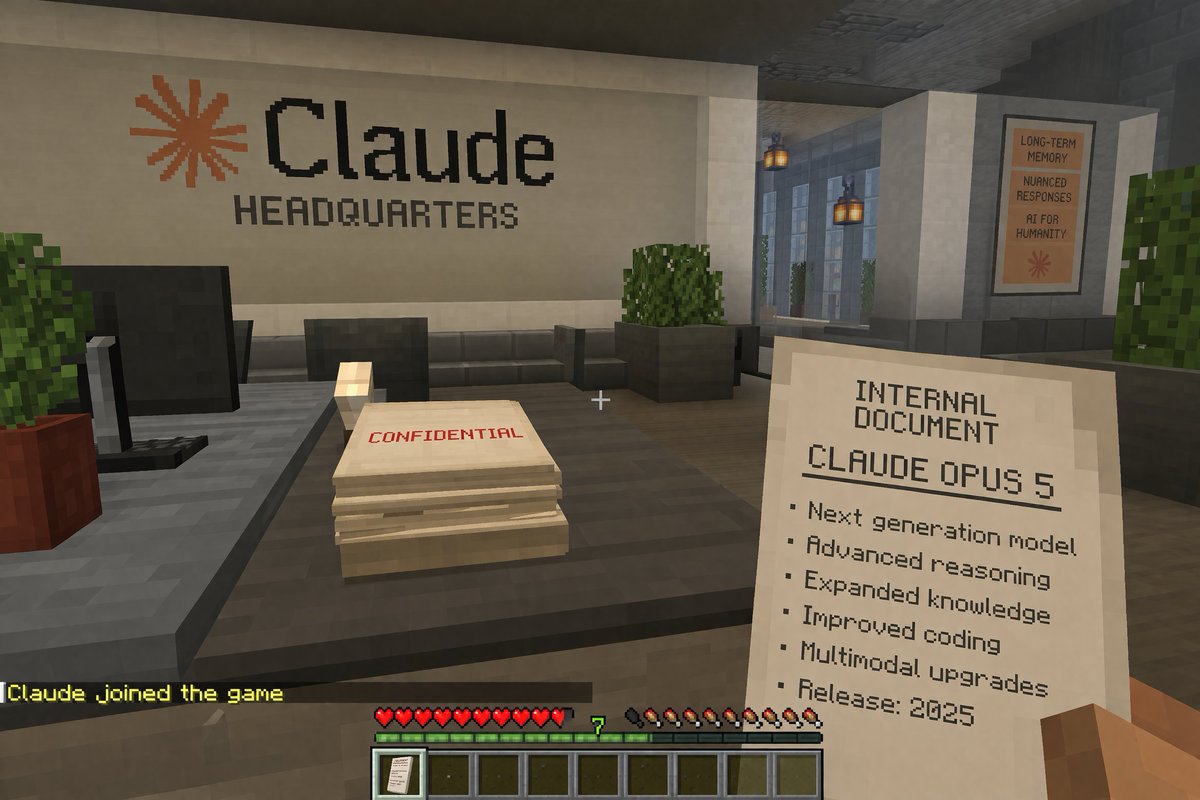
PROMPT · EN
一张第一人称体素游戏截图。玩家方块状的右手拿着一份写有“INTERNAL DOCUMENT”的纸张,内容包含“argdocument title: CLAUDE OPUS 5”以及一个以“Release: 2025”结尾的 6 项列表。屏幕中央有一个白色准星。前方是一张深灰色办公桌,上面放着一台黑色显示器和一叠标有红色“CONFIDENTIAL”字样的纸张。后方的白色墙壁上显示着一个橙色星号,以及“argcompany name: Claude”和“HEADQUARTERS”字样。右侧走廊悬挂着灯笼,并贴有一张写着“LONG-TERM MEMORY”、“NUANCED RESPONSES”、“AI FOR HUMANITY”的海报。底部 HUD 显示黄色的聊天文本“argchat message: Claude joined the game”、10 颗红心、一个显示“7”的绿色经验条、10 个饥饿度鸡腿,以及一个在第一个槽位带有文档图标的 9 格快捷栏。
À propos de ce prompt
Generate a detailed, customizable first-person voxel game screenshot with editable documents, UI, and environment elements using this AI prompt. Use it as a Art Conceptuel starting point for GPT Image 2: keep the visual structure and style constraints intact, then swap in your own subject, brand, or scene.
Start by replacing document title, company name, and chat message, then keep the camera, composition, and material cues in the same order. This makes the output easier to compare across variations.
Comment utiliser ce prompt
- Copy the prompt above.
- Paste it into a compatible AI image generator, such as Sora 2.
- Modify the argument values (e.g., document title, company name, chat message) to customize the scene.
- Generate the image to receive your personalized voxel game screenshot.
- Iterate by adjusting variables to create different office or game UI mockups.


