
GPT Image 2Prompt IA
3 Exquisite Mobile Beauty Landing Pages Mockup — Sora Prompt
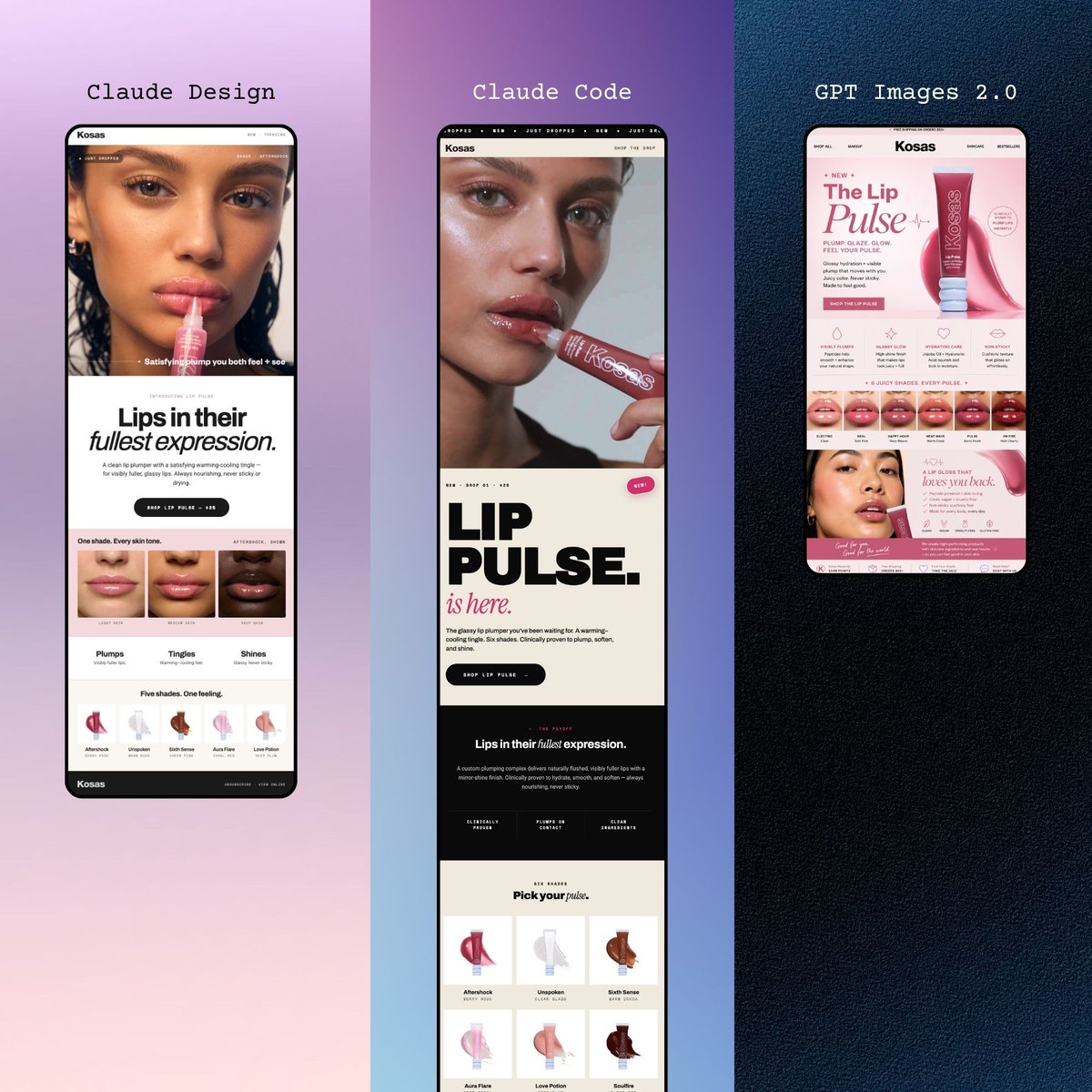
Generate a stylish trio of smartphone mockups featuring modern beauty brand landing pages, perfect for social media presentation and branding inspiration.
PROMPT · EN
一套精致的宣传样机,以垂直三联画布局并排展示了 3 个修长的智能手机屏幕,每个屏幕都呈现了一个现代美妆品牌的唇部产品落地页。整体构图具有编辑感、极简且高级,专为社交媒体上的移动端网页设计展示而设计。左侧面板位于柔和的淡紫色到腮红色的渐变背景上,展示了一款黑色边框手机,屏幕上是 argbrand name: Kosas 的奶油色调腮红美妆网站。在该面板顶部,优雅的小号衬线字体写着 argleft headline: Fresh Pout.。手机屏幕顶部展示了一张裁剪过的美妆特写图片,醒目的大标题写着“Lips in their fullest expression.”(其中“fullest”采用斜体衬线样式),配有一个圆角深色行动号召按钮、一排 3 个唇部特写缩略图、3 个标注为“Plumps”(丰盈)、“Tingles”(清凉)、“Shines”(光泽)的功效标签,以及下方一排 5 个色号或效果图标。中间面板位于淡紫色到深紫色的渐变背景上,展示了第二款黑色边框手机,其落地页更具排版设计感。上方衬线字体写着 argmiddle headline: Claude Code。屏幕顶部包含一张裁剪过的人像图片,一个非常醒目的黑色堆叠大标题“LIP PULSE.”,下方配有一行粉色斜体手写风格文字“is here.”,一个圆角深色按钮,一个包含短语“Lips in their fullest expression.”的深色区域,以及底部附近包含 6 张色号卡片(排列为 2 行 3 列)的产品网格。右侧面板位于深海军蓝纹理背景上,展示了第三款黑色边框手机,其页面采用粉色调的电商风格。上方居中处,等宽白色字体写着 argright headline: GPT Images 2.0。该屏幕显著展示了产品首屏区域,包含品牌名称“Kosas”、大标题“The Lip Pulse”、一个向右倾斜的粉色唇彩管、小型功能图标、中间附近的一排 6 个唇部试色,以及下方包含更多粉色产品图像的促销板块。保持布局对称,恰好 3 部手机,每面板一部,均完全可见且垂直放置。采用高端化妆品广告美学、整洁的间距、混合衬线与粗体无衬线字体的时尚网页排版、柔和的粉色与奶油色 UI 配色、微妙的阴影,以及适合展示 AI 生成的移动端网站概念的时尚产品设计呈现。
À propos de ce prompt
Generate a stylish trio of smartphone mockups featuring modern beauty brand landing pages, perfect for social media presentation and branding inspiration. Use it as a Art Conceptuel starting point for GPT Image 2: keep the visual structure and style constraints intact, then swap in your own subject, brand, or scene.
Start by replacing brand name, left headline, middle headline, and right headline, then keep the camera, composition, and material cues in the same order. This makes the output easier to compare across variations.
Comment utiliser ce prompt
- Copy the entire prompt text.
- Modify the branded headlines:
{argument name="brand name" default="Kosas"},{argument name="left headline" default="Fresh Pout."},{argument name="middle headline" default="Claude Code"},{argument name="right headline" default="GPT Images 2.0"}to your preference. - Paste into your chosen AI image generator (e.g., DALL-E 3, Midjourney, Stable Diffusion).
- Generate the output and iterate as needed to achieve the perfect mobile mockup composition.
- Use the result for social media, portfolio, or client presentations.


