
Sora2 Hub
Sora2 Hub
  • Bibliothèque de prompts
  • Tarifs
  • Galerie
Sora2 Hub
Sora2 Hub
Sora2 Hub

Sora2 Hub

Plateforme de création IA professionnelle propulsée par Sora 2, Veo 3.1 et Nano Banana Pro. Créez des vidéos époustouflantes et des images de qualité studio avec un contrôle avancé, une qualité HD et sans filigrane.

Email:support@sora2hub.org

Générateur Vidéo IA

  • Texte vers Vidéo
  • Image vers Vidéo
  • Veo 3.1
  • Sora 2
  • Kling 3.0
  • Kling 2.6
  • Kling 2.5
  • Runway
  • Wan 2.6
  • Seedance 2.0
  • Hailuo 2.3
  • Grok Imagine
  • HappyHorse-1.0

Générateur d'Image IA

  • Texte vers Image
  • Image vers Image
  • Nano Banana Pro
  • Nano Banana
  • 4o Image
  • Flux Kontext
  • Z Image
  • Seedream 4.5
  • Seedream 5.0 Lite
  • Nano Banana 2
  • GPT Image 2
  • Agrandisseur d'Image IA

Effets IA

  • Filtre d'Âge IA
  • Échange de Genre IA
  • Baiser IA
  • Câlin IA
  • Image Ghibli
  • Filtre Sirène IA
  • Secousse Corporelle IA
  • Filtre Sourire
  • Gros IA
  • Figurine d'Action

Produit

  • Fonctionnalités
  • Vitrines
  • Tarifs

Entreprise

  • À propos
  • Contact

© 2025 • Sora2 Hub ORG Tous droits réservés.

  • Politique de confidentialité
  • Conditions d'utilisation
  • Politique de remboursement
  1. Accueil
  2. /
  3. Prompts
  4. /
  5. GPT Image 2
  6. /
  7. Side-Backlight Portrait Tutorial — Sora 2 Book Page Prompt
GPT Image 2Prompt IA

Side-Backlight Portrait Tutorial — Sora 2 Book Page Prompt

Generate a sleek book page teaching backlight portrait photography, with lighting diagrams, gear settings, and composition tips—perfect for guides and mockups.
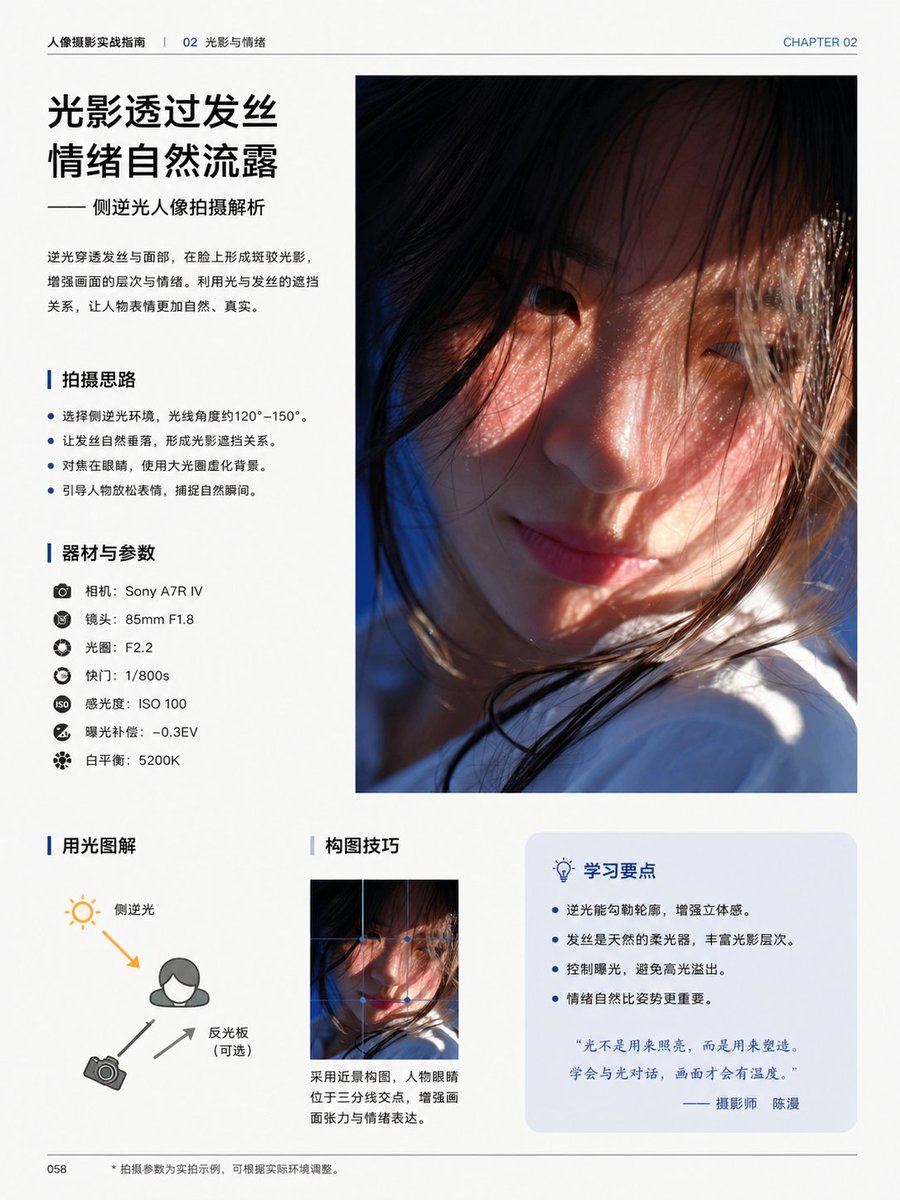
Side-Backlight Portrait Tutorial — Sora 2 Book Page Prompt
PROMPT · EN
type
编辑类摄影教程书籍页面
style
简洁现代的中文杂志排版,极简白色背景,专业排版,宽裕的页边距,细分割线,蓝色点缀色,高端印刷设计
page
chapter_label
第 02 章
header_left
人像摄影实战指南 | 02 光影与情绪
page_number
058
size
单页纵向书籍页面
content_blocks
item 1
kind
headline_block
position
top-left
title
{argument name="headline text" default="光影透过发丝 情绪自然流露"}
subtitle
—— 侧逆光人像拍摄解析
body
逆光穿透发丝与面部,在脸上形成斑驳光影,增强画面的层次与情绪。利用光与发丝的遮挡关系,让人物表情更加自然、真实。
item 2
kind
main_photo
position
top-right
count
1
description
占据页面右上半部分的巨幅纵向人像照片,电影感特写,年轻女性侧逆光,温暖阳光穿过散落的发丝,柔和的肤色,浅景深,部分面部被发丝和构图遮挡,底部可见白色衣物,氛围感强且亲密
item 3
kind
bullet_section
position
mid-left
title
拍摄思路
count
4
items
item 1
选择侧逆光环境,光线角度约 120°–150°。
item 2
让发丝自然垂落,形成光影遮挡关系。
item 3
对焦在眼睛,使用大光圈虚化背景。
item 4
引导人物放松表情,捕捉自然瞬间。
item 4
kind
gear_section
position
left-center
title
器材与参数
count
7
items
item 1
相机:{argument name="camera model" default="Sony A7R IV"}
item 2
镜头:85mm F1.8
item 3
光圈:F2.2
item 4
快门:1/800s
item 5
感光度:ISO 100
item 6
曝光补偿:-0.3EV
item 7
白平衡:5200K
item 5
kind
diagram_section
position
bottom-left
title
用光图解
count
3
labels
item 1
侧逆光
item 2
反光板(可选)
item 3
相机
description
简单的布光图解,包含人物图标、左上角的太阳图标、左下角的相机图标,一个橙色箭头表示背侧光线射向主体,两个灰色箭头表示相机与反光板的位置关系
item 6
kind
composition_section
position
bottom-center
title
构图技巧
count
1
image
同一人像照片的小尺寸纵向裁剪
caption
采用近景构图,人物眼睛位于三分线交点,增强画面张力与情绪表达。
item 7
kind
tips_box
position
bottom-right
title
学习要点
count
4
items
item 1
逆光能勾勒轮廓,增强立体感。
item 2
发丝是天然的柔光器,丰富光影层次。
item 3
控制曝光,避免高光溢出。
item 4
情绪自然比姿势更重要。
quote
“光不是用来照亮,而是用来塑造,学会与光对话,画面才会有温度。”—— 摄影师 {argument name="photographer name" default="陈漫"}
footer
left
058
center
• 拍摄参数为实拍示例,可根据实际环境调整。
visual_notes
所有正文使用简体中文,标题采用加粗黑色中文字体,章节标题前带有蓝色竖向强调条,提示框后方带有淡蓝色圆角矩形,逼真的印刷级编辑排版,高端摄影教育书籍美学

À propos de ce prompt

Generate a sleek book page teaching backlight portrait photography, with lighting diagrams, gear settings, and composition tips—perfect for guides and mockups. Use it as a Art Conceptuel starting point for GPT Image 2: keep the visual structure and style constraints intact, then swap in your own subject, brand, or scene.

This prompt is organized as structured JSON with fields such as type, style, page, content blocks, footer, and visual notes. Keeping that hierarchy helps the model separate the subject, layout, interface elements, and detail constraints.

Start with small changes to subject, scene, camera, and color, then generate a few variations to compare composition and detail without turning the page copy into keyword stuffing.

Comment utiliser ce prompt

  1. Copy the prompt into your preferred AI image generator (e.g., Sora 2, DALL·E).
  2. Choose a model optimized for editorial design layouts.
  3. Customize variable arguments like camera model and headline text if needed.
  4. Generate the image and refine with negative prompts for cleaner output.
  5. Download the high-resolution book page for your project.

FAQ

骑司Chase

@qisi_ai→

Publié
30 avr. 2026
Langue source
EN
Modèle
GPT Image 2
Catégorie
Art Conceptuel
GPT Image 2Art Conceptuelgpt-image-2twitter
Vues
493
Copies
67
J’aime
26

Partager

Plus de GPT Image 2

Tout voir
Ultra-Realistic 3D Exploded View Prompt: Sony BRAVIA 8K TV

Ultra-Realistic 3D Exploded View Prompt: Sony BRAVIA 8K TV

@Ankit_patel211
Photorealistic Fashion Magazine Cover — Sora 2 Prompt

Photorealistic Fashion Magazine Cover — Sora 2 Prompt

@aichof21
Dark Anime Devil Girl Mario Kart Poster — Sora 2 Prompt

Dark Anime Devil Girl Mario Kart Poster — Sora 2 Prompt

@opener_ai

Créez plus vite avec les prompts Sora2Hub.

Utilisez des pages de prompts curées comme entrées recherchables, puis générez avec le bon contexte de modèle.

Explorer les prompts

