
GPT Image 2Prompt IA
Lone Samurai Wildfire Night — Sora 2 Prompt
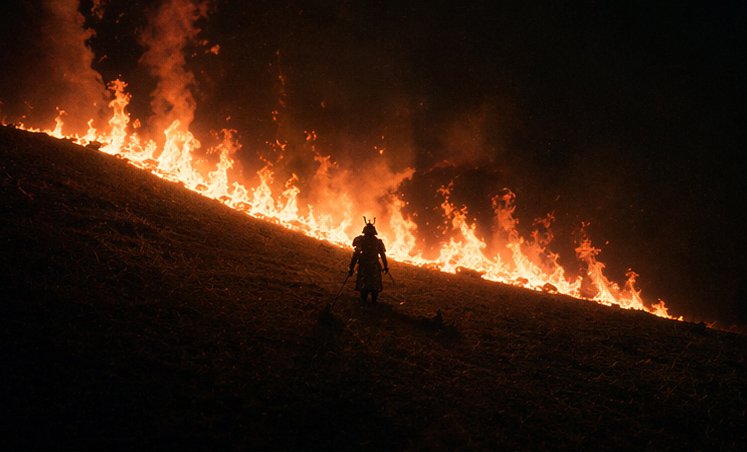
Generate an epic cinematic scene featuring a lone samurai silhouette standing before a diagonal wildfire on a dark hillside, with intense atmosphere and dramatic backlighting.
PROMPT · EN
这是一场电影般的夜景,场景设定在陡峭的草坡上,正值野火蔓延。画面中下方中心位置站着一名孤独的武士,呈现出深色剪影。山坡从左上角向右下角呈对角线延伸,一道连绵的明亮橙色火焰在人物身后的坡面上蔓延,在黑暗的地面与漆黑烟雾弥漫的天空之间形成了一道发光的边界。武士身着传统盔甲,头戴带角的兜鍪(kabuto),腰间佩戴双刀,面朝上坡方向凝视着火焰。人物比例需相对于景观保持较小,以强调规模感与孤独感。采用极低调的布光,利用火焰产生的强烈背光,营造深邃的黑色调、浓重的烟雾、飘散的余烬,以及由黑色、余烬红和火橙色组成的深沉高对比度色调。画面应呈现出史诗级日本战争电影的质感,采用宽画幅构图、极简主义取景、戏剧性的留白、写实的纹理以及浓郁的氛围烟雾。
À propos de ce prompt
Generate an epic cinematic scene featuring a lone samurai silhouette standing before a diagonal wildfire on a dark hillside, with intense atmosphere and dramatic backlighting. Use it as a Art Conceptuel starting point for GPT Image 2: keep the visual structure and style constraints intact, then swap in your own subject, brand, or scene.
Start with small changes to subject, scene, camera, and color, then generate a few variations to compare composition and detail without turning the page copy into keyword stuffing.
Comment utiliser ce prompt
- Copy the prompt text from the page.
- Paste it into an AI image generator like Sora 2, Midjourney, or DALL·E 3.
- Set a wide aspect ratio (e.g., 16:9) and add style modifiers like 'cinematic lighting' if needed.
- Generate and tweak keywords such as 'low-key lighting' or 'heavy smoke' to refine the mood.
- Pick the best result and upscale for a high-resolution epic still.


