
GPT Image 2Prompt IA

10-Shot Magical Girl Transformation Storyboard — AI Prompt

Generate a detailed 10-shot anime storyboard for a magical girl transformation sequence, perfect for animation pre-vis, director notes, and scene planning.
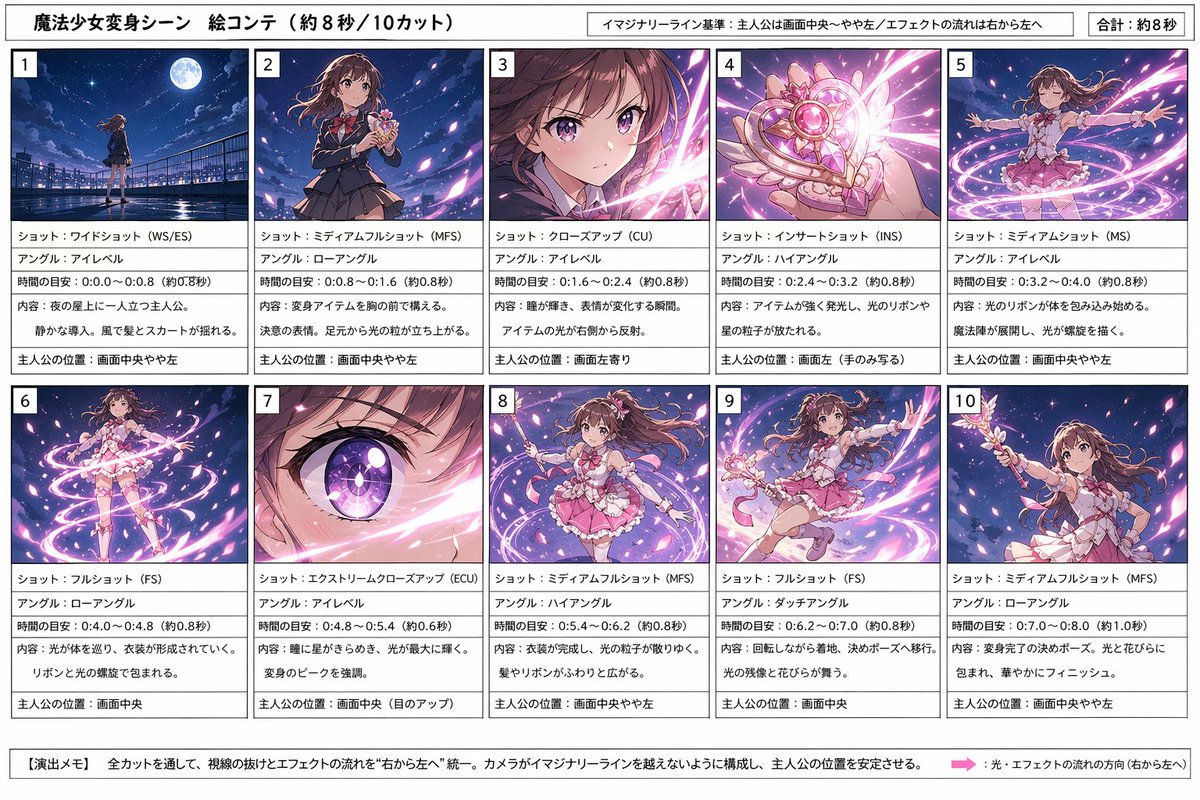
10-Shot Magical Girl Transformation Storyboard — AI Prompt
PROMPT · EN
type
动画变身分镜表
subject
魔法少女变身序列
style
用于图像生成规划的简洁专业分镜,精致的动画插画缩略图,充满活力的夜空幻想特效,漫画制作表美学
canvas
orientation
横向
aspect_ratio
16:9
header
title
魔法少女变身场景 分镜(约 8 秒/10 个镜头)
notes
item 1
假想线基准:主角位于画面中央至偏左位置/特效流向为从右向左
item 2
总计:约 8 秒
character
name
{argument name="character name" default="主角"}
appearance
十几岁的魔法少女,留着长长的波浪卷{argument name="hair color" default="棕色"}发,大而有神的眼睛,校服变身为魔法少女装,带有丝带的粉色荷叶边服装,短层叠裙,蝴蝶结细节,白色手套,带有心形和翅膀图案的魔杖式变身道具
layout
grid
columns
5
rows
2
count
10
sections
item 1
title
1
position
左上
count
1
labels
item 1
镜头:远景(WS/ES)
item 2
角度:平视
item 3
时间预估:0.0-0.8(约 0.8 秒)
item 4
内容:主角独自站在夜间的屋顶。安静的开场,风吹动头发和裙摆。
item 5
主角位置:画面中央偏左
item 2
title
2
position
上排第二
count
1
labels
item 1
镜头:中全景(MFS)
item 2
角度:低角度
item 3
时间预估:0.8-1.6(约 0.8 秒)
item 4
内容:在胸前握住变身道具。坚定的表情。脚下升起光点。
item 5
主角位置:画面中央偏左
item 3
title
3
position
上排第三
count
1
labels
item 1
镜头:特写(CU)
item 2
角度:平视
item 3
时间预估:1.6-2.4(约 0.8 秒)
item 4
内容:眼睛闪烁,表情变化的瞬间。道具的光芒从右侧反射。
item 5
主角位置:画面偏左
item 4
title
4
position
上排第四
count
1
labels
item 1
镜头:插入镜头(INS)
item 2
角度:高角度
item 3
时间预估:2.4-3.2(约 0.8 秒)
item 4
内容:道具发出强烈光芒,释放出光之丝带和星形粒子。
item 5
主角位置:画面左侧(仅露出手部)
item 5
title
5
position
右上
count
1
labels
item 1
镜头:中景(MS)
item 2
角度:平视
item 3
时间预估:3.2-4.0(约 0.8 秒)
item 4
内容:光之丝带开始包裹身体。魔法阵展开,光芒呈螺旋状。
item 5
主角位置:画面中央偏左
item 6
title
6
position
左下
count
1
labels
item 1
镜头:全景(FS)
item 2
角度:低角度
item 3
时间预估:4.0-4.8(约 0.8 秒)
item 4
内容:光芒环绕身体,服装逐渐成型。被丝带和光的螺旋所包围。
item 5
主角位置:画面中央
item 7
title
7
position
下排第二
count
1
labels
item 1
镜头:大特写(ECU)
item 2
角度:平视
item 3
时间预估:4.8-5.4(约 0.6 秒)
item 4
内容:眼中闪烁着星星,光芒达到最盛。强调变身的高潮。
item 5
主角位置:画面中央(眼睛特写)
item 8
title
8
position
下排第三
count
1
labels
item 1
镜头:中全景(MFS)
item 2
角度:高角度
item 3
时间预估:5.4-6.2(约 0.8 秒)
item 4
内容:服装完成,光之粒子缓慢收敛。头发和丝带轻柔地散开。
item 5
主角位置:画面中央偏左
item 9
title
9
position
下排第四
count
1
labels
item 1
镜头:全景(FS)
item 2
角度:荷兰式倾斜
item 3
时间预估:6.2-7.0(约 0.8 秒)
item 4
内容:旋转着落地。过渡到定格姿势。光影残像与花瓣飞舞。
item 5
主角位置:画面中央
item 10
title
10
position
右下
count
1
labels
item 1
镜头:中全景(MFS)
item 2
角度:低角度
item 3
时间预估:7.0-8.0(约 1.0 秒)
item 4
内容:变身完成的定格姿势。被光芒与花瓣包围,华丽收尾。
item 5
主角位置:画面中央偏左
footer
title
【演出笔记】
count
2
labels
item 1
所有镜头中,视线引导与特效流向统一为“从右向左”。构图上确保摄像机不越过假想线,保持主角位置稳定。
item 2
光效与特效的流动方向(从右向左)
visuals
panel_style
10 个分镜框中,上方为完整渲染的动画缩略图,下方为文字描述框,左上角标有粗体分镜编号
background
带有黑色边框和细分割线的白色分镜表
thumbnail_consistency
10 个分镜中角色保持一致,夜间屋顶,明亮的月亮,深蓝紫色天空,粉色与白色魔法光带,闪烁的花瓣,动态的变身能量
text_language
日语
color_palette
item 1
深海军蓝
item 2
紫罗兰色
item 3
粉红色
item 4
白色
item 5
柔和洋红色
quality
高分辨率编辑排版,清晰易读的日语文字,平衡的页边距,可直接打印的分镜设计

À propos de ce prompt

Generate a detailed 10-shot anime storyboard for a magical girl transformation sequence, perfect for animation pre-vis, director notes, and scene planning. Use it as a Art Conceptuel starting point for GPT Image 2: keep the visual structure and style constraints intact, then swap in your own subject, brand, or scene.

This prompt is organized as structured JSON with fields such as type, subject, style, canvas, header, character, and layout. Keeping that hierarchy helps the model separate the subject, layout, interface elements, and detail constraints.

Start with small changes to subject, scene, camera, and color, then generate a few variations to compare composition and detail without turning the page copy into keyword stuffing.

Comment utiliser ce prompt

  1. Copy the complete storyboard prompt template.
  2. Choose your AI model (e.g., Midjourney, DALL·E, or Stable Diffusion) and paste the prompt.
  3. Customize variables like character name, hair color, or any other details within the {argument} fields.
  4. Set the desired output format (e.g., image grid, sequential panels) and aspect ratio (16:9).
  5. Generate and iterate on individual panels or the full sequence as needed.

FAQ

Plus de GPT Image 2

Tout voir

Créez plus vite avec les prompts Sora2Hub.

Utilisez des pages de prompts curées comme entrées recherchables, puis générez avec le bon contexte de modèle.

