
GPT Image 2Prompt IA
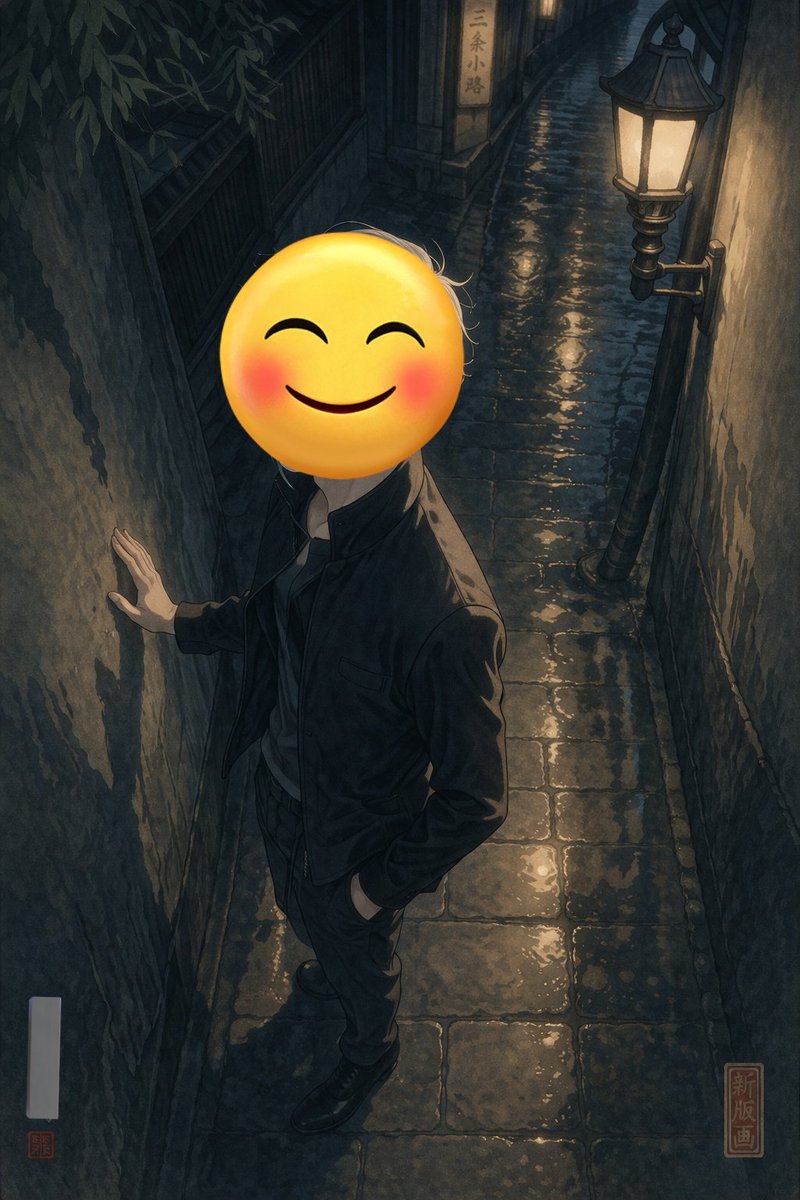
Customizable Emoji Portrait in Night Alley — Sora Prompt
Generate a moody, high-contrast illustration of a figure with an emoji face in a rain-soaked alley, fully customizable with this Sora 2 prompt.
PROMPT · EN
一幅全身肖像,描绘了一个人站在 argsetting: 夜晚潮湿狭窄的鹅卵石巷弄 中。此人身穿 argclothing: 深色夹克和深色长裤,一只手靠在左侧粗糙且富有质感的墙壁上,另一只手随意地插在口袋里。他们的脸被一个 argface replacement: 带有红晕的大型黄色笑脸表情包 完全遮住。场景由安装在右侧墙壁上的一盏复古路灯照亮,投射出温暖的黄色光芒,在潮湿的铺路石上形成美丽的倒影,营造出深邃且富有情绪的阴影。背景中,一块发光的小招牌上写着“argbackground sign text: 三条小路”。这件艺术品是一种 argart style: 具有高对比度光影和微妙新版画风格的现代数字插画,右下角有一个红色方形印章,上面写着“新版画”,左下角有一个空白的白色垂直签名框,带有一个微小的红色印章。
À propos de ce prompt
Generate a moody, high-contrast illustration of a figure with an emoji face in a rain-soaked alley, fully customizable with this Sora 2 prompt. Use it as a Art Conceptuel starting point for GPT Image 2: keep the visual structure and style constraints intact, then swap in your own subject, brand, or scene.
Start by replacing setting, clothing, face replacement, and background sign text, then keep the camera, composition, and material cues in the same order. This makes the output easier to compare across variations.
Comment utiliser ce prompt
- Copy the prompt text from this page.
- Paste it into Sora 2 or your preferred AI image generator.
- Adjust the variables like setting, clothing, face emoji, and sign text to suit your idea.
- Generate the image and try different art style variations.
- Download and share your unique creation.


