GPT Image 2Prompt IA

Cute LLM Training Process Poster — Sora 2 Prompt

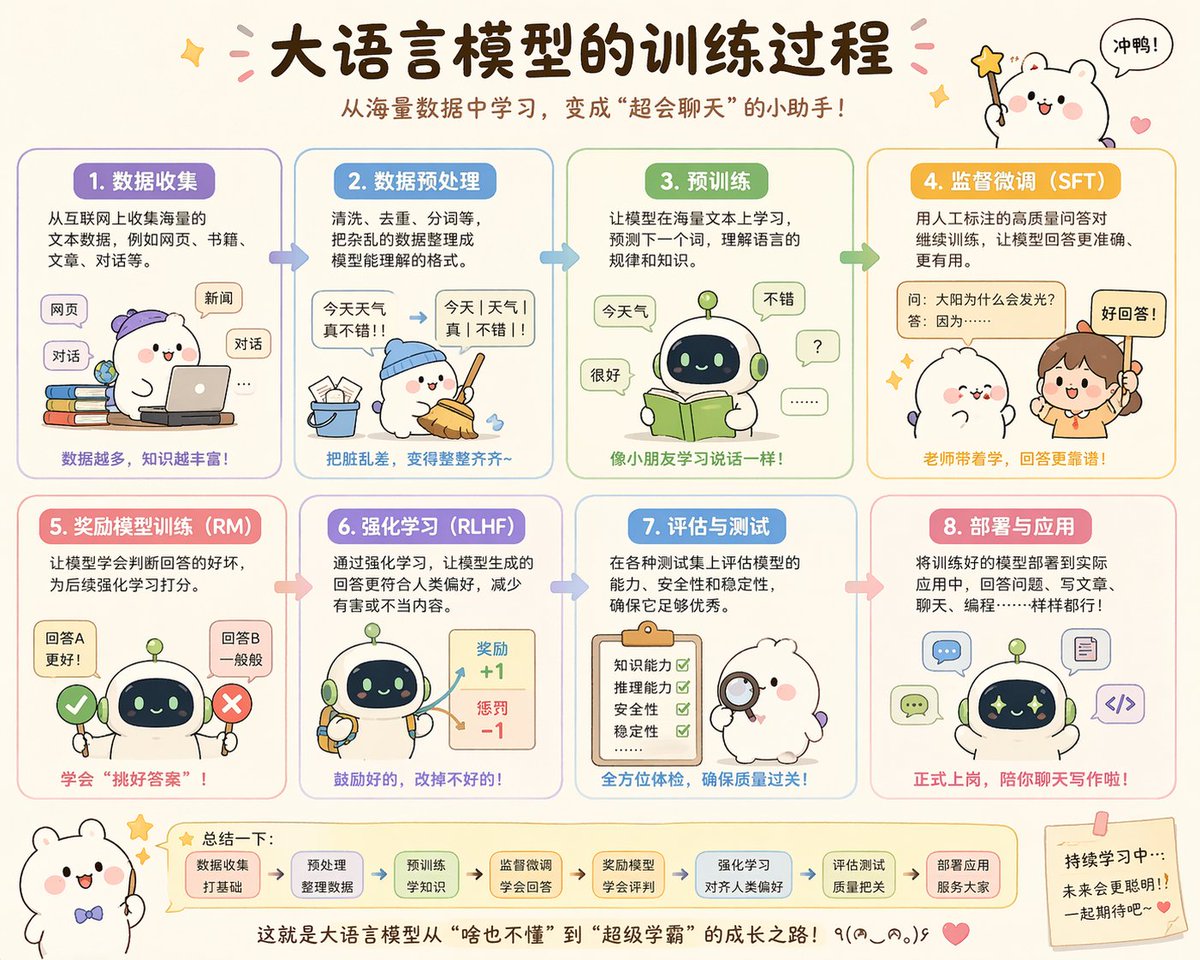
Generate a charming Chinese infographic explaining the 8 steps of training a large language model with cute mascots, perfect for social media.
Cute LLM Training Process Poster — Sora 2 Prompt
PROMPT · EN
type
可爱教育信息图海报
topic
{argument name="headline text" default="大语言模型的训练过程"}
subtitle
{argument name="subtitle text" default="从海量数据中学习,变成"超会聊天"的小助手!"}
style
overall
可爱的中文科普海报,柔和的课堂信息图风格,圆角面板,奶油色背景,手绘卡通美学,简洁的矢量插画,温暖友好的教育基调
palette
item 1
奶油色
item 2
薰衣草紫
item 3
天蓝色
item 4
薄荷绿
item 5
黄橙色
item 6
粉色
item 7
柔棕色
rendering
高质量扁平化插画,带有细腻阴影,清晰的中文排版,贴纸风格装饰,小星星、爱心、箭头和对话气泡
layout
format
横版海报
grid
rows
2
columns
4
count
8
sections
item 1
title
1. 数据收集
position
左上角
count
1
labels
item 1
网页
item 2
新闻
item 3
对话
item 2
title
2. 数据预处理
position
顶行,第二列
count
1
labels
item 1
今天 天气 真不错!!
item 2
今天|天气|真|不错!!
item 3
title
3. 预训练
position
顶行,第三列
count
1
labels
item 1
今天气
item 2
很好
item 3
不错
item 4
?
item 5
......
item 4
title
4. 监督微调(SFT)
position
右上角
count
1
labels
item 1
问:太阳为什么会发光?
item 2
答:因为……
item 3
好回答!
item 5
title
5. 奖励模型训练(RM)
position
底行,第一列
count
1
labels
item 1
回答A 更好!
item 2
回答B 一般般
item 6
title
6. 强化学习(RLHF)
position
底行,第二列
count
1
labels
item 1
奖励 +1
item 2
惩罚 -1
item 7
title
7. 评估与测试
position
底行,第三列
count
1
labels
item 1
知识能力
item 2
推理能力
item 3
安全性
item 4
稳定性
item 8
title
8. 部署与应用
position
右下角
count
1
labels
item 1
聊天
item 2
写代码
item 3
写文章
topDecorations
count
4
items
item 1
左上角的小闪光
item 2
标题周围的粉色纸屑
item 3
右上角拿着星星魔杖的可爱白色吉祥物
item 4
写着“冲鸭!”的对话气泡
bottomDecorations
count
4
items
item 1
左下角戴领结的白色小吉祥物
item 2
包含 7 个圆角小方框和箭头的总结栏
item 3
底部居中的结束语
item 4
右下角带有鼓励文字和爱心的便利贴
characters
main mascots
count
4
types
item 1
脸颊粉红的白色圆润小熊吉祥物
item 2
带有深色面部屏幕和绿色天线的小圆机器人
item 3
扎着马尾辫的人类老师女孩
item 4
拿着放大镜的毛茸茸白色角色
recurring_robot_design
矮小可爱的机器人,圆润的身体,浅绿色和奶油色外壳,深蓝色面部显示屏配有发光的眼睛,细小的四肢
sectionDetails
item 1
title
1. 数据收集
panelColor
薰衣草紫
scene
戴着紫色帽子的白色吉祥物坐在彩色书堆旁使用笔记本电脑;浮动的圆角标签代表互联网来源
caption
数据越多,知识越丰富!
item 2
title
2. 数据预处理
panelColor
天蓝色
scene
戴着蓝色帽子的吉祥物将散落的纸屑扫进桶里;杂乱的句子被转换成结构清晰的文本,并配有箭头
caption
把脏乱差,变得整整齐齐~
item 3
title
3. 预训练
panelColor
薄荷绿
scene
机器人阅读着一本打开的绿色书籍,周围的对话气泡显示简单的词元和回复,暗示语言学习过程
caption
像小朋友学习说话一样!
item 4
title
4. 监督微调(SFT)
panelColor
金黄色
scene
老师指着一张带标签的问答卡片,可爱的吉祥物在倾听;强调人工标注的高质量问答对
caption
老师带着学,回答更靠谱!
item 5
title
5. 奖励模型训练(RM)
panelColor
粉色
scene
机器人站在绿色对勾和红色叉号之间,对比两个答案选项,学习哪个更好
caption
学会"挑好答案"!
item 6
title
6. 强化学习(RLHF)
panelColor
薰衣草蓝
scene
机器人拿着工具,奖励项目显示带有箭头的正向和负向分数反馈
caption
鼓励好的,改掉不好的!
item 7
title
7. 评估与测试
panelColor
蓝色
scene
毛茸茸的白色考官角色拿着放大镜,站在带有四个绿色对勾的检查清单旁
caption
全方位体检,确保质量过关!
item 8
title
8. 部署与应用
panelColor
柔粉红色
scene
机器人周围出现了聊天、写作、代码和文档等应用图标,展示了实际部署场景
caption
正式上岗,陪你聊天写作啦!
bottomSummary
title
总结一下:
count
7
steps
item 1
数据收集 打好基础
item 2
预处理 整理数据
item 3
预训练 学知识
item 4
监督微调 学会回答
item 5
奖励模型 学会评判
item 6
强化学习 对齐人类偏好
item 7
评估测试 质量把关
closingText
{argument name="closing sentence" default="这就是大语言模型从"啥也不懂"到"超级学霸"的成长之路!٩(๑^o^๑)۶"}
language
Simplified Chinese
quality
精美且适合社交媒体发布的信息图,布局平衡,中文文字清晰易读,风格迷人且极具分享价值

À propos de ce prompt

Generate a charming Chinese infographic explaining the 8 steps of training a large language model with cute mascots, perfect for social media. Use it as a Art Conceptuel starting point for GPT Image 2: keep the visual structure and style constraints intact, then swap in your own subject, brand, or scene.

This prompt is organized as structured JSON with fields such as type, topic, subtitle, style, layout, characters, and sectionDetails. Keeping that hierarchy helps the model separate the subject, layout, interface elements, and detail constraints.

Start with small changes to subject, scene, camera, and color, then generate a few variations to compare composition and detail without turning the page copy into keyword stuffing.

Comment utiliser ce prompt

  1. Copy the prompt from sora2hub.
  2. Paste it into your preferred AI image generator (e.g., DALL·E 3, Stable Diffusion, or Midjourney).
  3. (Optional) Adjust the variables like headline text or subtitle text to customize the title and subtitle.
  4. Set the aspect ratio to horizontal (e.g., 16:9) to match the poster layout.
  5. Generate the image and enjoy your cute educational infographic!
FAQ

Plus de GPT Image 2

Tout voir

Créez plus vite avec les prompts Sora2Hub.

Utilisez des pages de prompts curées comme entrées recherchables, puis générez avec le bon contexte de modèle.