
GPT Image 2Prompt IA
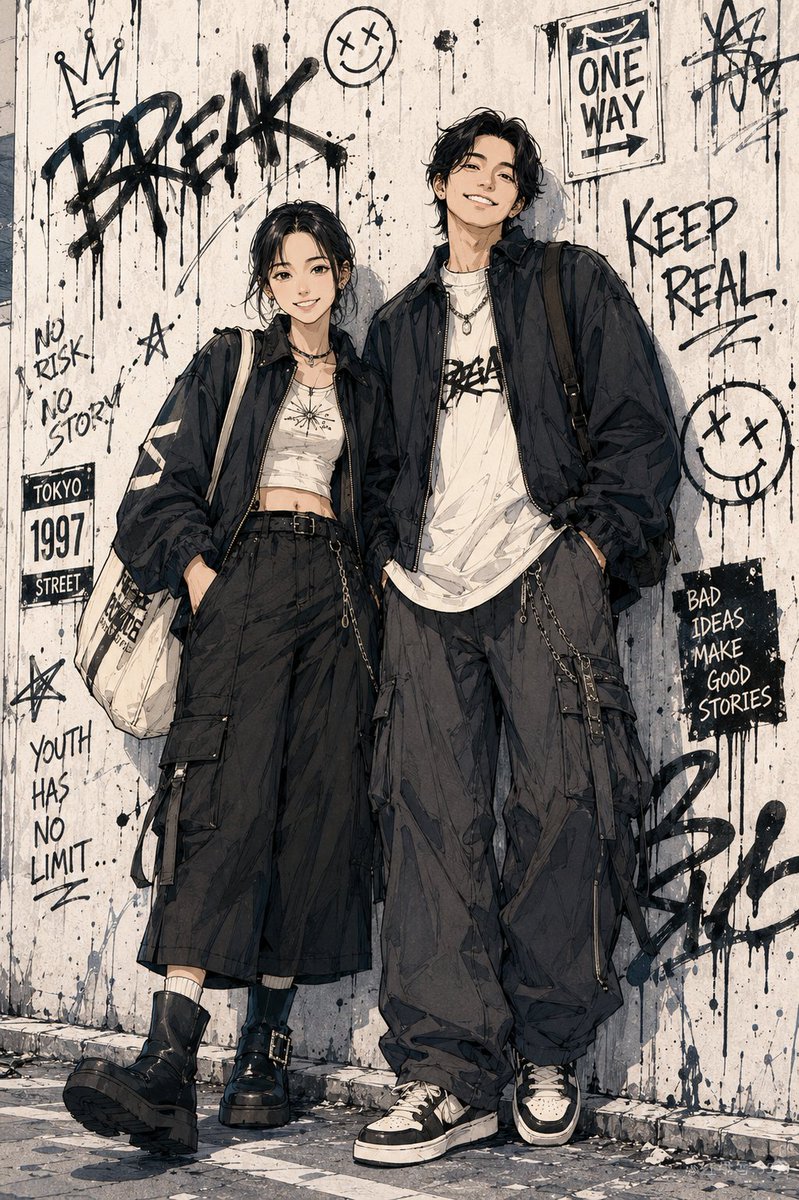
Urban Manga Portrait Prompt — Convert Photo to Shonen Style
Turn your photo into a dynamic Japanese shonen manga character with Tokyo streetwear fashion and cinematic urban backgrounds.
1 / 3
PROMPT · EN
基于用户上传的真实照片,将角色转换为 argart style: 日本少年漫画风格 / 都市街头动漫角色海报。在创作全新的全身动漫插画时,保留脸型、五官比例和气质等真实身份特征。艺术风格:漫画彩页、干净且有力的黑色线条、锐利的发型、清晰的衣物褶皱、轻微的铅笔素描感,以及纸张纹理上的水彩或马克笔上色。为角色设计 argclothing style: 东京街头时尚 —— 年轻、随性且酷炫。使用大廓形夹克、工装裤、耳机或咖啡杯等元素。将角色安排在动态姿势中(例如:行走、倚靠墙壁),以营造电影感。将他们置于 argbackground setting: 东京街头巷弄、便利店门口或地铁出口 中,并添加涂鸦、海报和自动贩卖机等图层。氛围:少年漫画、都市街头、青春以及时尚杂志插画感。
À propos de ce prompt
Turn your photo into a dynamic Japanese shonen manga character with Tokyo streetwear fashion and cinematic urban backgrounds. Use it as a Art Conceptuel starting point for GPT Image 2: keep the visual structure and style constraints intact, then swap in your own subject, brand, or scene.
Start by replacing art style, clothing style, and background setting, then keep the camera, composition, and material cues in the same order. This makes the output easier to compare across variations.
Comment utiliser ce prompt
- Copy the full prompt and paste it into your preferred AI image generator (e.g., Sora 2, Midjourney).
- Choose a model optimized for anime/illustration output.
- Replace the
{art style},{clothing style}, and{background setting}variables with your preferences or keep the defaults. - Upload your reference photo as instructed by the platform.
- Generate the image and iterate on settings for the best result.


