
GPT Image 2Prompt IA
Isometric Miniature Dino Museum for Q-Kids — Sora 2 Prompt
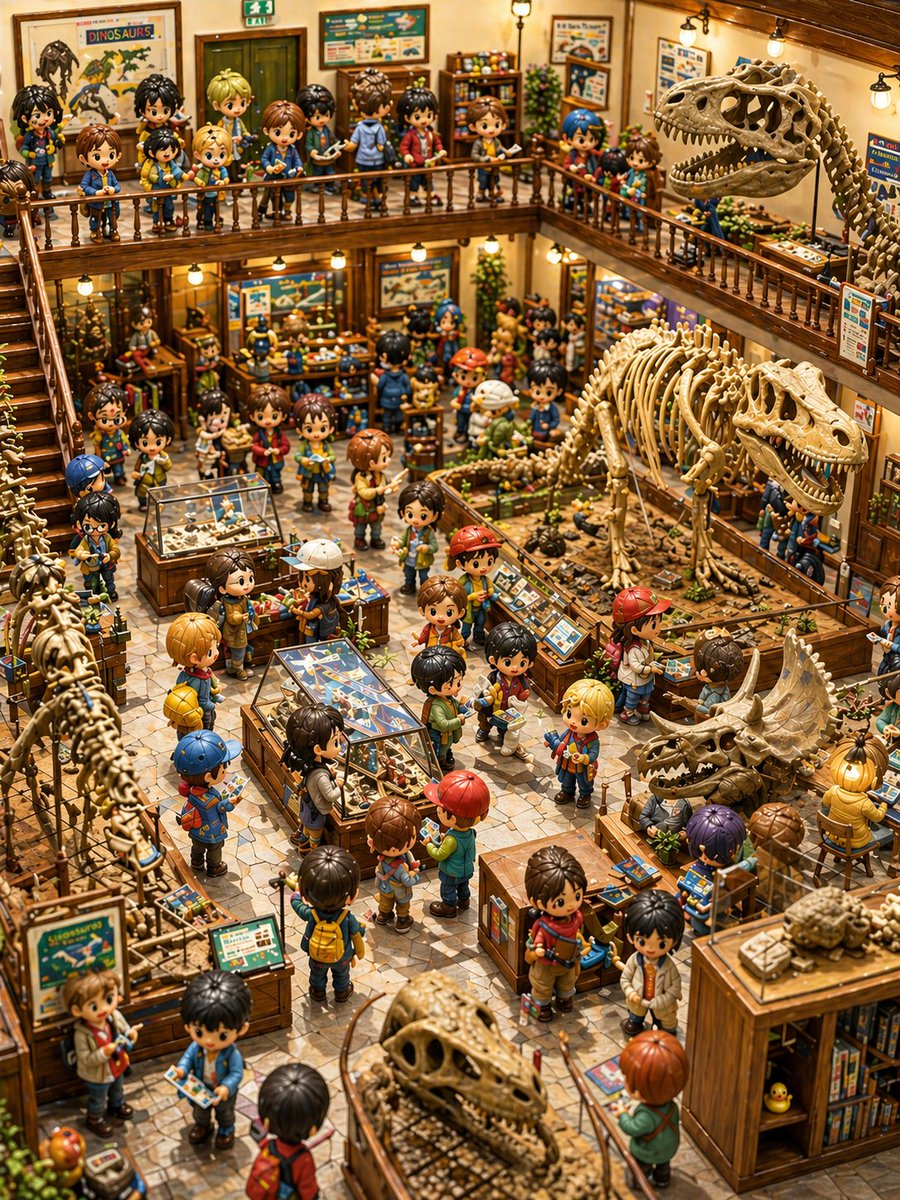
Generate a whimsical isometric miniature dinosaur museum teeming with Q-version kid explorers, perfect for detailed fantasy art and storybook scenes.
PROMPT · EN
这是一个高度精细、温暖且充满奇幻色彩的等轴测视角双层恐龙博物馆内景,挤满了 Q 版动漫儿童和化石展品。画面呈现出手工制作的微缩模型质感,带有玩具般的人偶、闪亮的大眼睛、圆润的脸庞以及精致的木质与黄铜材质博物馆家具。场景采用高处转角俯视视角,可以看到繁忙的中央大厅,展示品和游客摆放得错落有致。场景中包含约 52 名散布在博物馆各处的 Q 版儿童,上层阳台和底层大厅都非常拥挤,每个孩子都打扮成小小探险家的模样,穿着色彩鲜艳的休闲装,背着背包,戴着帽子,穿着夹克、短裤和运动鞋,许多人手里还拿着导览手册或宣传册。整体氛围欢快且充满冒险气息,金色的环境光来自悬挂的小灯,配有抛光的木质栏杆、左侧的楼梯、瓷砖石地板、墙上装裱的恐龙海报、教育标识、标本柜、书架、植物以及礼品店风格的展示桌。 重点展示 6 个清晰可见的大型恐龙骨架展品:右侧上层是一具张开大嘴、占据主导地位的大型霸王龙骨架;中央右侧底层展坑内是一具中型兽脚类恐龙骨架;右下方是一个三角龙颅骨及部分骨架展示;左下边缘垂直排列着一具长颈恐龙的部分骨架;下方中央前景处是一个大型化石颅骨展示;右下角尽头的木柜上是一个小型化石或类似海龟的标本。此外,还包括 5 个玻璃展示柜或桌面标本展品:下方中间是一个中央长方形蝴蝶或昆虫标本桌,中心左侧是一个玻璃顶化石柜,中左侧附近是一个较小的蓝色台面标本柜,恐龙展坑旁是一个倾斜的教育控制面板或化石信息展台,右下方工作区还集成了一个额外的展示桌。在柜台和地面展品上,添加许多较小的化石托盘、骨头、岩石和挖掘样本。 建筑结构应包含 2 个可见楼层:一个环绕后侧和右侧的上层夹层阳台,以及下方开放式的底层展览空间。左侧设有一道通往阳台的楼梯。在上层墙壁上,放置几张装裱好的恐龙海报和博物馆项目,其中包括一张醒目的海报,上面写着 argposter title: DINOSAURS。在后门上方添加一个紧急出口标志。使用丰富的色调,包括蜂蜜棕色的木材、米色的化石、青色和蓝色的展览图形,以及孩子们服装上点缀的红色、黄色和绿色。整体氛围是充满童趣的探索感,仿佛儿童科学博物馆与收藏家模型世界的结合,具有极高的场景密度、清晰的焦点、丰富的细节、电影般的景深以及高级的绘本微缩模型写实感。画面中没有成人,没有留白,没有现代极简主义;画面的每一处都应充满迷人的博物馆活动。
À propos de ce prompt
Generate a whimsical isometric miniature dinosaur museum teeming with Q-version kid explorers, perfect for detailed fantasy art and storybook scenes. Use it as a Art Conceptuel starting point for GPT Image 2: keep the visual structure and style constraints intact, then swap in your own subject, brand, or scene.
Start by replacing poster title, then keep the camera, composition, and material cues in the same order. This makes the output easier to compare across variations.
Comment utiliser ce prompt
- Copy the prompt from sora2hub.com and paste it into your AI image generator (Sora, Midjourney, DALL-E, etc.).
- If your model supports style presets, select a miniature or isometric 3D style to enhance the toy-like feel.
- Tweak the
{argument name="poster title" default="DINOSAURS"}variable if you want a custom poster text (e.g., "FOSSILS"). - Generate the image at high resolution. For complex scenes, run multiple iterations and choose the best output.
- (Optional) Refine the image in an editor to adjust colors or add finer details.


