Sora2 Hub
Sora2 Hub
  • Bibliothèque de prompts
  • Tarifs
  • Galerie
Sora2 Hub
Sora2 Hub
Sora2 Hub

Sora2 Hub

Plateforme de création IA professionnelle propulsée par Sora 2, Veo 3.1 et Nano Banana Pro. Créez des vidéos époustouflantes et des images de qualité studio avec un contrôle avancé, une qualité HD et sans filigrane.

Email:support@sora2hub.org

Générateur Vidéo IA

  • Texte vers Vidéo
  • Image vers Vidéo
  • Veo 3.1
  • Sora 2
  • Kling 3.0
  • Kling 2.6
  • Kling 2.5
  • Runway
  • Wan 2.6
  • Seedance 2.0
  • Hailuo 2.3
  • Grok Imagine
  • HappyHorse-1.0
  • HappyHorse 1.1
  • Kling 3.0 Turbo
  • Volcengine Video-to-Video Lip Sync
  • OmniHuman 1.5
  • Grok Imagine Video 1.5
  • Gemini Omni
  • Wan 2.7 Video
  • Seedance 2.0 Mini

Générateur d'Image IA

  • Texte vers Image
  • Image vers Image
  • Nano Banana Pro
  • Nano Banana
  • 4o Image
  • Flux Kontext
  • Z Image
  • Seedream 4.5
  • Seedream 5.0 Lite
  • Nano Banana 2
  • GPT Image 2
  • Agrandisseur d'Image IA
  • Seedream 5.0 Pro
  • Nano Banana 2 Lite
  • Qwen Image 2.0

Effets IA

  • Filtre d'Âge IA
  • Échange de Genre IA
  • Baiser IA
  • Câlin IA
  • Image Ghibli
  • Filtre Sirène IA
  • Secousse Corporelle IA
  • Filtre Sourire
  • Gros IA
  • Figurine d'Action

Produit

  • Fonctionnalités
  • Vitrines
  • Tarifs

Entreprise

  • À propos
  • Contact

© 2025 • Sora2 Hub ORG Tous droits réservés.

  • Politique de confidentialité
  • Conditions d'utilisation
  • Politique de remboursement
  1. Accueil
  2. /
  3. Prompts
  4. /
  5. GPT Image 2
  6. /
  7. SaaS Before/After Comparison Banner — AI Prompt
GPT Image 2Prompt IA

SaaS Before/After Comparison Banner — AI Prompt

Generate a sleek Japanese tech-style banner with before/after photo comparisons and a 5-step timeline, ideal for product update announcements.
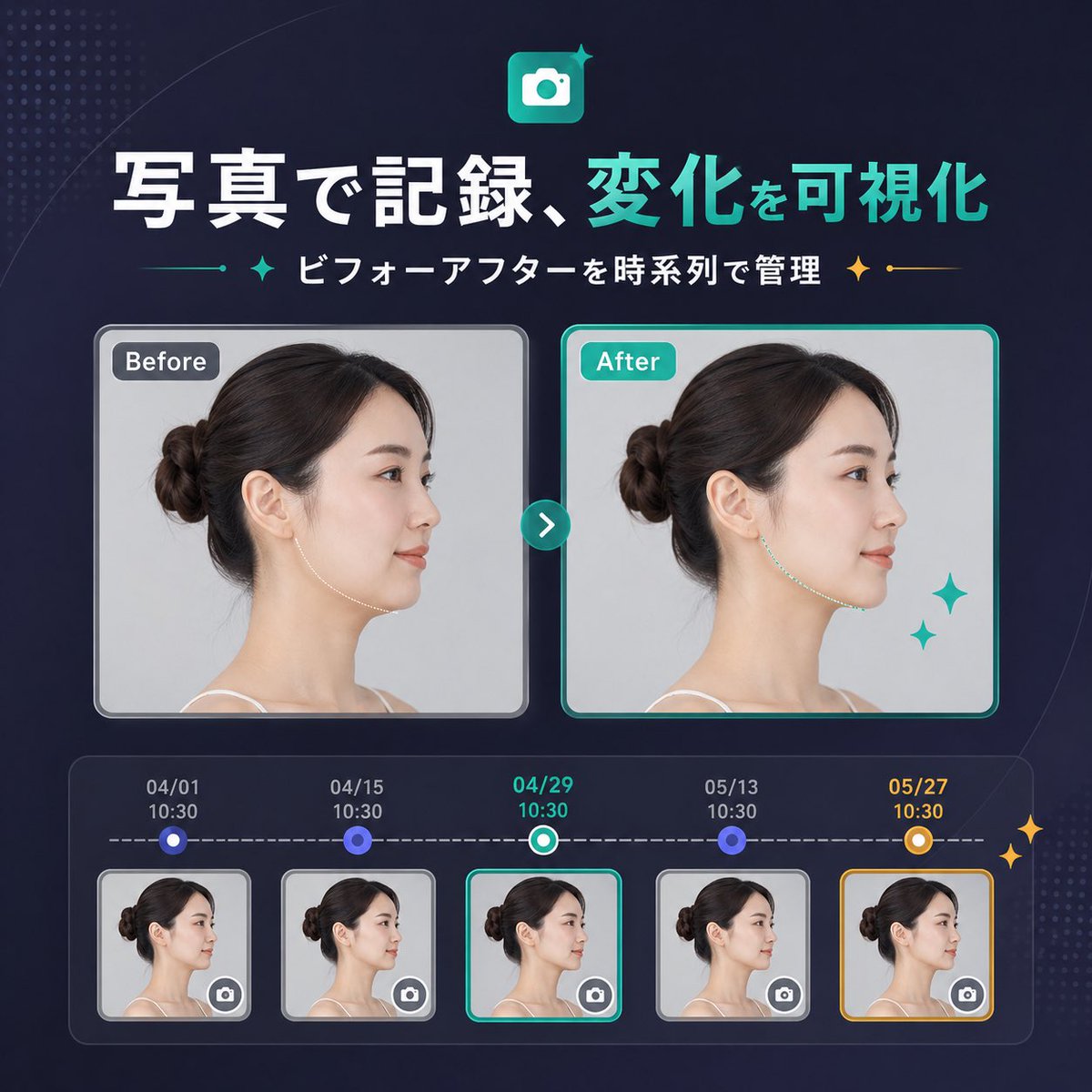
SaaS Before/After Comparison Banner — AI Prompt
PROMPT · EN
type
SaaS 功能更新横幅信息图
style
简洁现代的日式科技营销风格,高级 UI,深海军蓝渐变背景,左上角和右下角带有微妙的圆点半调纹理,柔和的曲线装饰,亮眼的霓虹青色高光,精致的高质量产品发布视觉效果
canvas
aspect_ratio
1:1
headline
icon
带有白色相机符号的圆角方形应用图标,背景为青色渐变,带有小闪光装饰
title
{argument name="headline text" default="照片记录,可视化变化"}
subtitle
{argument name="subtitle text" default="按时间轴管理前后对比"}
language
Chinese
title_style
大号粗体无衬线字体,第一短语为白色,第二短语为亮青色
subtitle_style
中号粗体白色无衬线字体,两侧带有青色和金色闪光装饰分隔符
layout
sections
item 1
title
对比卡片
position
center
count
2
labels
item 1
之前
item 2
之后
item 2
title
时间轴条目
position
bottom
count
5
labels
item 1
04/01 10:30
item 2
04/15 10:30
item 3
04/29 10:30
item 4
05/13 10:30
item 5
05/27 10:30
centerpiece
并排的前后对比肖像卡片,由一个圆形的青色箭头按钮连接
bottom_panel
圆角矩形时间轴模块,包含五个带日期的缩略图,由虚线水平进度条连接
comparison
subject
同一位成年女性,左侧侧面轮廓,深棕色头发扎成整洁的低发髻,肤色白皙,穿着细肩带上衣,摄影棚灯光,浅灰色背景
privacy
大卡片和所有五个缩略图中的面部区域均覆盖有垂直矩形模糊块
before_card
label
之前
frame
带浅灰色边框和柔和阴影的圆角矩形
image
中性临床风格肖像
after_card
label
之后
frame
带亮青色边框和柔和阴影的圆角矩形
image
相似的肖像,下颌线/颈部轮廓有细微改善,暗示可见的变化
decorations
之后卡片右下角有 2 颗青色闪光星
connector
位于卡片中间的小型圆形青色按钮,带有白色向右箭头
timeline
panel_style
深色半透明圆角容器,带有内发光效果
line
白色水平虚线
entries
item 1
date
04/01
time
10:30
state
缩略图上方的小型圆形蓝色节点
thumbnail
女性侧面轮廓缩略图,带模糊块,右下角有微型相机图标按钮
frame
浅灰色圆角边框
item 2
date
04/15
time
10:30
state
缩略图上方的小型圆形蓝色节点
thumbnail
女性侧面轮廓缩略图,带模糊块,右下角有微型相机图标按钮
frame
浅灰色圆角边框
item 3
date
04/29
time
10:30
state
当前选中状态,带有青白色环形节点
thumbnail
女性侧面轮廓缩略图,带模糊块,右下角有微型相机图标按钮
frame
亮青色圆角边框
item 4
date
05/13
time
10:30
state
缩略图上方的小型圆形蓝色节点
thumbnail
女性侧面轮廓缩略图,带模糊块,右下角有微型相机图标按钮
frame
浅灰色圆角边框
item 5
date
05/27
time
10:30
state
高亮里程碑,带有金白色环形节点
thumbnail
女性侧面轮廓缩略图,带模糊块,右下角有微型相机图标按钮
frame
金色圆角边框
extra_decorations
时间轴面板最右侧边缘有 2 颗小型金色闪光星
color_palette
background
深海军蓝至靛蓝渐变
primary
亮青色
secondary
白色
accent
金色
support
柔和的灰色和蓝紫色
rendering
清晰的矢量与 UI 设计结合,嵌入逼真的肖像摄影,间距平衡,居中构图,初创公司落地页横幅品质

À propos de ce prompt

Generate a sleek Japanese tech-style banner with before/after photo comparisons and a 5-step timeline, ideal for product update announcements. Use it as a Art Conceptuel starting point for GPT Image 2: keep the visual structure and style constraints intact, then swap in your own subject, brand, or scene.

This prompt is organized as structured JSON with fields such as type, style, canvas, headline, layout, comparison, and timeline. Keeping that hierarchy helps the model separate the subject, layout, interface elements, and detail constraints.

Start with small changes to subject, scene, camera, and color, then generate a few variations to compare composition and detail without turning the page copy into keyword stuffing.

Comment utiliser ce prompt

  1. Copy the entire prompt text.
  2. Open your AI image generator (Midjourney, DALL-E 3, etc.).
  3. Replace {headline text} and {subtitle text} with your own copy.
  4. Generate and refine as needed.

FAQ

サトウヒデキ LINEミニアプリを創る人

@Satohide1994→

Publié
25 avr. 2026
Langue source
EN
Modèle
GPT Image 2
Catégorie
Art Conceptuel
GPT Image 2Art Conceptuelgpt-image-2twitter
Vues
1.5K
Copies
135
J’aime
118

Partager

Plus de GPT Image 2

Tout voir
Gothic Anime Girl with Hidden Face — Sora 2 Prompt

Gothic Anime Girl with Hidden Face — Sora 2 Prompt

@hoshi122221
Graphic Novel Ink Splash Portrait — Sora 2 Prompt

Graphic Novel Ink Splash Portrait — Sora 2 Prompt

@iamsofiaijaz
Cozy Anime Cat Holiday Bedroom — Sora 2 Prompt

Cozy Anime Cat Holiday Bedroom — Sora 2 Prompt

@miya_space

Créez plus vite avec les prompts Sora2Hub.

Utilisez des pages de prompts curées comme entrées recherchables, puis générez avec le bon contexte de modèle.

Explorer les prompts