
GPT Image 2Prompt IA
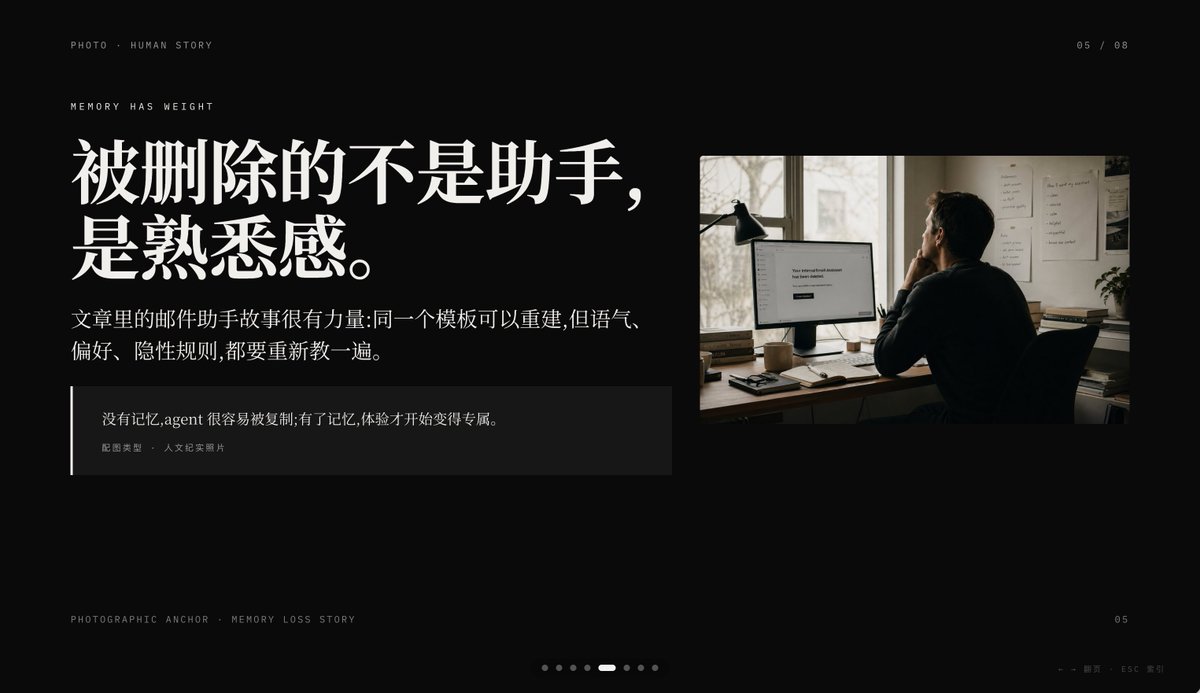
Memory Loss Slide with Chinese Typography & Documentary Photo
Generate a cinematic, editorial-style slide with dark background, Chinese typography, and a documentary photo, perfect for memory-themed presentations in Keynote or PPT.
PROMPT · EN
创建一个极简主义电影感演示 Slides,采用深黑色背景和高端编辑风格 PPT 排版,比例为 16:9 宽屏。布局采用非对称设计,左侧为大面积文本块,右上角放置一张纪实风格照片,留出充裕的负空间。使用优雅且高对比度的中文字体,营造出高端杂志的质感。在左上角放置一行小型大写微型文字:“PHOTO • HUMAN STORY”。在其下方,添加另一行小型大写文字:“MEMORY HAS WEIGHT”。左侧的主标题为非常醒目的白色粗体中文字体,分为两行:argheadline text: 被删除的不是助手,\n是熟悉感。。在标题下方,放置一段较小的白色或浅灰色中文段落,共两行:argbody text: 文章里的邮件助手故事很有力量:同一个模板可以重建,但语气、\n偏好、隐性规则,都要重新教一遍。。下方添加一个深色半透明引用框,左侧边缘带有一条细长的白色垂直线;框内包含两层文本:中文引用内容 argquote: 没有记忆, Agent 很容易被复制; 有了记忆, 体验才开始变得专属。,以及一行较小的署名文字“配图类型 · 人文纪实照片”。在右侧,插入一张暖色调的人文纪实照片:一名成年人背对镜头,坐在昏暗的办公室书桌前看着电脑显示器;显示器左侧立着一盏台灯,墙上贴着文件,柔和的日光透过窗户洒入。显示器屏幕上显示着简洁的白色界面,居中文字为 argscreen text: Your conversational Assistant has been deleted.。照片应呈现胶片摄影质感,色调为柔和的棕色和灰色,氛围私密、深沉且略带忧郁。添加类似界面的分页细节:右上角显示“05 / 08”,左下角微型文字“PHOTOGRAPHIC ANCHOR · MEMORY LOSS STORY”,右下角小字“05”,底部中心放置 8 个微小的分页圆点,其中第 5 个圆点高亮显示为细长的白色胶囊状,其余为暗灰色圆点。在最右下角,添加微小的导航提示“← → 翻页 · ESC 关闭”。整体氛围:编辑风格、克制、电影感、记忆与缺失、高端 Keynote 幻灯片设计、简洁的间距、精准的对齐、高端叙事演示美学。
À propos de ce prompt
Generate a cinematic, editorial-style slide with dark background, Chinese typography, and a documentary photo, perfect for memory-themed presentations in Keynote or PPT. Use it as a Art Conceptuel starting point for GPT Image 2: keep the visual structure and style constraints intact, then swap in your own subject, brand, or scene.
Start by replacing headline text, body text, quote, and screen text, then keep the camera, composition, and material cues in the same order. This makes the output easier to compare across variations.
Comment utiliser ce prompt
- Copy the prompt to your clipboard.
- Open your preferred AI image generator (e.g., DALL·E 3, Midjourney, Stable Diffusion).
- Replace the placeholder text variables (headline, body, quote, screen text) with your own content.
- Generate the image; if the layout or typography needs adjustment, tweak the prompt and regenerate.
- Use the output as a slide background in Keynote, PowerPoint, or Google Slides.


