Sora2 Hub
Sora2 Hub
  • Bibliothèque de prompts
  • Tarifs
  • Galerie
Sora2 Hub
Sora2 Hub
Sora2 Hub

Sora2 Hub

Plateforme de création IA professionnelle propulsée par Sora 2, Veo 3.1 et Nano Banana Pro. Créez des vidéos époustouflantes et des images de qualité studio avec un contrôle avancé, une qualité HD et sans filigrane.

Email:support@sora2hub.org

Générateur Vidéo IA

  • Texte vers Vidéo
  • Image vers Vidéo
  • Veo 3.1
  • Sora 2
  • Kling 3.0
  • Kling 2.6
  • Kling 2.5
  • Runway
  • Wan 2.6
  • Seedance 2.0
  • Hailuo 2.3
  • Grok Imagine
  • HappyHorse-1.0
  • HappyHorse 1.1
  • Kling 3.0 Turbo
  • Volcengine Video-to-Video Lip Sync
  • OmniHuman 1.5
  • Grok Imagine Video 1.5
  • Gemini Omni
  • Wan 2.7 Video
  • Seedance 2.0 Mini

Générateur d'Image IA

  • Texte vers Image
  • Image vers Image
  • Nano Banana Pro
  • Nano Banana
  • 4o Image
  • Flux Kontext
  • Z Image
  • Seedream 4.5
  • Seedream 5.0 Lite
  • Nano Banana 2
  • GPT Image 2
  • Agrandisseur d'Image IA
  • Seedream 5.0 Pro
  • Nano Banana 2 Lite
  • Qwen Image 2.0

Effets IA

  • Filtre d'Âge IA
  • Échange de Genre IA
  • Baiser IA
  • Câlin IA
  • Image Ghibli
  • Filtre Sirène IA
  • Secousse Corporelle IA
  • Filtre Sourire
  • Gros IA
  • Figurine d'Action

Produit

  • Fonctionnalités
  • Vitrines
  • Tarifs

Entreprise

  • À propos
  • Contact

© 2025 • Sora2 Hub ORG Tous droits réservés.

  • Politique de confidentialité
  • Conditions d'utilisation
  • Politique de remboursement
  1. Accueil
  2. /
  3. Prompts
  4. /
  5. GPT Image 2
  6. /
  7. Travel Ad Slide Comparison — AI vs Canva vs PPTX Layout
GPT Image 2Prompt IA

Travel Ad Slide Comparison — AI vs Canva vs PPTX Layout

Create a clean Japanese-style comparison slide showcasing travel brochure layouts from AI, Canva, and custom PPTX tools, perfect for editable layer demos.
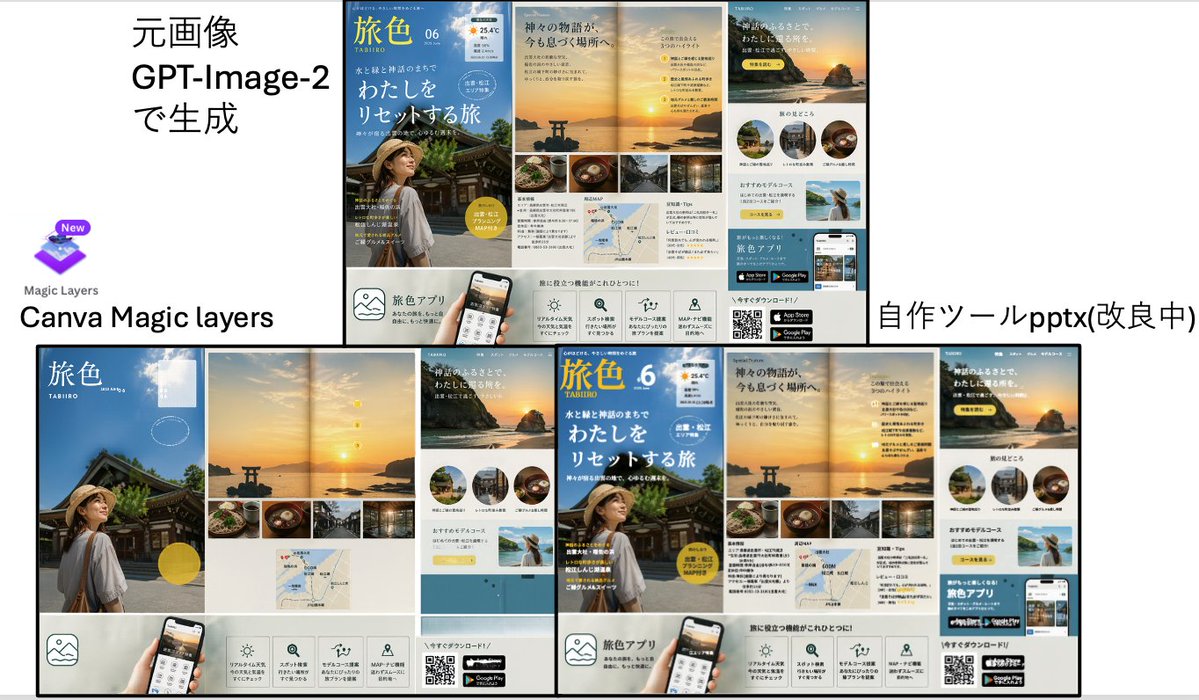
Travel Ad Slide Comparison — AI vs Canva vs PPTX Layout
PROMPT · EN
type
包含两张大型海报布局旅游广告的对比演示 Slides
style
简洁的日式商务演示风格,白色背景,黑色分割线,类似截图的复合布局
canvas
aspect_ratio
16:9
background
white
layout
sections
item 1
title
左侧对比区域
position
左上和左下
count
3
labels
item 1
元画像 GPT-Image-2で生成
item 2
Canva Magic layers
item 3
Magic Layers
item 2
title
右侧对比区域
position
右上和右下
count
2
labels
item 1
自作ツールpptx(改良中)
dividers
中心附近有一条粗垂直分割线,中间有一条粗水平分割线,广告项目周围有细黑色边框
composition
顶行左侧显示源文件,右侧显示转换后的输出;底行并排显示放大的重构布局
text_elements
top_left_heading
元画像 GPT-Image-2で生成
bottom_left_brand
Canva Magic layers
bottom_right_label
自作ツールpptx(改良中)
embedded_ad_design
type
日式旅游杂志 / 旅游 App 宣传册
count
4
brand_name
旅色
issue
06
subtitle
TABIIRO
theme
日本日落海岸神社之旅
color_palette
item 1
sky blue
item 2
sunset gold
item 3
warm beige
item 4
white
item 5
black
main_pages
4
page_descriptions
item 1
封面页,蓝天背景,传统神社建筑,左下角可见一名戴草帽的女性背影,巨大的白色日文标题文字,黄色圆形徽章,右上角有小型天气图标
item 2
双页日落跨页,水中的鸟居,地平线附近的炽热太阳,垂直排列的 4 个黄色小数字标记,底部有一条包含 4 张美食和旅游照片的矩形长条
item 3
页面特色为一张巨大的日落悬崖图片配日文文案,一行 3 个圆形目的地缩略图,一个淡黄色推荐框,以及一张女性在海边举起双臂的小型风景照
item 4
底部信息栏包含 5 个方形功能图标,一个手持智能手机样机,一个二维码,以及 2 个应用商店徽章
visual_details
canva_logo
present
true
position
左中
description
紫色分层方形图标,上方带有小的 New 徽章,下方有 Magic Layers 字样
reconstruction_difference
右侧输出将相同的广告组件排列为分离的可编辑模块,具有更紧凑的对齐方式和可见的模块化特征
ad_components_count
circular_thumbnails
3
bottom_feature_icons
5
app_store_badges
2
qr_codes
1
small_bottom_strip_photos
4
rendering
扁平化演示截图,清晰的排版,高分辨率 UI/文档样机美学

À propos de ce prompt

Create a clean Japanese-style comparison slide showcasing travel brochure layouts from AI, Canva, and custom PPTX tools, perfect for editable layer demos. Use it as a Art Conceptuel starting point for GPT Image 2: keep the visual structure and style constraints intact, then swap in your own subject, brand, or scene.

This prompt is organized as structured JSON with fields such as type, style, canvas, layout, text elements, embedded ad design, and visual details. Keeping that hierarchy helps the model separate the subject, layout, interface elements, and detail constraints.

Start with small changes to subject, scene, camera, and color, then generate a few variations to compare composition and detail without turning the page copy into keyword stuffing.

Comment utiliser ce prompt

  1. Copy the full prompt from the body section.
  2. Paste into an AI image generator like DALL·E 3 or GPT-Image-2.
  3. Ensure 16:9 aspect ratio is set for correct dimensions.
  4. Generate the initial slide; tweak ad design details if needed.
  5. Download the flat mockup and use it for layer reconstruction presentations.

FAQ

中崎工房 | AIで1時間の仕事を5分で終わらせる人

@nakazakifam→

Publié
30 avr. 2026
Langue source
EN
Modèle
GPT Image 2
Catégorie
Art Conceptuel
GPT Image 2Art Conceptuelgpt-image-2twitter
Vues
291
Copies
32
J’aime
9

Partager

Plus de GPT Image 2

Tout voir
Cozy Anime Cat Holiday Bedroom — Sora 2 Prompt

Cozy Anime Cat Holiday Bedroom — Sora 2 Prompt

@miya_space
Anime Schoolgirls Sharing Transparent Umbrella — Sora 2 Prompt

Anime Schoolgirls Sharing Transparent Umbrella — Sora 2 Prompt

@yB7CqdfoDmrbhgD
Minimalist Skincare Brand Manual — Sora 2 Prompt

Minimalist Skincare Brand Manual — Sora 2 Prompt

@FranromeGraph

Créez plus vite avec les prompts Sora2Hub.

Utilisez des pages de prompts curées comme entrées recherchables, puis générez avec le bon contexte de modèle.

Explorer les prompts