Sora2 Hub
GPT Image 2Prompt IA

Director Storyboard Infographic — AI Prompt for Educational Poster

Creates a detailed 5-part educational poster explaining the director's storyboard process, complete with flowcharts, breakdowns, and a visual example.
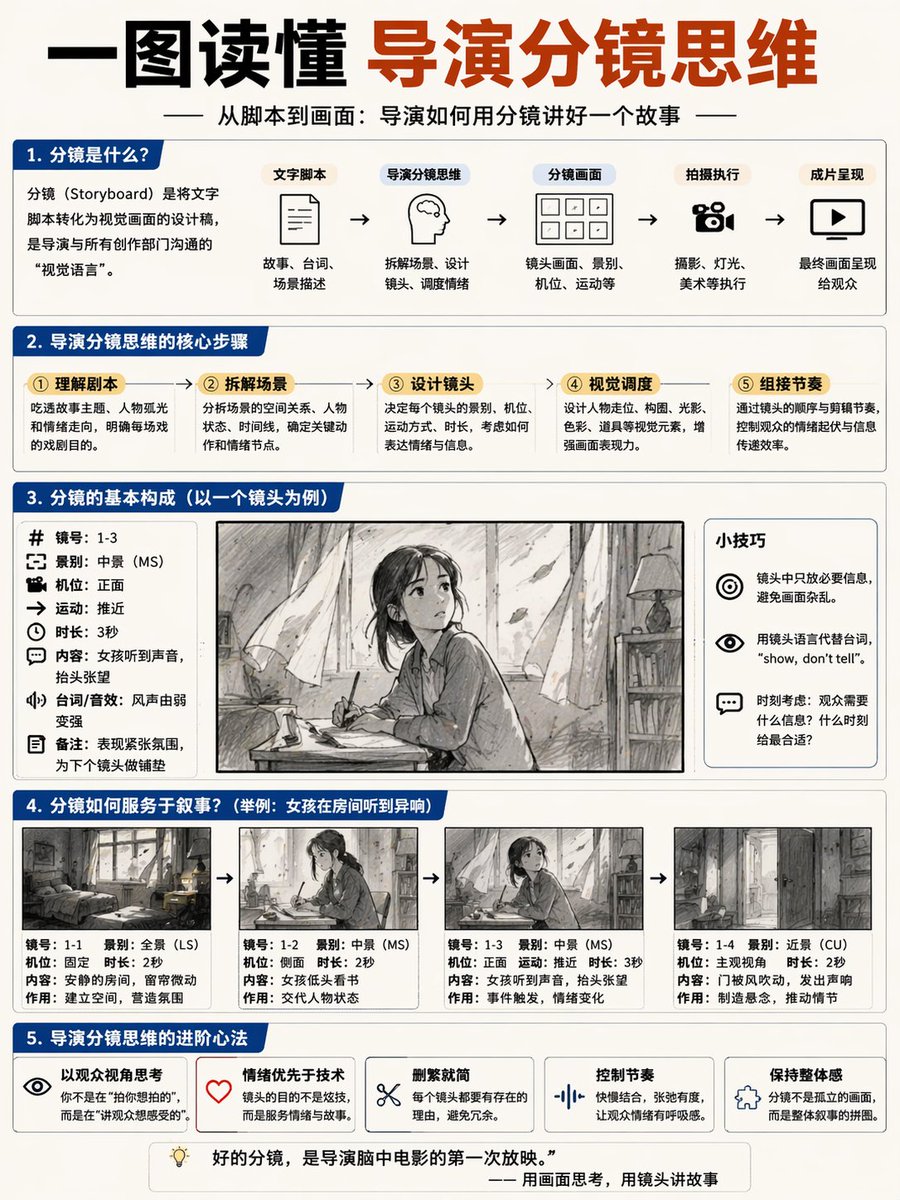
Director Storyboard Infographic — AI Prompt for Educational Poster
PROMPT · EN
type
educational infographic poster
header
title
{argument name="main title" default="一图读懂 导演分镜思维"}
subtitle
{argument name="subtitle" default="从脚本到画面:导演如何用分镜讲好一个故事"}
layout
sections
item 1
title
1. 分镜是什么?
components
item 1
definition text box
item 2
type
flowchart
count
5
labels
item 1
文字脚本
item 2
导演分镜思维
item 3
分镜画面
item 4
拍摄执行
item 5
成片呈现
item 2
title
2. 导演分镜思维的核心步骤
count
5
labels
item 1
① 理解剧本
item 2
② 拆解场景
item 3
③ 设计镜头
item 4
④ 视觉调度
item 5
⑤ 组接节奏
item 3
title
3. 分镜的基本构成(以一个镜头为例)
columns
item 1
position
left
count
8
labels
item 1
镜号
item 2
景别
item 3
机位
item 4
运动
item 5
时长
item 6
内容
item 7
台词/音效
item 8
备注
item 2
position
center
image
{argument name="character subject" default="anime girl reading in a room"}
item 3
position
right
title
小技巧
count
3
description
icon bullet points
item 4
title
4. 分镜如何服务于叙事?
subtitle
{argument name="example scenario" default="举例:女孩在房间听到异响"}
count
4
panels
item 1
wide shot room
item 2
medium shot girl reading
item 3
medium shot girl looking up
item 4
close up door opening
caption_labels
item 1
镜号
item 2
景别
item 3
机位
item 4
时长
item 5
内容
item 6
作用
item 5
title
5. 导演分镜思维的进阶心法
count
5
labels
item 1
以观众视角思考
item 2
情绪优先于技术
item 3
删繁就简
item 4
控制节奏
item 5
保持整体感
footer
{argument name="footer quote" default="好的分镜,是导演脑中电影的第一次放映。"}
style
clean corporate infographic, blue and white palette, structured grid

À propos de ce prompt

Creates a detailed 5-part educational poster explaining the director's storyboard process, complete with flowcharts, breakdowns, and a visual example. Use it as a Art Conceptuel starting point for GPT Image 2: keep the visual structure and style constraints intact, then swap in your own subject, brand, or scene.

This prompt is organized as structured JSON with fields such as type, header, layout, and style. Keeping that hierarchy helps the model separate the subject, layout, interface elements, and detail constraints.

Start with small changes to subject, scene, camera, and color, then generate a few variations to compare composition and detail without turning the page copy into keyword stuffing.

Comment utiliser ce prompt

  1. Copy the entire prompt JSON object.
  2. Choose an AI image generator that supports complex JSON prompts (e.g., Sora 2).
  3. Customize the default Chinese text and character scene by editing the {argument} variables in the prompt.
  4. Submit the prompt to generate a clean, corporate-style infographic in blue and white.
  5. Use the output for film education, presentations, or creative planning.
FAQ

Plus de GPT Image 2

Tout voir

Créez plus vite avec les prompts Sora2Hub.

Utilisez des pages de prompts curées comme entrées recherchables, puis générez avec le bon contexte de modèle.