
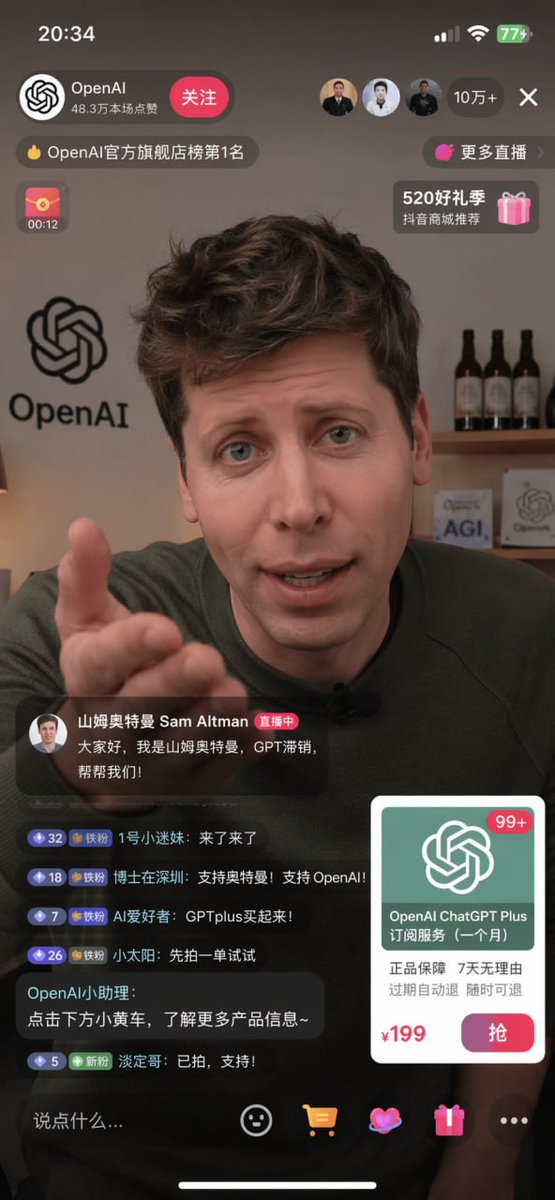
Livestream Screenshot: Sam Altman & OpenAI — Sora 2 Prompt
Generate a realistic livestream screenshot featuring Sam Altman, complete with chat, product card, and interactive UI — perfect for e-commerce and AI demos.
À propos de ce prompt
Generate a realistic livestream screenshot featuring Sam Altman, complete with chat, product card, and interactive UI — perfect for e-commerce and AI demos. Use it as a Art Conceptuel starting point for GPT Image 2: keep the visual structure and style constraints intact, then swap in your own subject, brand, or scene.
This prompt is organized as structured JSON with fields such as type, subject, background, and layout. Keeping that hierarchy helps the model separate the subject, layout, interface elements, and detail constraints.
Start with small changes to subject, scene, camera, and color, then generate a few variations to compare composition and detail without turning the page copy into keyword stuffing.
Comment utiliser ce prompt
- Copy the prompt from this page.
- Open your preferred AI image generator (Sora 2, DALL·E, etc.) and paste the prompt.
- Customize the template variables in curly braces (e.g.,
{argument name="streamer name" default="OpenAI"}) to match your brand. - Generate the image; try different seeds or aspect ratios if needed.
- Use the output as a UI mockup for e-commerce, social media, or presentations.


