
Sora2 Hub
Sora2 Hub
  • Libreria di Prompt
  • Prezzi
  • Vetrina
Sora2 Hub
Sora2 Hub
Sora2 Hub

Sora2 Hub

Piattaforma di creazione professionale AI basata su Sora 2, Veo 3.1 e Nano Banana Pro. Crea video straordinari e immagini di qualità da studio con controllo avanzato, qualità HD e senza filigrana.

Email:support@sora2hub.org

Generatore Video IA

  • Testo a Video
  • Immagine a Video
  • Veo 3.1
  • Sora 2
  • Kling 3.0
  • Kling 2.6
  • Kling 2.5
  • Runway
  • Wan 2.6
  • Seedance 2.0
  • Hailuo 2.3
  • Grok Imagine
  • HappyHorse-1.0

Generatore Immagini IA

  • Testo a Immagine
  • Immagine a Immagine
  • Nano Banana Pro
  • Nano Banana
  • 4o Image
  • Flux Kontext
  • Z Image
  • Seedream 4.5
  • Seedream 5.0 Lite
  • Nano Banana 2
  • GPT Image 2
  • Ingranditore Immagini IA

Effetti IA

  • Filtro Età IA
  • Scambio Genere IA
  • Bacio IA
  • Abbraccio IA
  • Immagine Ghibli
  • Filtro Sirena IA
  • Scossa Corporea IA
  • Filtro Sorriso
  • Grasso IA
  • Action Figure

Prodotto

  • Funzionalità
  • Vetrine
  • Prezzi

Azienda

  • Chi siamo
  • Contatto

© 2025 • Sora2 Hub ORG Tutti i diritti riservati.

  • Informativa sulla Privacy
  • Termini di Servizio
  • Politica di Rimborso
  1. Home
  2. /
  3. Prompt
  4. /
  5. GPT Image 2
  6. /
  7. Desktop AI Agent Architecture — Bilingual Infographic
GPT Image 2Prompt AI

Desktop AI Agent Architecture — Bilingual Infographic

Create a professional bilingual architecture diagram for desktop AI agents, complete with layers, icons, and styling. Ideal for enterprise presentations.
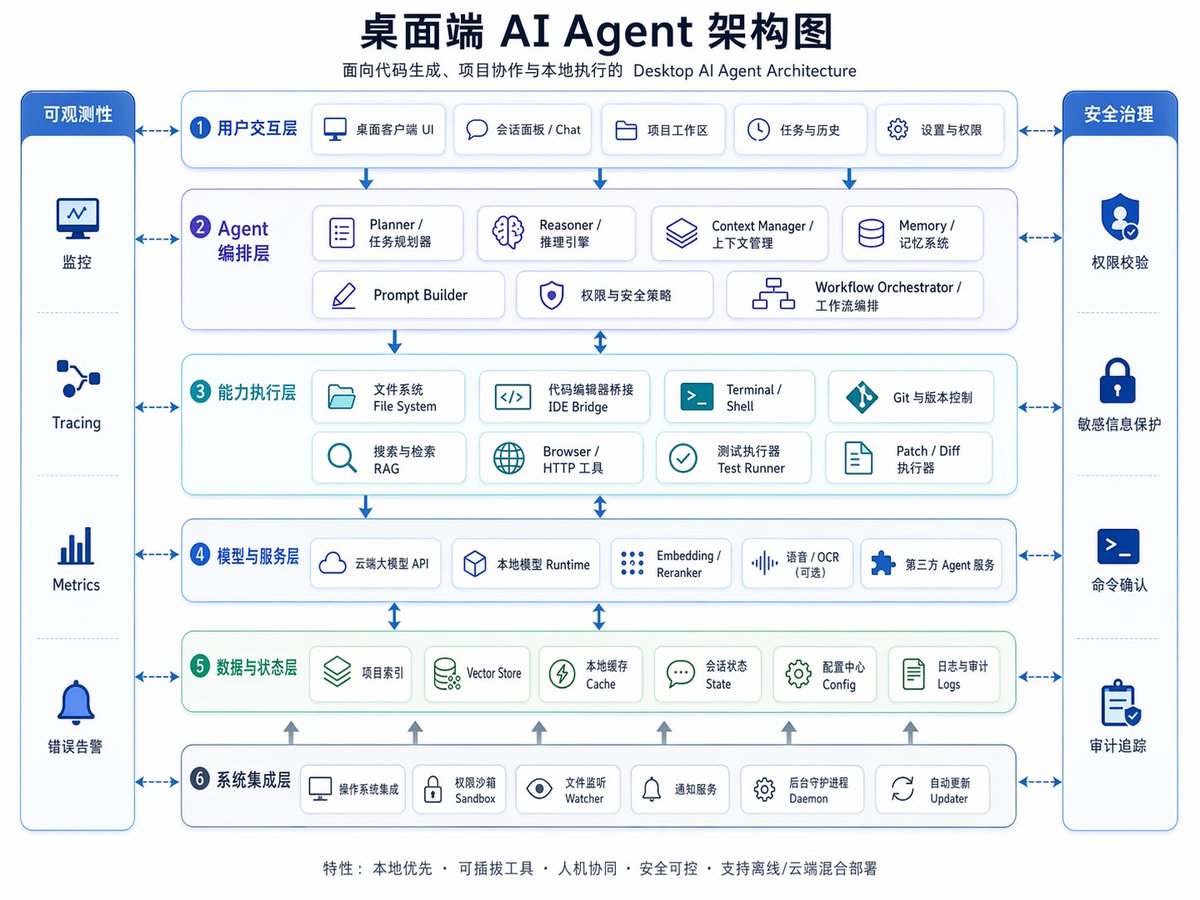
Desktop AI Agent Architecture — Bilingual Infographic
PROMPT · EN
type
双语企业架构信息图
topic
{argument name="headline text" default="桌面端 AI Agent 架构图"}
subtitle
面向代码生成、项目协作与本地执行的 Desktop AI Agent Architecture
style
look
简洁现代 SaaS 架构图,企业演示文稿风格,矢量信息图
background
浅灰白色
palette
primary
深海军蓝
secondary
中蓝色
accent
青绿色
support
柔和灰色
security
亮宝蓝色
typography
粗体中文标题搭配较小的双语标签,清晰无衬线字体,高易读性
icons
圆角白色卡片内嵌极简线条图标,带有细微阴影和蓝色轮廓
geometry
对称网格,圆角矩形,细连接箭头,模块间距均匀
layout
orientation
横向 4:3 演示幻灯片
header
title_centered
true
title_size
large
subtitle_below
true
sections
item 1
title
可观测性
position
最左侧垂直侧边栏
count
4
labels
item 1
监控
item 2
Tracing
item 3
Metrics
item 4
错误告警
container
高圆角蓝色面板,包含四个堆叠单元格和图标
item 2
title
安全治理
position
最右侧垂直侧边栏
count
4
labels
item 1
权限校验
item 2
敏感信息保护
item 3
命令确认
item 4
审计追踪
container
高圆角蓝色面板,包含四个堆叠单元格和图标
item 3
title
1 用户交互层
position
顶部水平层
count
5
labels
item 1
桌面客户端 UI
item 2
会话面板 / Chat
item 3
项目工作区
item 4
任务与历史
item 5
设置与权限
container
宽圆角白色面板,带蓝色边框
item 4
title
2 Agent 编排层
position
第二水平层
count
7
labels
item 1
Planner / 任务规划器
item 2
Reasoner / 推理引擎
item 3
Context Manager / 上下文管理
item 4
Memory / 记忆系统
item 5
Prompt Builder
item 6
权限与安全策略
item 7
Workflow Orchestrator / 工作流编排
container
宽圆角白色面板,带淡紫蓝色调
item 5
title
3 能力执行层
position
第三水平层
count
8
labels
item 1
文件系统 File System
item 2
代码编辑器桥接 IDE Bridge
item 3
Terminal / Shell
item 4
Git 与版本控制
item 5
搜索与检索 RAG
item 6
Browser / HTTP 工具
item 7
测试执行器 Test Runner
item 8
Patch / Diff 执行器
container
宽圆角白色面板,带淡青色调
item 6
title
4 模型与服务层
position
第四水平层
count
5
labels
item 1
云端大模型 API
item 2
本地模型 Runtime
item 3
Embedding / Reranker
item 4
语音 / OCR(可选)
item 5
第三方 Agent 服务
container
宽圆角白色面板,带蓝色边框
item 7
title
5 数据与状态层
position
第五水平层
count
6
labels
item 1
项目索引
item 2
Vector Store
item 3
本地缓存 Cache
item 4
会话状态 State
item 5
配置中心 Config
item 6
日志与审计 Logs
container
宽圆角白色面板,带淡绿色调
item 8
title
6 系统集成层
position
底部水平层
count
6
labels
item 1
操作系统集成
item 2
权限沙箱 Sandbox
item 3
文件监听 Watcher
item 4
通知服务
item 5
后台守护进程 Daemon
item 6
自动更新 Updater
container
宽圆角白色面板,带蓝色边框
centerpiece
中间六层堆叠架构,两侧为治理侧边栏
connectors
虚线双向箭头连接各核心层与两侧边栏;垂直蓝色箭头在核心层间向下流动;小型灰色向上箭头从底部集成层升至数据层
footer
count
1
text
特性: 本地优先 · 可插拔工具 · 人机协同 · 安全可控 · 支持离线/云端混合部署
position
底部居中
rendering
flat_vector
true
high_resolution
true
sharp_lines
true
balanced_whitespace
true
professional_pitch_deck_quality
true

Informazioni su questo prompt

Create a professional bilingual architecture diagram for desktop AI agents, complete with layers, icons, and styling. Ideal for enterprise presentations. Use it as a Concept Art starting point for GPT Image 2: keep the visual structure and style constraints intact, then swap in your own subject, brand, or scene.

This prompt is organized as structured JSON with fields such as type, topic, subtitle, style, layout, and rendering. Keeping that hierarchy helps the model separate the subject, layout, interface elements, and detail constraints.

Start with small changes to subject, scene, camera, and color, then generate a few variations to compare composition and detail without turning the page copy into keyword stuffing.

Come usare questo prompt

  1. Copy the prompt and open an AI image generator like DALL·E 3, Midjourney, or Sora.
  2. Edit the {argument name="headline text"} placeholder to set your diagram title, or modify section labels directly.
  3. Paste the full prompt and generate the image. Ensure the model supports detailed infographics.
  4. Review the output; tweak colors, sections, or text for your use case.
  5. Use the diagram in presentations, documentation, or planning.

FAQ

breeze

@breeze71115348→

Pubblicato
25 apr 2026
Lingua originale
EN
Modello
GPT Image 2
Categoria
Concept Art
GPT Image 2Concept Artgpt-image-2twitter
Visualizzazioni
941
Copie
92
Mi piace
50

Condividi

Altro da GPT Image 2

Vedi tutto
Gothic Anime Girl Bites Playground Rail — Sora 2 Prompt

Gothic Anime Girl Bites Playground Rail — Sora 2 Prompt

@hoshi122221
Shenzhen Golden Hour City Prompt: Futuristic Heritage Poster

Shenzhen Golden Hour City Prompt: Futuristic Heritage Poster

@ivanalog_com
Luxury Tennis Fashion Poster — Bold Studio Shoot Sora Prompt

Luxury Tennis Fashion Poster — Bold Studio Shoot Sora Prompt

@blueski68251660

Crea più velocemente con i prompt Sora2Hub.

Usa pagine prompt curate come ingressi ricercabili e passa subito alla generazione con il contesto modello corretto.

Esplora prompt

