Sora2 Hub
Sora2 Hub
  • Libreria di Prompt
  • Prezzi
  • Vetrina
Sora2 Hub
Sora2 Hub
Sora2 Hub

Sora2 Hub

Piattaforma di creazione professionale AI basata su Sora 2, Veo 3.1 e Nano Banana Pro. Crea video straordinari e immagini di qualità da studio con controllo avanzato, qualità HD e senza filigrana.

Email:support@sora2hub.org

Generatore Video IA

  • Testo a Video
  • Immagine a Video
  • Veo 3.1
  • Sora 2
  • Kling 3.0
  • Kling 2.6
  • Kling 2.5
  • Runway
  • Wan 2.6
  • Seedance 2.0
  • Hailuo 2.3
  • Grok Imagine
  • HappyHorse-1.0
  • HappyHorse 1.1
  • Kling 3.0 Turbo
  • Volcengine Video-to-Video Lip Sync
  • OmniHuman 1.5
  • Grok Imagine Video 1.5
  • Gemini Omni
  • Wan 2.7 Video
  • Seedance 2.0 Mini

Generatore Immagini IA

  • Testo a Immagine
  • Immagine a Immagine
  • Nano Banana Pro
  • Nano Banana
  • 4o Image
  • Flux Kontext
  • Z Image
  • Seedream 4.5
  • Seedream 5.0 Lite
  • Nano Banana 2
  • GPT Image 2
  • Ingranditore Immagini IA
  • Seedream 5.0 Pro
  • Nano Banana 2 Lite
  • Qwen Image 2.0

Effetti IA

  • Filtro Età IA
  • Scambio Genere IA
  • Bacio IA
  • Abbraccio IA
  • Immagine Ghibli
  • Filtro Sirena IA
  • Scossa Corporea IA
  • Filtro Sorriso
  • Grasso IA
  • Action Figure

Prodotto

  • Funzionalità
  • Vetrine
  • Prezzi

Azienda

  • Chi siamo
  • Contatto

© 2025 • Sora2 Hub ORG Tutti i diritti riservati.

  • Informativa sulla Privacy
  • Termini di Servizio
  • Politica di Rimborso
  1. Home
  2. /
  3. Prompt
  4. /
  5. GPT Image 2
  6. /
  7. Dense vs MoE Infographic — AI Architecture Comparison Prompt
GPT Image 2Prompt AI

Dense vs MoE Infographic — AI Architecture Comparison Prompt

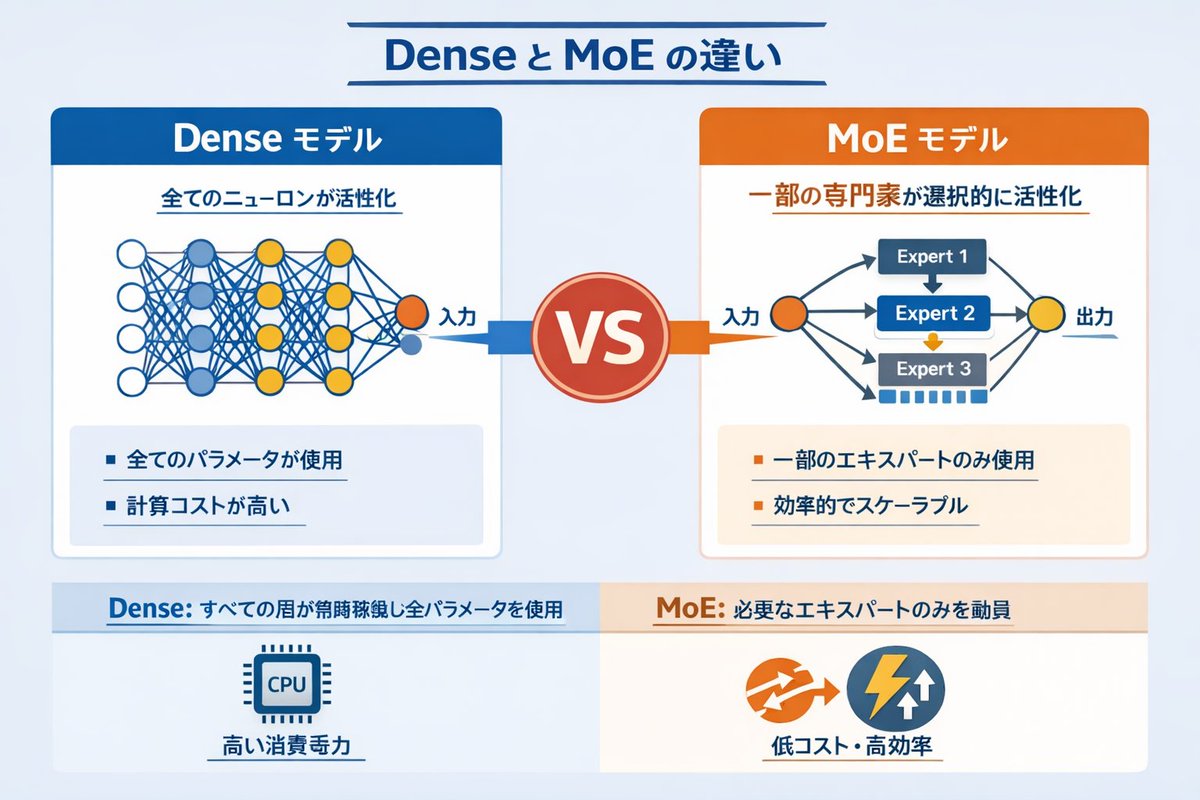
Generate a side-by-side infographic comparing Dense and Mixture of Experts neural networks, highlighting key differences in architecture and efficiency.
Dense vs MoE Infographic — AI Architecture Comparison Prompt
PROMPT · EN
type
信息图对比图
header
title
{argument name="main title" default="Dense 与 MoE 的区别"}
layout
structure
两列式布局,中间由 VS 徽章分隔,底部设有分栏页脚
sections
item 1
position
左侧栏
theme_color
蓝色
header
{argument name="left model name" default="Dense 模型"}
subtitle
所有神经元均被激活
diagram
type
全连接神经网络
elements
item 1
1 个橙色输入节点,标注为“输入”
item 2
4 个隐藏层,节点数分别为 4、5、4 和 2
item 3
节点颜色为白色、蓝色和黄色
item 4
所有相邻节点间密集的交叉连接线
bullet_points
count
2
items
item 1
{argument name="left bullet point" default="使用所有参数"}
item 2
计算成本高
item 2
position
右侧栏
theme_color
橙色
header
{argument name="right model name" default="MoE 模型"}
subtitle
选择性激活部分专家
diagram
type
混合专家网络
elements
item 1
1 个橙色输入节点,标注为“输入”
item 2
3 个矩形块,分别标注为 Expert 1、Expert 2、Expert 3
item 3
1 个黄色输出节点,标注为“输出”
item 4
连接输入到专家、以及专家到输出的分支箭头
bullet_points
count
2
items
item 1
{argument name="right bullet point" default="仅使用部分专家"}
item 2
高效且可扩展
item 3
position
中心
element
带有 VS 文字的红色圆形徽章
connections
指向左侧的蓝色箭头,指向右侧的橙色箭头
item 4
position
页脚左侧
background
浅蓝色
text
Dense:所有层常驻运行并使用全部参数
icon
1 个 CPU 芯片图形
label
高功耗
item 5
position
页脚右侧
background
浅橙色
text
MoE:仅调用必要的专家
icons
2 个圆形图形(橙色箭头、蓝色闪电)
label
低成本、高效率

Informazioni su questo prompt

Generate a side-by-side infographic comparing Dense and Mixture of Experts neural networks, highlighting key differences in architecture and efficiency. Use it as a Concept Art starting point for GPT Image 2: keep the visual structure and style constraints intact, then swap in your own subject, brand, or scene.

This prompt is organized as structured JSON with fields such as type, header, and layout. Keeping that hierarchy helps the model separate the subject, layout, interface elements, and detail constraints.

Start with small changes to subject, scene, camera, and color, then generate a few variations to compare composition and detail without turning the page copy into keyword stuffing.

Come usare questo prompt

  1. Copy the full prompt code above.
  2. Paste it into a text-to-image AI tool like Sora 2 or DALL·E.
  3. Replace argument placeholders (e.g., model names, bullet points) with your desired content.
  4. Generate the infographic and make adjustments if needed.
  5. Download the image for presentations, articles, or social media.
FAQ

Vania

@VantageAdol→

Pubblicato
25 apr 2026
Lingua originale
EN
Modello
GPT Image 2
Categoria
Concept Art
GPT Image 2Concept Artgpt-image-2twitter
Visualizzazioni
5.1K
Copie
579
Mi piace
258

Condividi

Altro da GPT Image 2

Vedi tutto
Minimalist Mother's Day Wallpaper — Sora 2 Prompt with Calligraphy & Carnations

Minimalist Mother's Day Wallpaper — Sora 2 Prompt with Calligraphy & Carnations

@EdimakorJP
Luxury Tennis Fashion Poster — Bold Studio Shoot Sora Prompt

Luxury Tennis Fashion Poster — Bold Studio Shoot Sora Prompt

@blueski68251660
Shenzhen Golden Hour City Prompt: Futuristic Heritage Poster

Shenzhen Golden Hour City Prompt: Futuristic Heritage Poster

@ivanalog_com

Crea più velocemente con i prompt Sora2Hub.

Usa pagine prompt curate come ingressi ricercabili e passa subito alla generazione con il contesto modello corretto.

Esplora prompt