
Mythological Boss Fight — Realistic Game Screenshot Prompt
Generate a AAA-quality video game screenshot of a warrior and boy fighting a massive mythological boss, complete with detailed HUD elements.
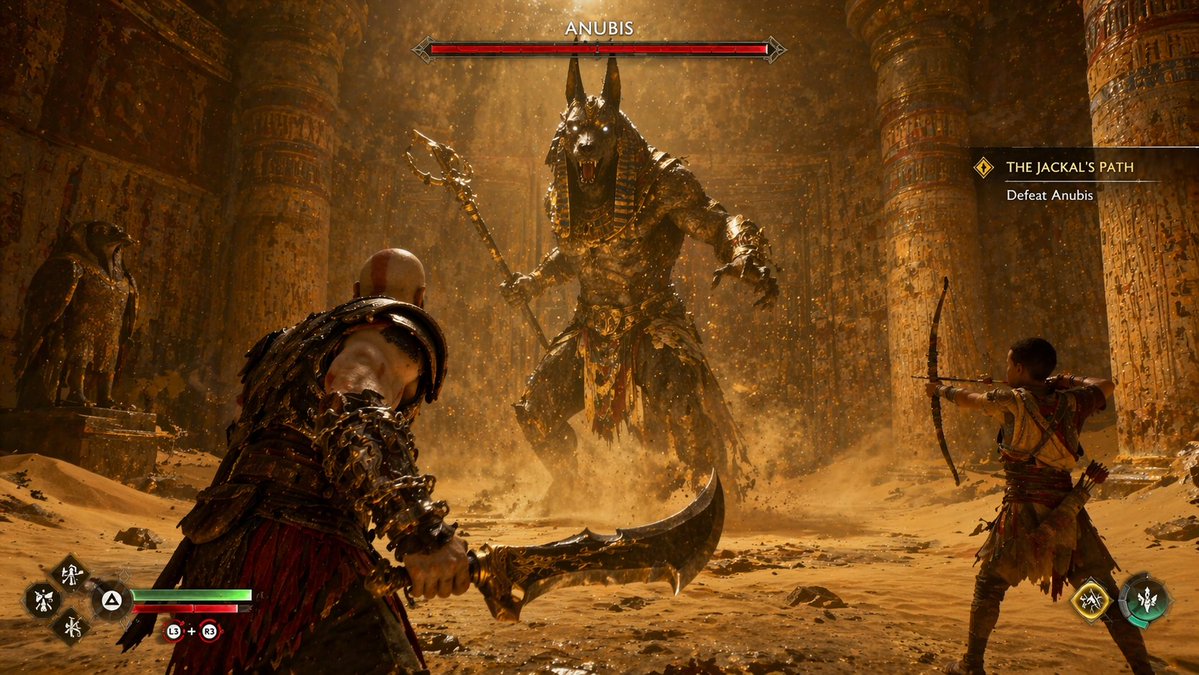
A highly realistic AAA video game screenshot depicting a boss fight inside a dusty, golden-lit argsetting: ancient Egyptian temple. In the center background, a massive argboss name: ANUBIS boss monster with a jackal head, glowing eyes, and ornate gold armor roars while wielding a staff, kicking up swirling sand. In the left foreground, a muscular, bald warrior with red body tattoos faces the boss, holding a argweapon: curved blade. In the right midground, a young boy aims a bow at the boss. The image features 4 distinct UI components: a top-center red boss health bar labeled 'argboss name: ANUBIS', a right-aligned quest tracker labeled 'argquest name: THE JACKAL'S PATH' with the subtext 'Defeat Anubis', a bottom-left player status HUD showing health and rage bars alongside 4 diamond-shaped skill icons with button prompts, and a bottom-right companion HUD showing 2 circular skill icons.
Informazioni su questo prompt
Generate a AAA-quality video game screenshot of a warrior and boy fighting a massive mythological boss, complete with detailed HUD elements. Use it as a Concept Art starting point for GPT Image 2: keep the visual structure and style constraints intact, then swap in your own subject, brand, or scene.
Common directions include gptimage2api prompts, gptimage2api, and en. Treat these tags as creative cues; the prompt structure and preview image are the more useful guide.
Start by replacing setting, boss name, weapon, and quest name, then keep the camera, composition, and material cues in the same order. This makes the output easier to compare across variations.
Come usare questo prompt
- Copy the full prompt text.
- Select an AI image model like Sora or Midjourney.
- Customize variables like
{boss name},{weapon}, and{quest name}. - Generate the image to get a realistic game screenshot.


