
GPT Image 2Prompt AI
Luxury Boutique Fashion Portrait — Sora 2 Prompt
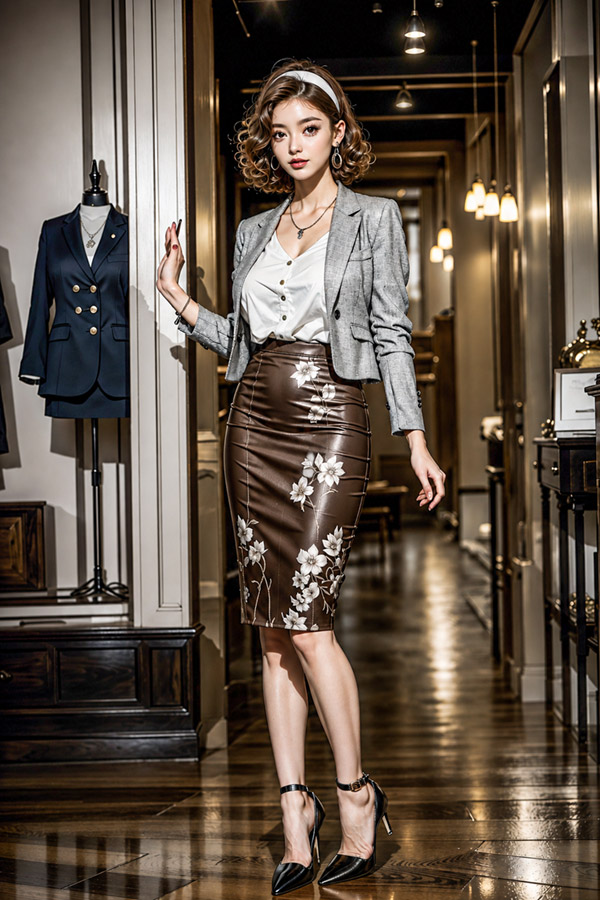
Create a photorealistic full-body fashion portrait of an elegant woman in a high-end boutique, featuring sharp tailoring and cinematic lighting.
PROMPT · EN
创作一张全身高定时尚大片,画面主角为 argcharacter name: 一位优雅的成年女性,她正站在一间奢华的精品店走廊中。走廊铺设着光亮的深色木地板,墙面为奶油色镶板,配有镜子和温暖的吊灯,左侧的人体模型上展示着一件海军蓝西装外套。她留着齐肩蓬松卷曲的 arghair color: 暖棕色 头发,戴着白色发带,佩戴着水滴状耳环和精致的项链,自信地摆出姿势,一只手轻轻触碰墙壁,目光看向镜头。她的装扮是精致的商务奢华风格:一件短款灰色粗花呢西装外套内搭白色衬衫,下身穿着高腰光泽感 argskirt color: 浓郁巧克力棕色 铅笔裙,裙身带有白色花卉刺绣,脚踩黑色尖头踝带细高跟鞋。运用写实的布料质感、利落的剪裁、精致的倒影、温暖的电影感精品店灯光、浅景深、竖构图,以及高端时尚杂志的摄影风格。面部应通过柔和的中性模糊处理进行遮挡或匿名化,同时保留发型和整体姿态。
Informazioni su questo prompt
Create a photorealistic full-body fashion portrait of an elegant woman in a high-end boutique, featuring sharp tailoring and cinematic lighting. Use it as a Concept Art starting point for GPT Image 2: keep the visual structure and style constraints intact, then swap in your own subject, brand, or scene.
Start by replacing character name, hair color, and skirt color, then keep the camera, composition, and material cues in the same order. This makes the output easier to compare across variations.
Come usare questo prompt
- Copy this prompt and paste it into Sora 2 or a similar AI video generator. 2. Choose a model that supports photorealistic image or video generation. 3. Customize the variables, such as
character name,hair color, andskirt color, to fit your creative vision. 4. Generate the output and refine as needed by adjusting lighting or pose descriptions.


